EasyManua.ls Logo

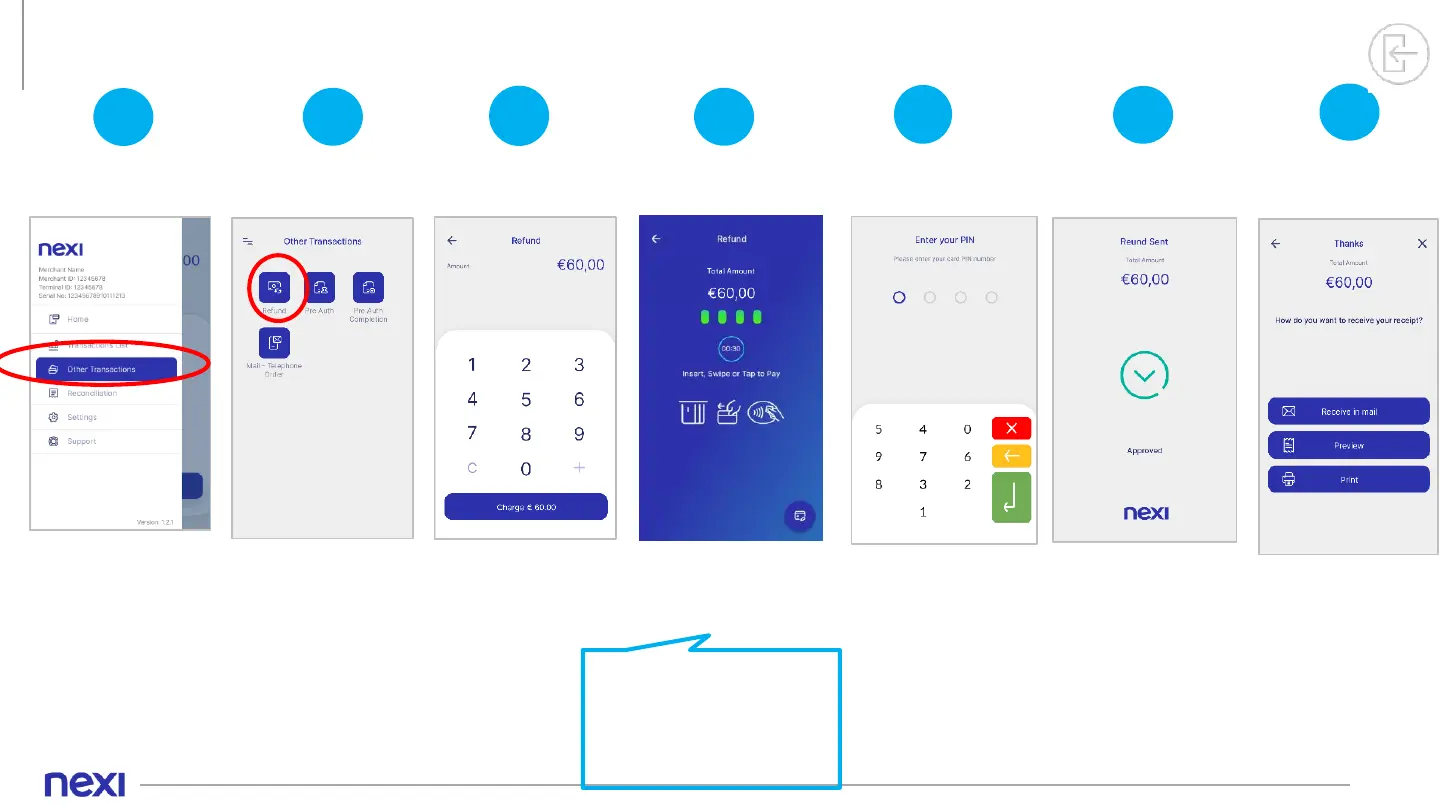
PAX A910 - Refund Process; Navigate to Other Transactions; Select Refund Option; Enter Refund Amount

PAX A910
15 pages
Print Icon
To Next Page IconTo Next Page
To Previous Page IconTo Previous Page
Loading...
11
5. Refund
4
The refund is
approved.
6
Refund Sent
2
Select
“Refund”.
Select Refund
3
Enter the
Amount to be
refunded.
Enter Refund
Amount
1
Please select
“Other
Transactions”
from the Menu.
Select “Other
Transactions”
5
PIN
If the system
requests it, hand
the POS to the
customer to enter
their PIN. Then
press the green
button.
Tap, insert or swipe
customer's card
into the reader.
If the customer wishes to
use their digital wallet
(Apple, Google, Samsung
Pay), ask them to bring their
device closer to the POS.
Refund
7
Completion &
Receipt
For the receipt,
select either
Send by email
Preview on
POS screen
Print.

Other manuals for PAX A910

Related product manuals