EasyManua.ls Logo

PAX A910 - Transaction Cancellation; Select Transactions List; Search and Select Transaction; View Transaction Details

PAX A910
15 pages
Print Icon
To Next Page IconTo Next Page
To Previous Page IconTo Previous Page
Loading...
7
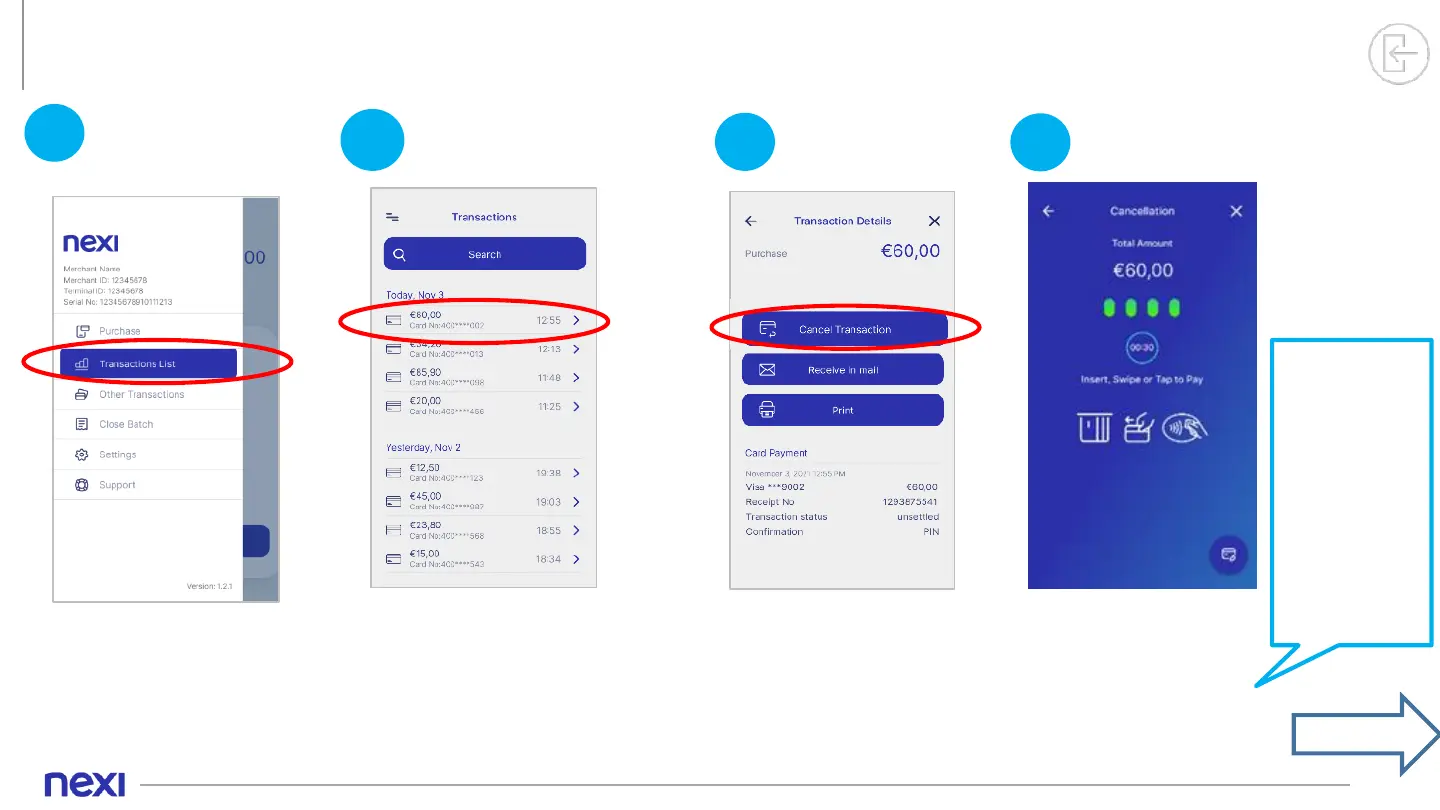
4. Transaction Cancellation
1
Please select
Transactions List
from the Menu.
Select
Transactions List
2
Search and select the
transaction you want
to cancel from the list
Click on > to view the
Transaction Details”.
Search
3
On the transaction
details screen. click
“Cancel Transaction”.
Transaction
Details
4
Tap, insert or swipe the
customer's card that
was used in the initial
transaction into the
reader.
If the customer
wishes to use
their digital
wallet (Apple
Pay, Google
Pay, Samsung
Pay), ask them
to bring their
device closer to
the POS.
Cancel
Transaction
continue

Other manuals for PAX A910

Related product manuals