PaymentCloud LLC. • 800-988-2215 • support@paymentcloudinc.com
Table of Contents
Additional Information
7V.022025
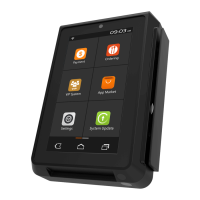
PAX SP30
User Manual & Setup Guide
Spec Sheet
Shop PAX SP30
Settings
How to Change the Date and Time
1. Press the FUNC button and 1 button simultaneously.
2. Enter the password when prompted, then press the green
enter key to conrm.
3. Press the down arrow key to access SETTINGS.
4. Select SYSTEM SETTINGS.
5. Select DATE/TIME SETUP.
6. Enter the day’s date, then press the green enter key to conrm.
7. Enter local time, then press the green enter key to conrm.
8. Press CANCEL to return to your SP30 home screen.
How to Settle a Batch
1. First, ensure all tips are appropriately adjusted if you use the
PAX SP30 for restaurant sales.
2. You will be prompted to select a FUNCTION button on your
paired terminal. On the A80, this will be the device’s F or
FUNC button.
3. If prompted, select HOST SETTINGS.
4. From the home screen, select BATCH.
5. Select BATCH CLOSE.
6. Press CANCEL to return to your SP30 home screen.
Accept Payments
4
Setup
3
Rights Reserved
9
Settings
7
Troubleshooting
& Tips
8
Overview
2



 To Next Page