Page 9
Ph: 804.227.3023
10511 Old Ridge Rd. Ashland, VA 23005
v 2.1
Powertrain Control Solutions
4 Initial Setup
4.1 Tire Size and Axle Ratio Setup
The two most important settings that must be done before going any further are the Vehicle Speed and the Throttle
Position calibrations. In order to calibrate the vehicle speed that is used by the controller, the tire size and nal drive ratio
need to be entered into the calibration. Tire size is entered in inches. If this is not known, you can use the calculator in the
software to enter the side wall information and get the size. The nal drive ratio will be the ratio of the rear end on a rear
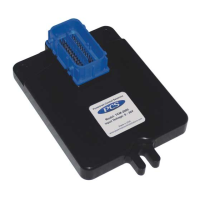
wheel drive vehicle. In the calibration tree view select “Setup Info/Gear Ratio and Tire Size”. Enter your vehicles axle ratio
and tire size only. The transmission ratios typically do not need
to be changed. Reference Figure 14.
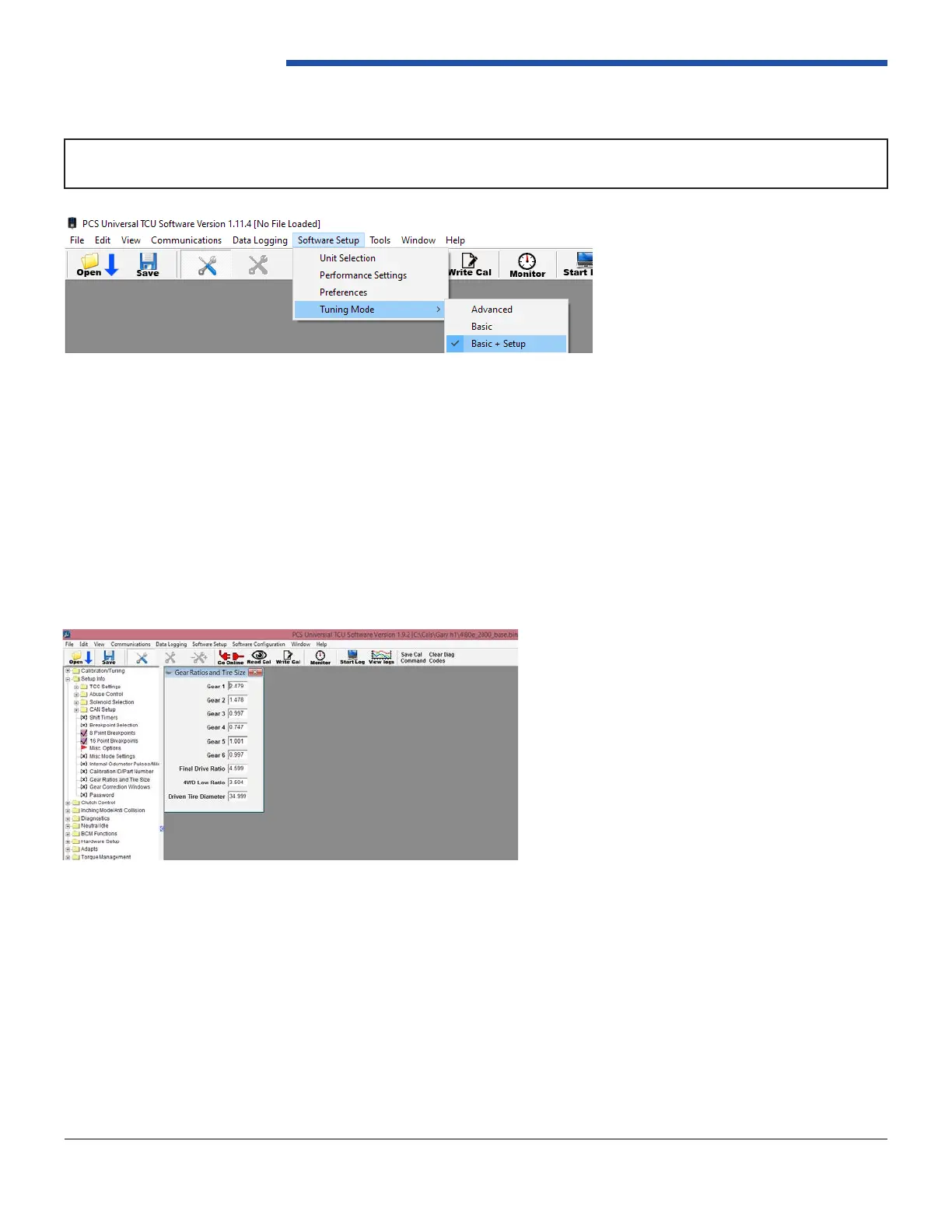
NOTE: In order to access the parameters required for initial setup you must be in Basic + Setup mode. To do this,
click Software Setup > Tuning Mode > Basic + Setup. Reference Figure 13.
Figure 14: Gear Ratios and Tire Size
Figure 13: Basic + Setup Mode


 To Next Page