PCAN-USB Hub – User Manual
10
3 Connectors on the Adapter
3.1 Upstream Port (USB Cable)
The cable with the USB plug is used for connecting the PCAN-USB
Hub to a computer.
When a High-speed USB connection (USB 2.0) is established, the
LED at the upstream port is on. For a Full-speed USB connection
(USB 1.1) the LED stays off.
The upstream port can be used for voltage supply of the PCAN-USB
Hub (see the following section 3.2).
3.2 Power (Voltage Supply)
The voltage supply of the PCAN-USB Hub may either be done via
the upstream port or with an external power supply at the power
socket.
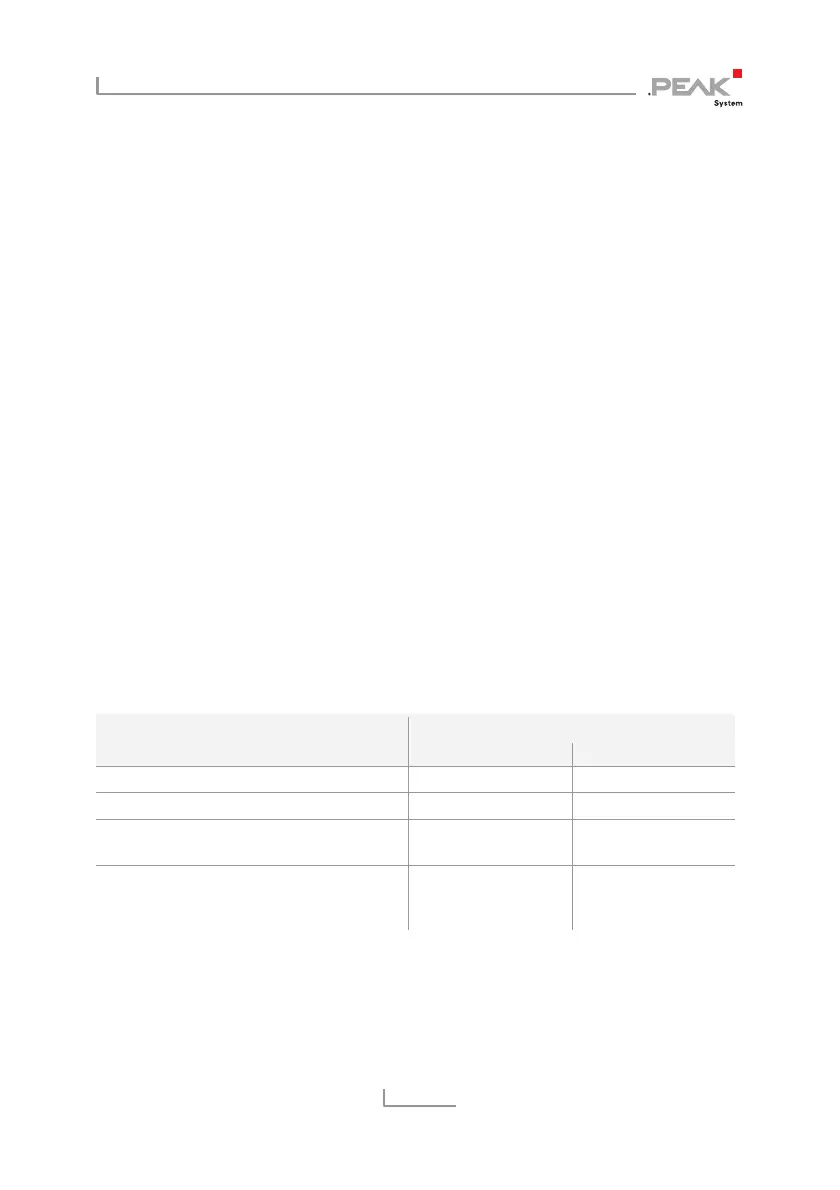
For voltage supply via Property
Upstream port Power socket
Supply voltage 5 V DC (USB) 9 - 36 V DC
Operating mode name Bus-powered Self-powered
Permissible current delivery
USB port 1/2
100 mA 500 mA
Permissible total current consumption
of hub (incl. additional USB devices at
the hub)
500 mA
If the permissible current delivery value is exceeded by connecting
additional USB devices to the PCAN-USB Hub, Windows shows a
respective warning and deactivates the related components.



 To Next Page