Shenzhen Pecron Technology Co.,Ltd
POWER IT POSSIBLE
Shenzhen Pecron Technology Co.,Ltd http://www.pecron.com Tel:0755-28601668
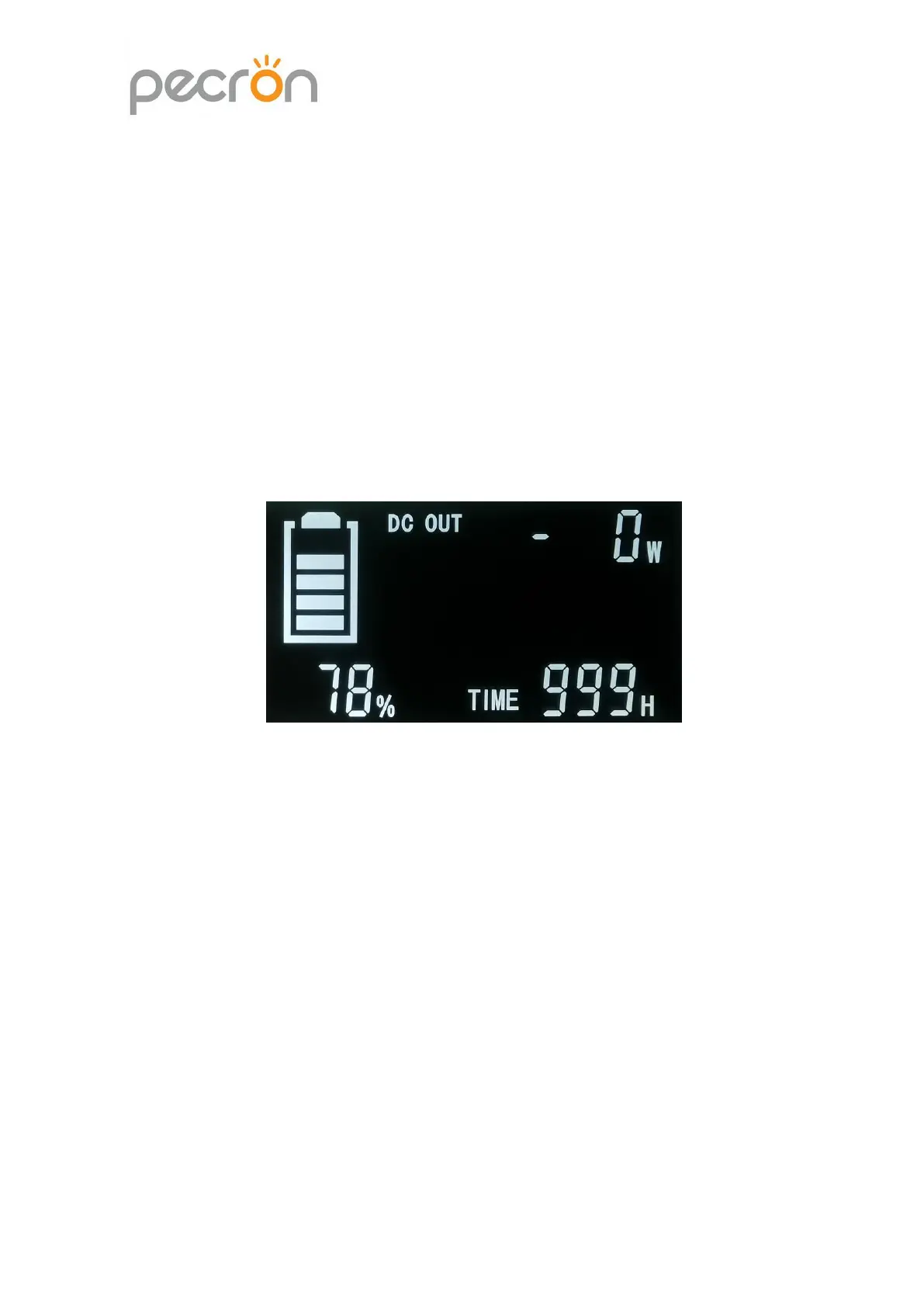
②DC Switch:After the power station on,press and hold the DC switch for 1
second,the USB and 12V output will be on,at the same time,the LCD screen shows
the battery percentage,DC discharge time(H)、DC discharge power, DC OUT
symbol(shown as picture 1,Page11). After DC output on, press the DC switch and
hold 1 second, the USB and 12V output shut down;After powering on,lightly press
DC switch,switch the real-time battery percentage /Battery real-time voltage mode.
Picture 1
③AC Switch:After powering on,press the AC switch and hold 1 second,the AC
output will be on,at the same time the LCD screen shows battery capacity
percentage / battery voltage、AC discharge time(h)、AC discharge power,AC
output power percentage、“AC OUT”symbol(shown as picture 2,Page11).After
AC output is on,press the AC switch and hold 1 second,the AC output will shut
down;After AC output on,lightly press the AC switch to AC discharge power + AC
discharge time / AC discharge voltage + PF value mode(shown as picture 2/3)


 To Next Page