40
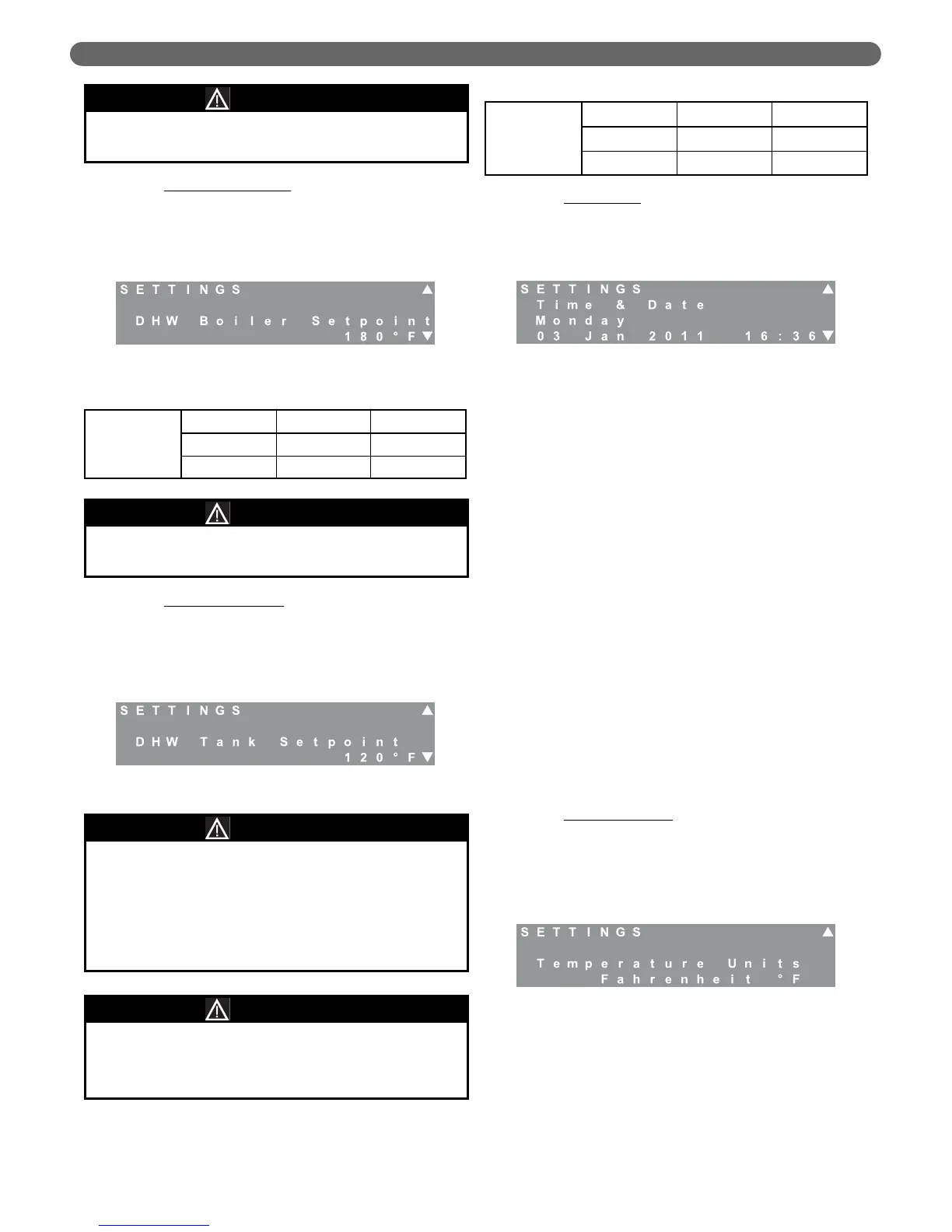
b. DHW Boiler Setpoint: This value determines the
target temperature for the boiler supply to an
indirect domestic hot water (DHW) storage tank.
This should not be confused with the DHW Tank
temperature. If the DHW Mode is set to Mode 0
(No DHW) this screen will not be visible.
c. DHW Tank Setpoint
: This screen allows the user
to select the target temperature for the indirect
DHW storage tank. This screen is only visible if
the DHW Mode is set to Mode 1 (DHW Tank with
Sensor) and an optional 12 kΩ DHW Tank sensor
is purchased (PB Stock Code 54157).
d. Time & Date
: This screen allows the user to set
the current date & time for the burner. Setting the
current date and time allows the installer to set up
alert messages for routine inspection and
maintenance.
•
Press the “Select” key. The third line will
alternately flash the day of the week and “---”.
•
Use the “L” and “M” keys to change the day.
Press the “Select” key to select the correct day.
•
The date value will flash. Use the “L” and
“M” keys to change the date. Press the
“Select” Key.
•
The month value will flash. Use the “L” and
“M” keys to change the month. Press the
“Select” Key.
•
The year value will flash. Use the “L” and
“M” keys to change the year. Press the
“Select” Key.
•
The hour value will flash. Use the “L” and
“M” keys to change the hour. Press the
“Select” Key. (Note that the hour is displayed
in the 24 hour format so that 3:00 pm =
15:00.)
•
The minute value will flash. Use the “L” and
“M” keys to change the minutes. Press the
“Select” Key.
The date and time will be stored in non-volatile
memory so the date will not require resetting if the
power is disconnected.
e. Temperature Units
: This screen allows the user to
change the temperature unit display. The default
units are Fahrenheit °F. To change the unit display,
press the “Select” key. The current unit system will
flash. Use the “L” and “M” keys to change the
value to Celsius °C. Press the “Select” key again
to choose the units.
3. LCD Message Menu
The messages menu allows the user to view the last
blocking error or last lockout error. The display will
also show the interval between the last blocking or
lockout error and the error before the last. To
determine the interval between the current time and
the error displayed, create an error by disconnecting
the supply sensor wire.
WARNING
DANGER
Water temperatures over 125°F can instantly cause
severe burns or death from scalding. Children, elderly
and disabled individuals are at the highest risk of
scalding. See instruction manual for the indirect tank
before setting the water heater temperature. Instruct
users to feel the water temperature before bathing or
showering. Anti-scald valves are recommended.
Figure 8.7: Settings – DHW Boiler Setpoint
Figure 8.8: Settings – DHW Tank Setpoint
Figure 8.9: Settings – Date & Time
Figure 8.10: Settings – Temperature Units
Table 8.7: DHW Boiler Setpoint Range & Defaults
DHW Boiler
Setpoint
Minimum Maximum Default
122°F 195°F 180°F
50°C 91°C 82°C
Table 8.8: DHW Tank Setpoint Range & Default
DHW Tank
Setpoint
Minimum Maximum Default
50°F 158°F 120°F
10°C 70°C 49°C
Be sure to only use the 12 kΩ tank sensor indicated.
Other sensors will not provide accurate tank
temperatures and may cause severe personal injury
due to scalding.
DHW Boiler Setpoint Setting is only available in DHW
Mode 1 & 2.
NOTICE
DHW Tank Setpoint Setting is only available in DHW
Mode 1.
NOTICE
BOILER CONTROL: OPERATION


 To Next Page