Cyclone Universal & Cyclone Universal FX - User Manual 8
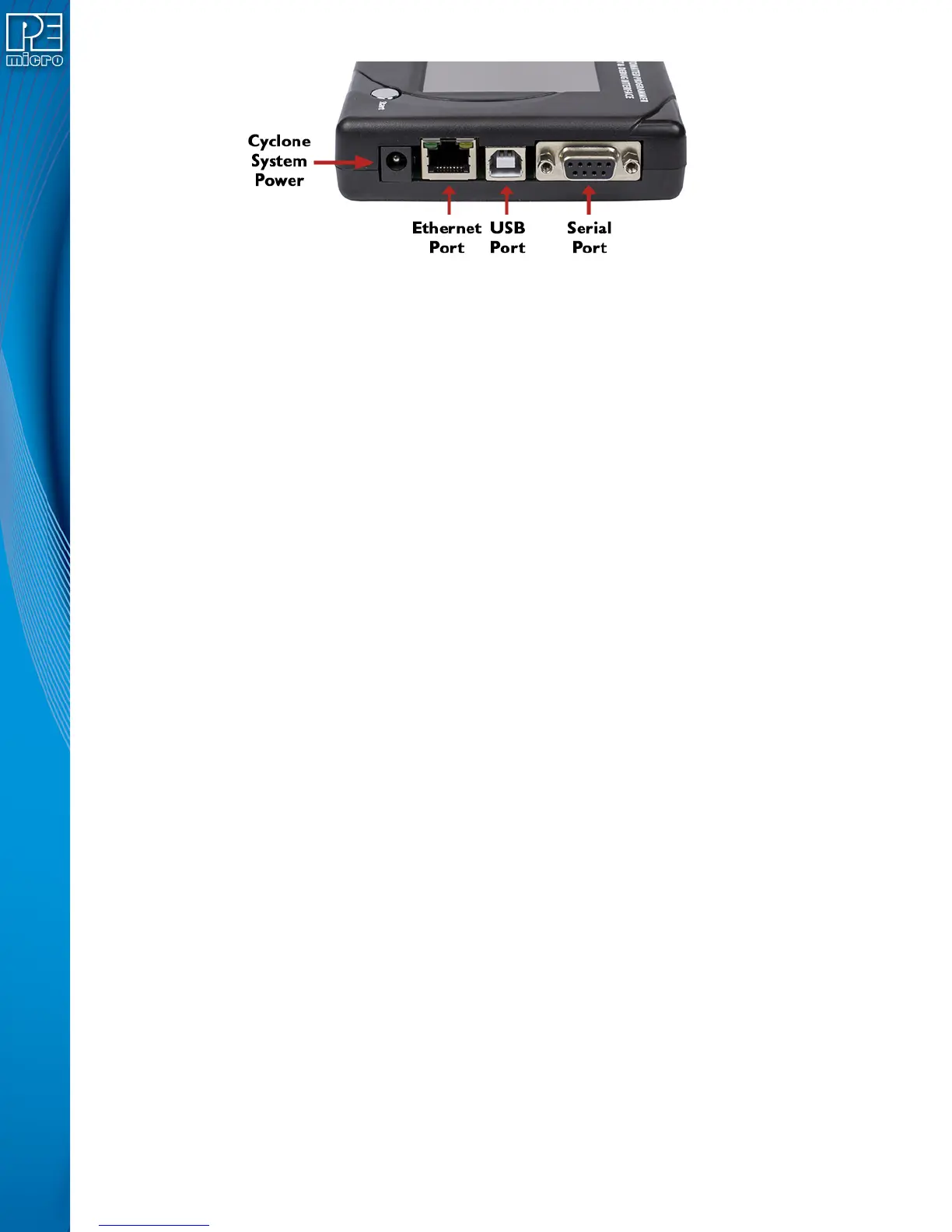
Figure 3-2: Cyclone Right Side View
3.5 Cyclone System Power
The Cyclone Universal and Cyclone Universal FX require a regulated 6V DC Center Positive
power supply with 2.5/5.5mm female plug. The Cyclones derive power from the Power Jack
located on the right end of the unit. The location of Cyclone System Power is shown in Figure 3-2.
3.6 RS232 Communication (Serial Port)
The Cyclone Universal and Cyclone Universal FX provide a DB9 Female connector to
communicate with a host computer through the RS232 communication (115200 Baud, 8 Data bits,
No parity, 1 Stop bit). The location of the Serial Port is shown in Figure 3-2.
3.7 Ethernet Communication
The Cyclone Universal and Cyclone Universal FX provide a standard RJ45 socket to
communicate with a host computer through the Ethernet Port (10/100 BaseT). The location of the
Ethernet Port is shown in Figure 3-2.
3.8 USB Communications
The Cyclone Universal and Cyclone Universal FX provide a USB connector for Universal Serial
Bus communications between the Cyclone and the host computer. The Cyclone Universal is a
USB 2.0 Full Speed compliant device, and the Cyclone Universal FX is a USB 2.0 High-Speed
compliant device. The location of the USB Port is shown in Figure 3-2.
3.9 Electromechanical Relays
Inside the Cyclone Universal and Cyclone Universal FX, two electromechanical relays are used
to cycle target power. The specifications of the relays are as following:
Maximum switched power: 30W or 125 VA
Maximum switched current: 1A
Maximum switched voltage: 150VDC or 300VAC
UL Rating: 1A at 30 VDC
1A at 125 VAC
P&E only recommends switching DC voltages up to 24 Volts.


 To Next Page