Cyclone Universal & Cyclone Universal FX - User Manual 36
5.1.8 FX Special Features (Enhanced Security Settings - FX Only)
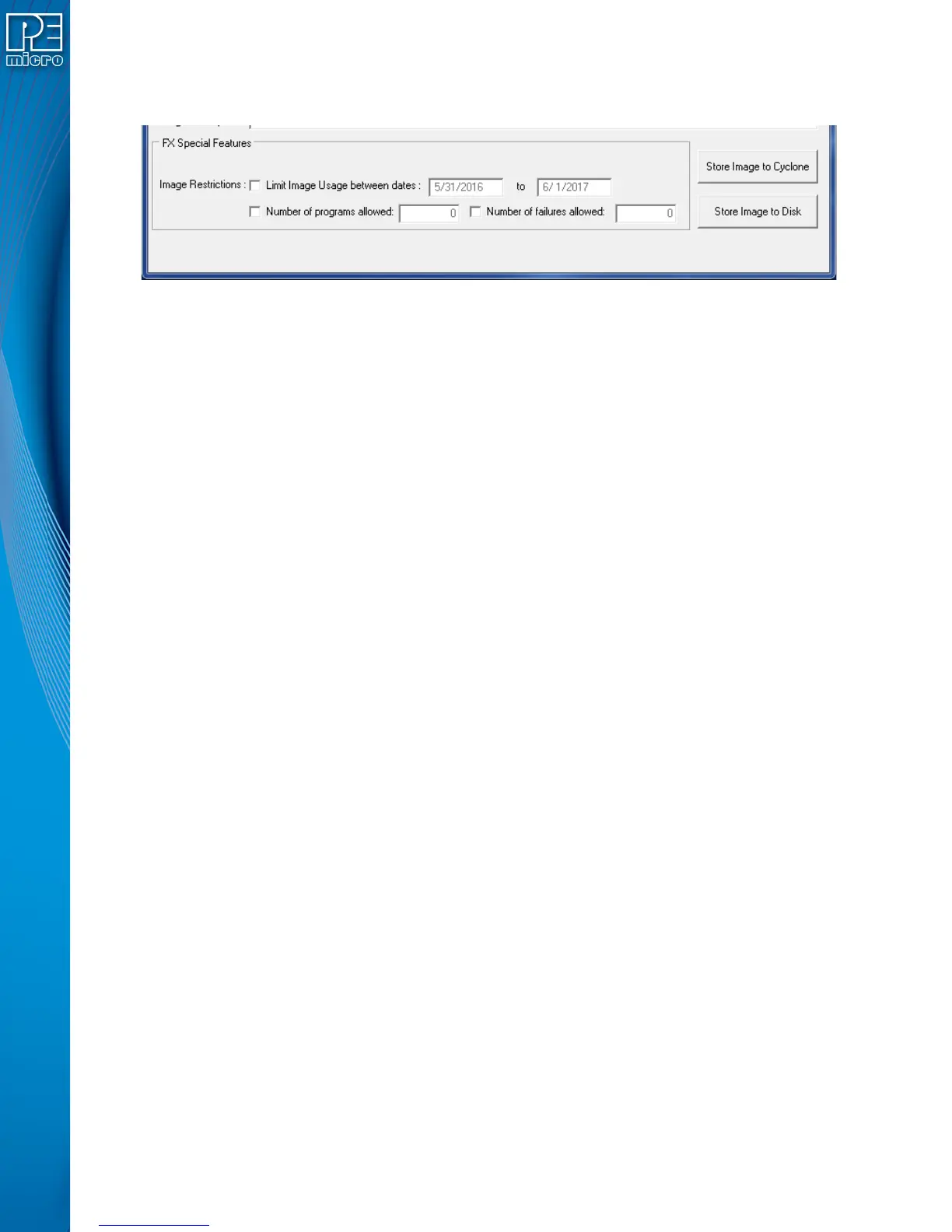
The Cyclone Universal FX includes additional security settings which may be configured here.
Figure 5-9: FX Special Features (Enhanced Security Settings)
5.1.8.1 Image Restrictions
There are any number of reasons why the user may want to place restrictions on the use of
specific programming images on a Cyclone programmer: from added ease when managing
production to a desire to protect intellectual property. When using the Cyclone Universal FX, the
“FX Special Features” section of the Cyclone Image Creation Utility allows you to specify one or
more restrictions and tie them to specific programming images. Even if restricted programming
images are deleted from Cyclone’s internal memory or an SD card, the Cyclone platform has a
persistent memory that continues to tie security restrictions to that programming image. Thus, if an
image is removed and re-added to a Cyclone, the image counts are maintained and would
continue counting from where it left off. Also, if the SD Card is moved from Cyclone to Cyclone, the
count is maintained in both Cyclones as well as the SD Card.
Every time an image is generated by the Cyclone Image Creation utility, it is encoded with a unique
image ID number. All counts are stored relative to this unique ID number. So, when an image is
regenerated in the Cyclone Image Creation utility, it will have its own counts which will not conflict
with the previously generated image, even if the images are otherwise exactly the same. In this
way, the user can regenerate an image to allow a new batch of targets to be programmed.
Currently the user may set the following restrictions:
5.1.8.1.1 Limit Image Usage Between Dates
When “Limit Usage Between Dates” is checked and the start and end dates are specified with valid
dates (format: DD/MM/YYYY), the Cyclone operator will only be allowed to program the
corresponding programming image when the date is on or between the dates specified. The
Cyclone has an onboard battery and clock which keeps a clock running even when power to the
Cyclone is removed. This clock date is the one used for comparison to the UTD Date specified in
the image. The ability to limit programming to a date is useful for making sure that an image will
stop working after a period of time. This could be for security purposes, or to make sure that a new
and updated image will need to be uploaded to the Cyclone after a period of time (for instance, to
not allow a firmware more than a year old to be programmed onto a target).
5.1.8.1.2 Limit Number of Programs Allowed
When “Limit Number of Programs Allowed” is checked and a number is specified in the
corresponding box (minimum = 1), the Cyclone operator will only be able to execute a number of
successful programming operations of this programming image less than or equal to the number
specified. The current programming count can be displayed on the main screen of the Cyclone or it
can be seen on the image's statistics page (see Section 5.1.8.2 - Image Restriction Statistics).
5.1.8.1.3 Limit Number of Failures Allowed
When “Limit Number of Failures Allowed” is checked and a number is specified in the
corresponding box (minimum = 1), the Cyclone operator will only be able to execute programming
operations on the current image until the maximum number of errors specified has been reached.


 To Next Page