EN-17
Inserting and Removing an SD Memory Card (Optional Accessory)
The digital camera comes with approx. 12MB of internal memory, allowing you to store captured still
images or movie clips in the digital camera. Moreover, you can also expand the memory capacity by using
an optional SD (Secure Digital) memory card so that you can store more files.
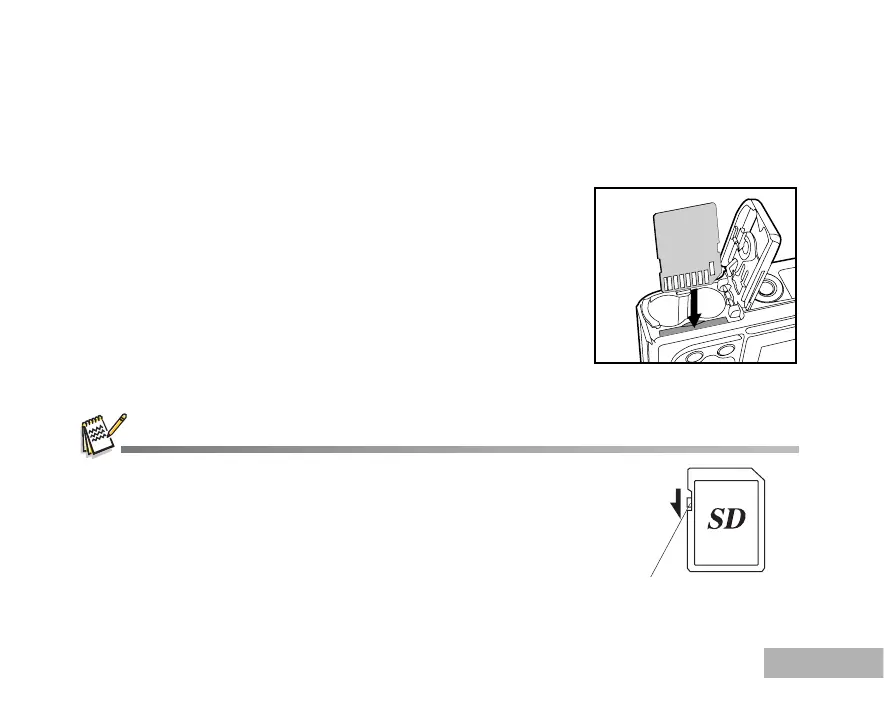
1. Make sure your camera is turned off before inserting or removing
an SD card.
2. Open the SD card cover.
3. Insert an SD card in the correct orientation as shown in the
illustration.
4. Close the SD card cover.
To remove the SD card, make sure the camera is turned off.
Press lightly on the edge of the memory card and it will eject.
Be sure to format an SD memory card with this digital camera before
using it. Refer to section in the manual titled “Formatting an SD Memory
Card or Internal Memory”. (Refer to EN-22 for further details.)
To prevent valuable data from being accidentally erased from an SD card,
you can slide the write protect tab (on the side of the SD memory card)
to “LOCK”.
To save, edit, or erase data on an SD memory card, you must unlock the card.
Write-protect switch
MEMU
DISPLAY



 To Next Page