98
Taking Pictures
4
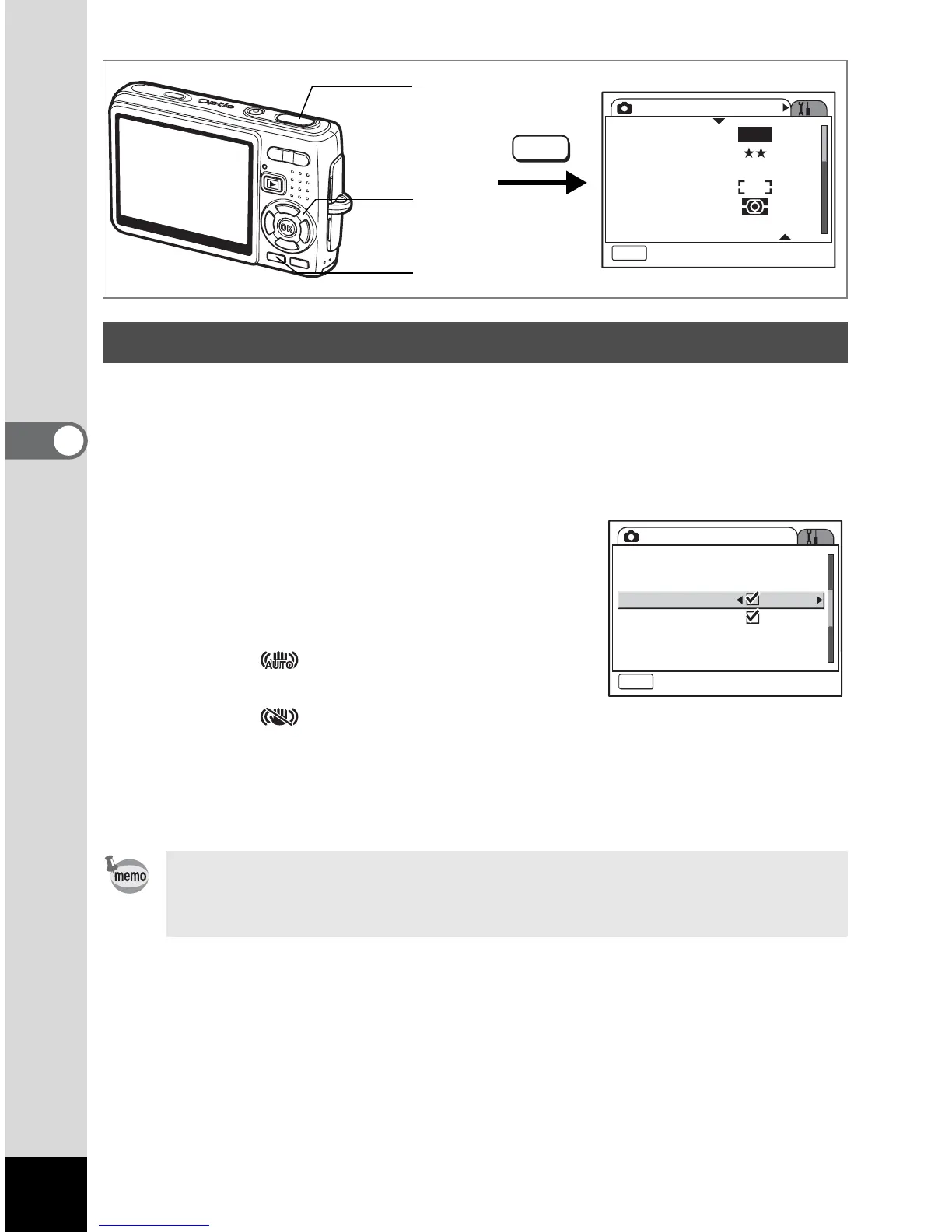
To use the shake reduction function for still pictures (p.51), you need to set
[Shake Reduction] to [O (On)] in the [
A Rec. Mode] menu.
1 Press the MENU button in Capture mode.
The [A Rec. Mode] menu appears.
2 Use the four-way controller (23) to
select [Shake Reduction].
3 Use the four-way controller (45) to
select [O (On)/P (Off)].
O (On) : (Shake Reduction On) is
displayed on the capture screen.
P
(Off) : (Shake Reduction Off) is displayed on the capture
screen.
4 Press the shutter release button halfway.
The camera is ready for taking pictures.
Setting the Shake Reduction for Still Pictures
You can also select On/Off using the Green button. This function
cannot be used when assigning a function other than Shake
Reduction to the Green button. (
1p.100)
Rec. Mode
MENU
Exit
Recorded Pixels
Quality Level
White Balance
AF Setting
AE Metering
Sensitivity
AWB
10M
AUTO 800
MENU
Shutter release
button
MENU button
Four-way
controller
Rec. Mode
MENU
Exit
EV Compensation
Movie
Digital Zoom
Instant Review
Memory
0.5sec0.5sec
±0.0
Shake Reduction











 To Next Page