112
5
Playing Back and Deleting Images
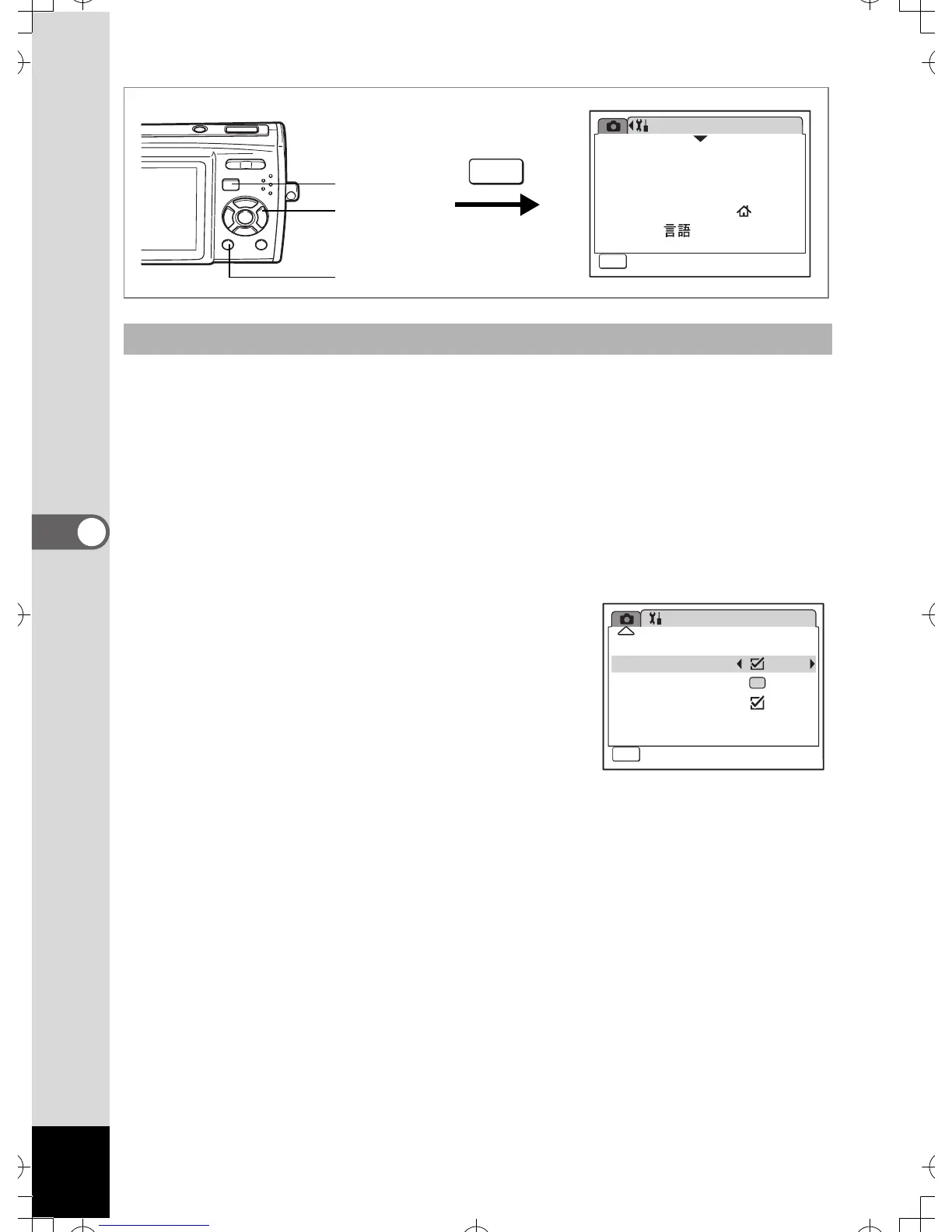
When the Quick Zoom function is enabled, you can display an image at
maximum magnification (×8) simply by pressing y on the Zoom/f/y
button once.
1 Press the 3 button in Q mode.
The [u Setting] menu appears.
2 Use the four-way controller (23) to select [Quick
Zoom].
3 Use the four-way controller (45)
to select O (On) or P (Off).
O : Jumps to ×8 magnification
P :Pressing y on the Zoom/f/y button
once magnifies the image in stages
from ×1.1 to ×8.0
4 Press the 3 button.
The camera returns to Q mode.
Setting the Quick Zoom Function
Setting
08/01/2007
Language/
MENU
1/3
Format
Sound
English
Date Adjust
World Time
Exit
MENU
2, 3
1
4
Setting
Quick Zoom
MENU
Exit
3/3
Green Button
Guide Display
Reset
Auto Power Off 3min


 To Next Page