EasyManua.ls Logo

Pentax OPTIO L40 - Setting the Camera Functions; Setting with the Menus

Pentax OPTIO L40
191 pages
Print Icon
To Next Page IconTo Next Page
To Previous Page IconTo Previous Page
Loading...
47
3
Common Operations
Setting the Camera Functions
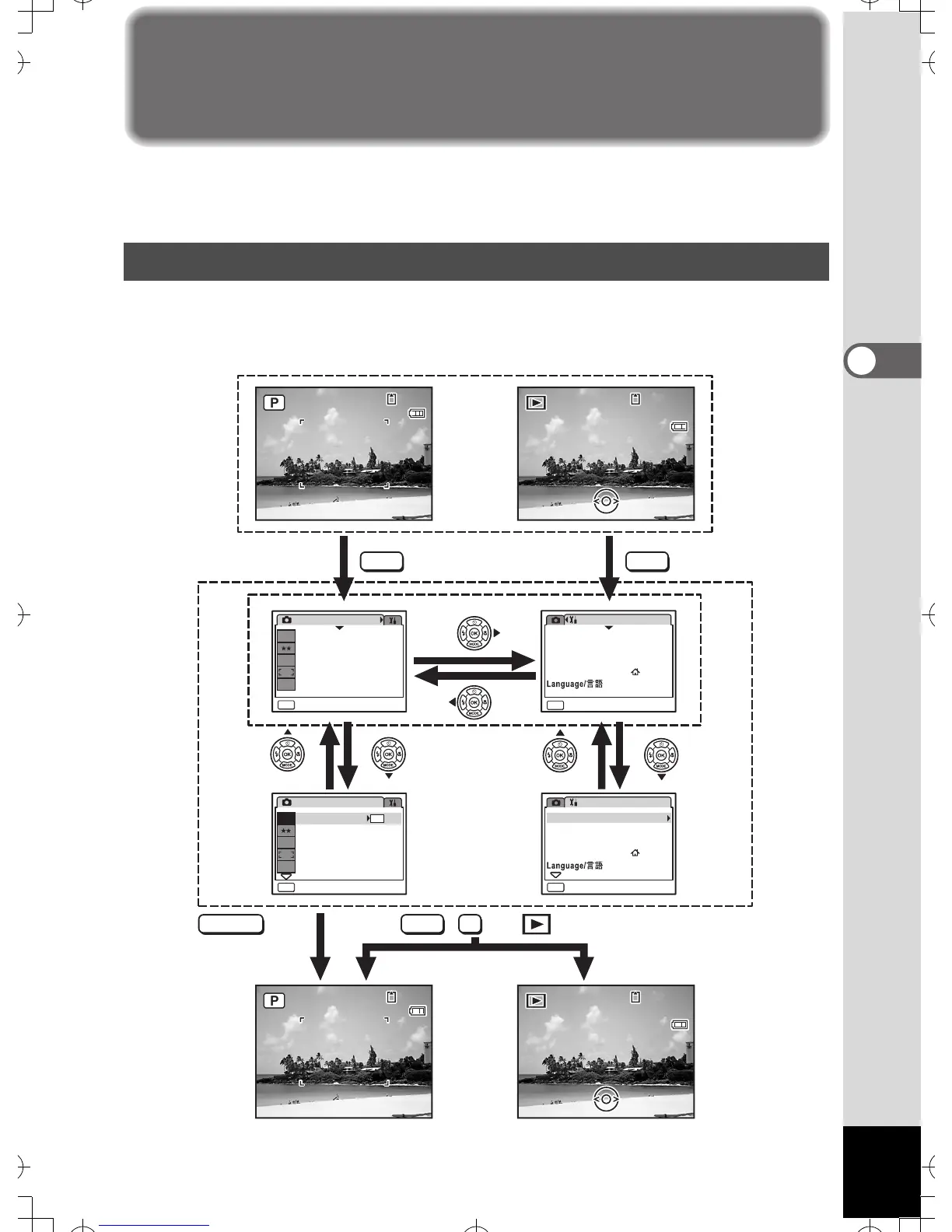
To change the camera settings, press the
3
button to display the
[
A
Rec. Mode] menu or [
u
Setting] menu. Menus for playing back and
editing images and sound files are displayed from the Playback Mode Palette.
Pressing the
3
button in
A
mode displays the [
A
Rec. Mode] menu.
Pressing the 3 button in Q mode displays the [u Setting] menu.
Setting with the Menus
MENU
SHUTTER
MENU
MENU
OK
MENU
Exit
38
3 8
38
0 8/0 1 / 2 007
08/01/2007
14:25
1 4:2 5
14:25
0 8/0 1 / 2 007
08/01/2007
14:25
1 4:2 5
14:25
100
1 00
-
0038
0 038
100
-
0038
38
3 8
38
0 8/0 1 / 2 007
08/01/2007
14:25
1 4:2 5
14:25
0 8/0 1 / 2 007
08/01/2007
14:25
1 4:2 5
14:25
100
1 00
-
0038
0 038
100
-
0038
Rec. Mode
MENU
Exit
MENU
1/3
8
M
AWB
ISO
AUTO
Rec. Mode
Quality Level
White Balance
Focusing Area
Sensitivity
1/3
Recorded Pixels
Quality Level
White Balance
Focusing Area
Exit
Sensitivity
AWB
ISO
AUTO
Setting
Sound
1/3
Format
Recorded Pixels
8
M
8
M
Setting
Format
Sound
English
World Time
Date Adjust
MENU
Exit
1/3
English
Date Adjust
World Time
or,
08/01/2007
08/01/2007
The setting is
complete and
the camera
returns to
A mode
Press halfway
During recording During playback
The setting is
complete and
the camera
returns to
Q mode
e
_
kb453
.
book
Page
47
Monday
,
July
23
,
2007
3:35
PM

Table of Contents

Related product manuals