EasyManua.ls Logo

Pentax OPTIO L40 - Setting the Playback Mode

Pentax OPTIO L40
191 pages
Print Icon
To Next Page IconTo Next Page
To Previous Page IconTo Previous Page
Loading...
57
3
Common Operations
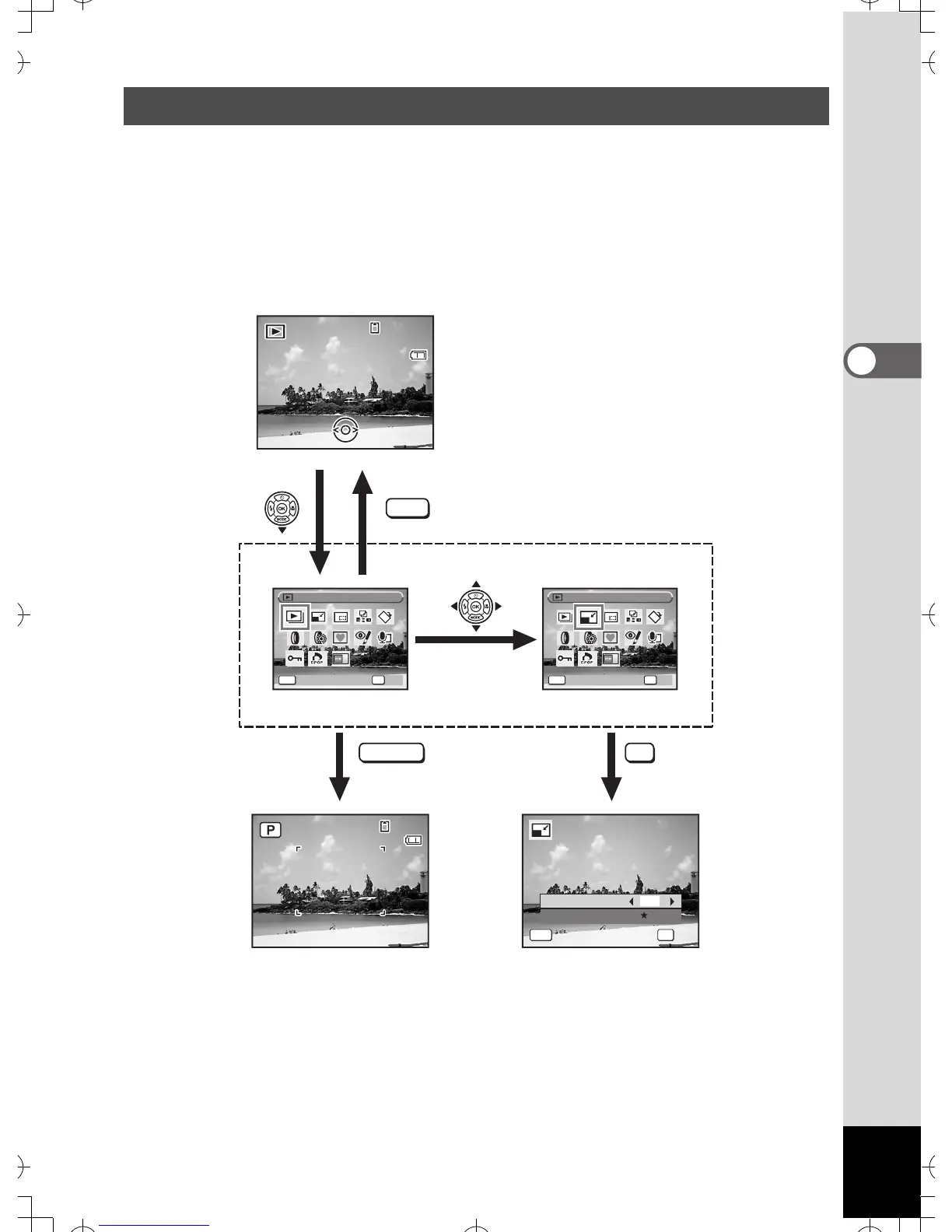
Press the four-way controller (3) in Playback mode to display the
Playback Mode Palette.
You can display the playback function you want to use simply by using
the four-way controller (2345) to choose an icon and pressing the
4 button.
Setting the Playback Mode
SHUTTER OK
MENU
0 8/0 1 / 2 007
08/01/2007
14:25
1 4:2 5
14:25
100
1 00
-
0038
0 038
100
-
0038
38
3 8
38
0 8/0 1 / 2 007
08/01/2007
14:25
1 4:2 5
14:25
OK
O K
OK
Cancel
Cancel
Quality Level
MENU
Recorded Pixels
8
M
OK
O K
OK
C a nc e l
Cancel
MENU OKMENU
S l id e sh ow
Slideshow
R e si z e
Resize
O K
OK
C a nc e l
Cancel
Goes to the screen for
selected playback function.
Closes the Playback Mode
Palette and goes to A mode.
Press halfway
e
_
kb453
.
book
Page
57
Monday
,
July
23
,
2007
3:35
PM

Table of Contents

Related product manuals