Installing your Lambda Spectrometer . 39
Setting up the Instrument in the Software
Before you can use your instrument with UV WinLab software, you must set up the
instrument in the UV WinLab Explorer.
NOTE: For instructions on how to install the Standard version of the UV WinLab software,
see the
High-Performance Lambda Spectrometers Getting Started Guide
(L6050007).
For instructions on the installation and use of the Enhanced Security version, see the
UV WinLab (ES) Administrator’s Guide
(L6050012) provided with your software.
NOTE: If your instrument is installed by a PerkinElmer Service Engineer, you should not
need to do this. You will require permission to configure instruments to add a new
instrument.
1. With the instrument switched on, from the Folder List in the UV WinLab Explorer
Window select Instruments.
The Instruments pane is displayed.
2. Double-click Add New Instrument,
.
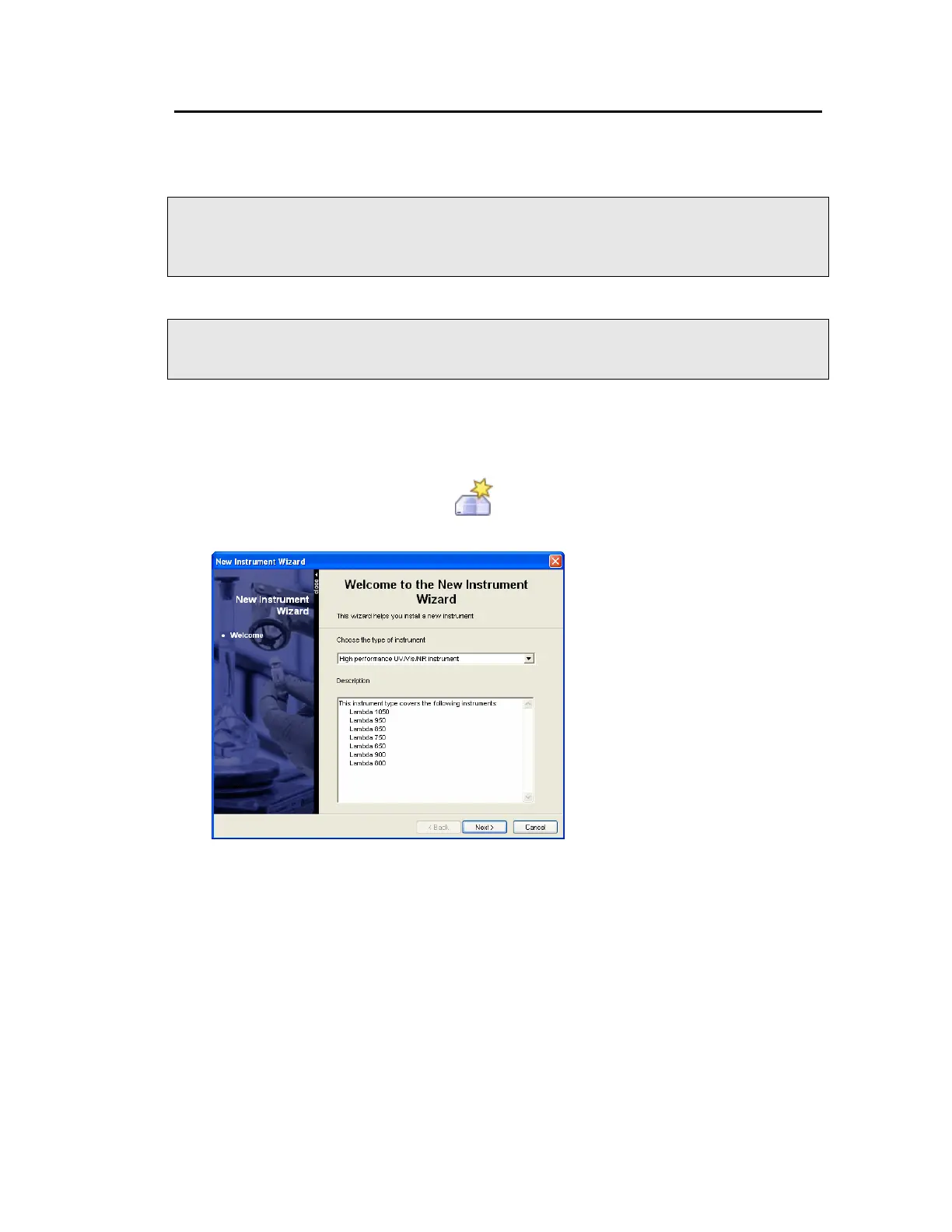
The New Instrument Wizard starts.
3. Select the High performance UV/Vis/NIR instrument from the Choose the type of
instrument from the drop-down list.
The Description below the drop-down list details the available instruments for the
selected type.






 To Next Page