09931286E
31
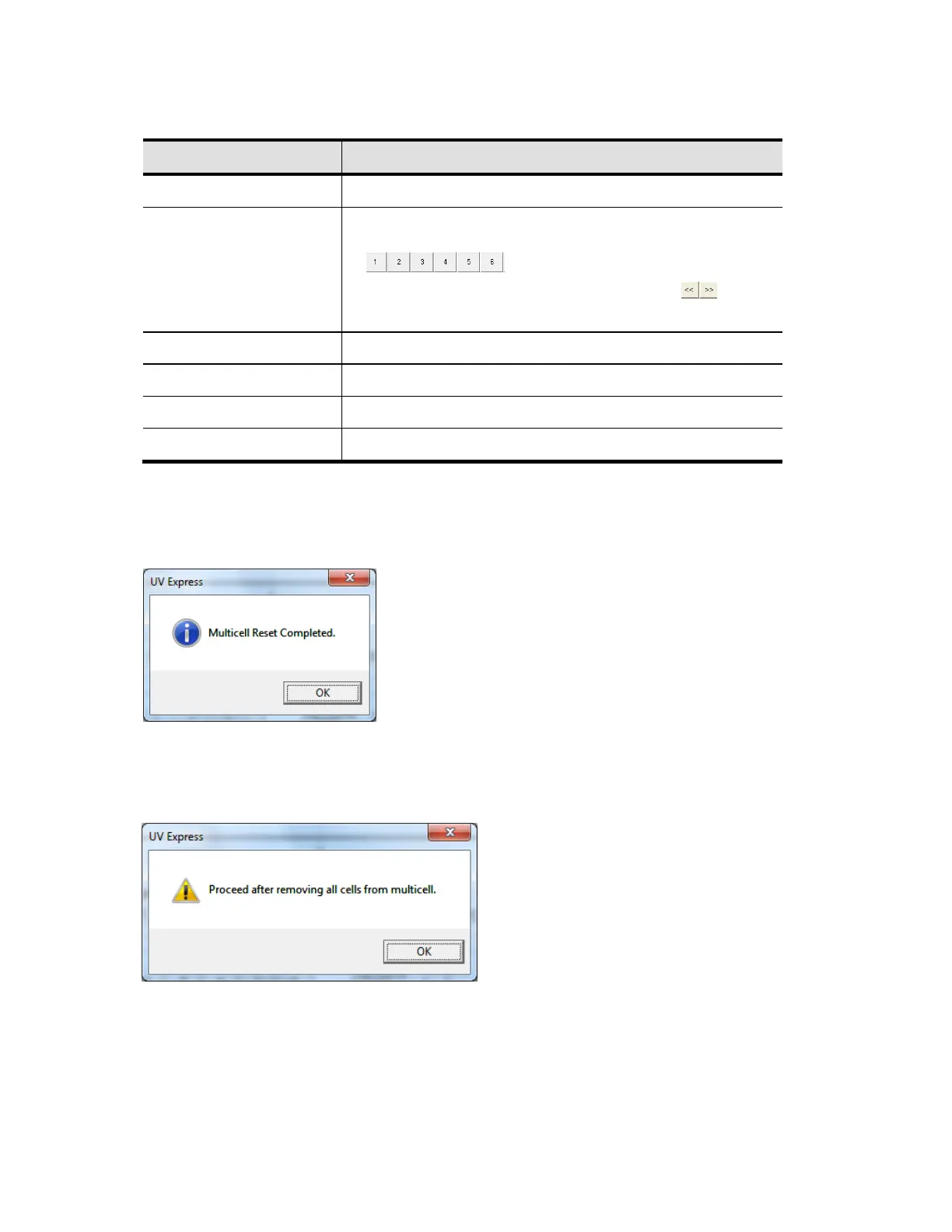
3. The Functions of the Multi-Cell Calibration are shown as follows.
Command Function
MultiCell Position It shows saved steps of each cell position of the Multi-Cell.
Multicell Move
It is used for moving Multi-Cell position as clicking buttons
.
It is used for moving Multi-Cell position using buttons
by entered step.
Multicell Calibration Perform the Multi-Cell calibration.
Stop Stop operation during Multi-Cell calibration.
Save Result It is used to save the calibrated result.
Reset Multicell Move to ‘0’ step of Multi-Cell position.
NOTE:
Although eight positions (steps) are displayed, only the first six (6) positions are used for 6-Position
Peltier Controlled Cell Changer. The last two positions remain 0 steps.
4. Click Reset Multicell to format the Multi-Cell steps. Click OK.
5. Click MultiCell Calibration. Then the following dialog box will appear. Remove all samples from the
6-Position Peltier Controlled Cell Changer. [Empty the 6-Position Peltier Controlled Cell Changer].
Click OK.






 To Next Page