F5 Corpus Repairs - Seat
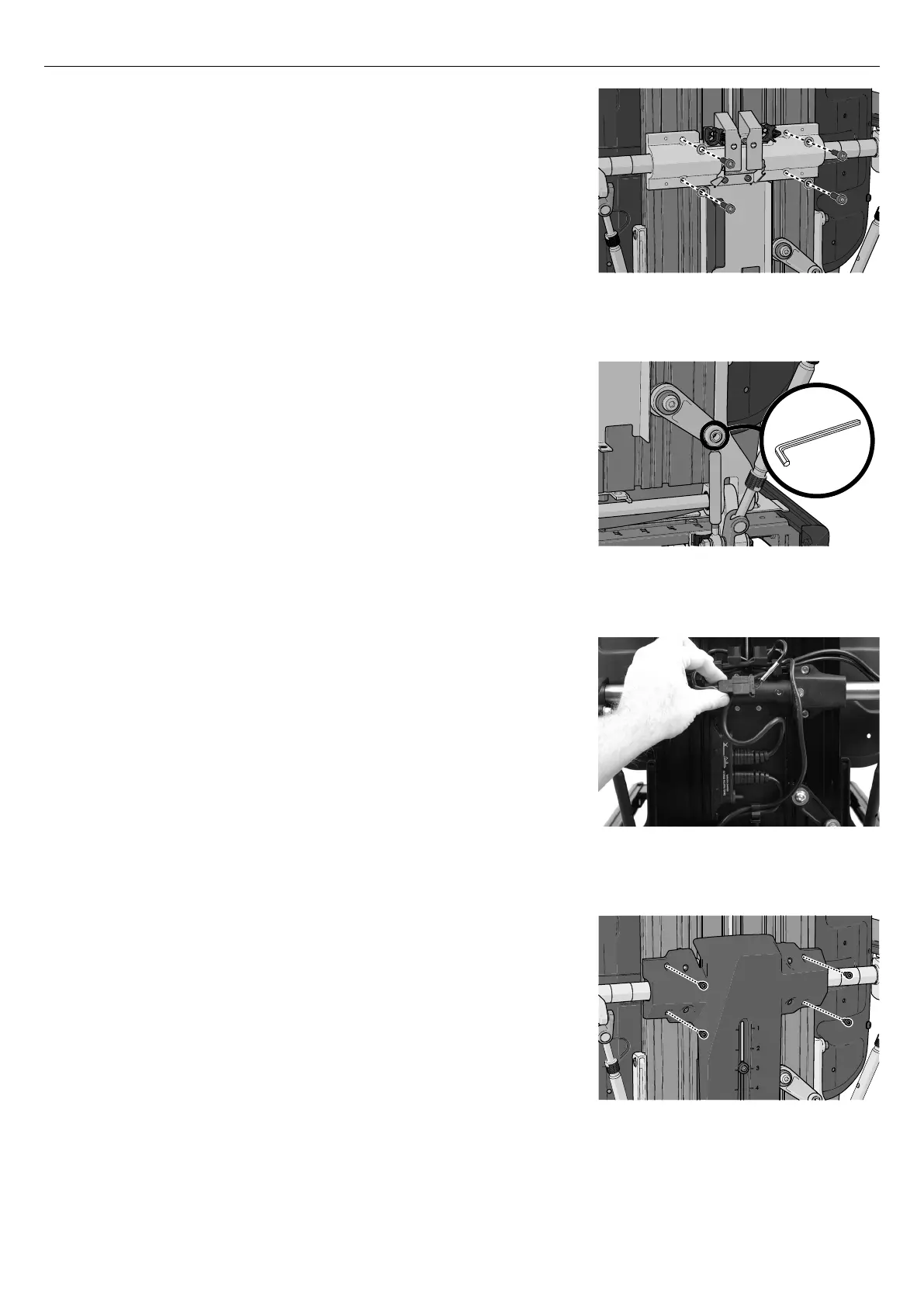
Figure 102. The armrests are held in place by four
screws
6. Carefully put the armrests and the armrest hinge back to its original
position.
7. Reattach the armrests using the four screws with the washers.
Tighten the screws using a torque wrench. Tightening torque
7.2 lb.ft.
Figure 103. The joint for the backrest slide function is
held in place by one screw.
8. Assemble the joint for the backrest slide function using the screw
supplied. Tighten the screw using a torque wrench. Tightening
torque 7.2 lb.ft.
Figure 104. Connect the R-net cable into the contact
block at back of the backrest.
9. Check your documentation on the cable set up.
10. Connect the BUS contacts into the contact block and assemble the
cabling for the ICS switchbox at the contact on the cabling.
Figure 105. The locations of the four screws securing
the plastic cover.
11. Attach the plastic cover with the four screws. Tightening torque:
0.89 lb.ft.
12. Reassemble the backrest plates. For a detailed description. See
4.1.4
Backrest
, Page 24.
45










 To Next Page