29
Taking BP in Clinic Mode
Clinic Mode is the mode used when the user wants to be in control of the timing and frequency of BP
measurements. When used in Clinic Mode, the user must leave the BPcycle setting OFF (by definition,
the OFF setting puts the unit into Clinic Mode). For each desired reading, touch the BP Go/Stop button
to initiate (or stop) a BP reading. The cuff will inflate automatically after the BP determination is started.
During cuff pressure deflation, petMAP+II will display the cuff pressure and the oscillometric waveform.
Using the graph of the oscillometric envelope, the user can discern the quality of the determination.
See examples of good, bad and ugly readings later in this section. If a determination is developing a bad
or ugly waveform, stop the determination, calm the patient, and then try again.
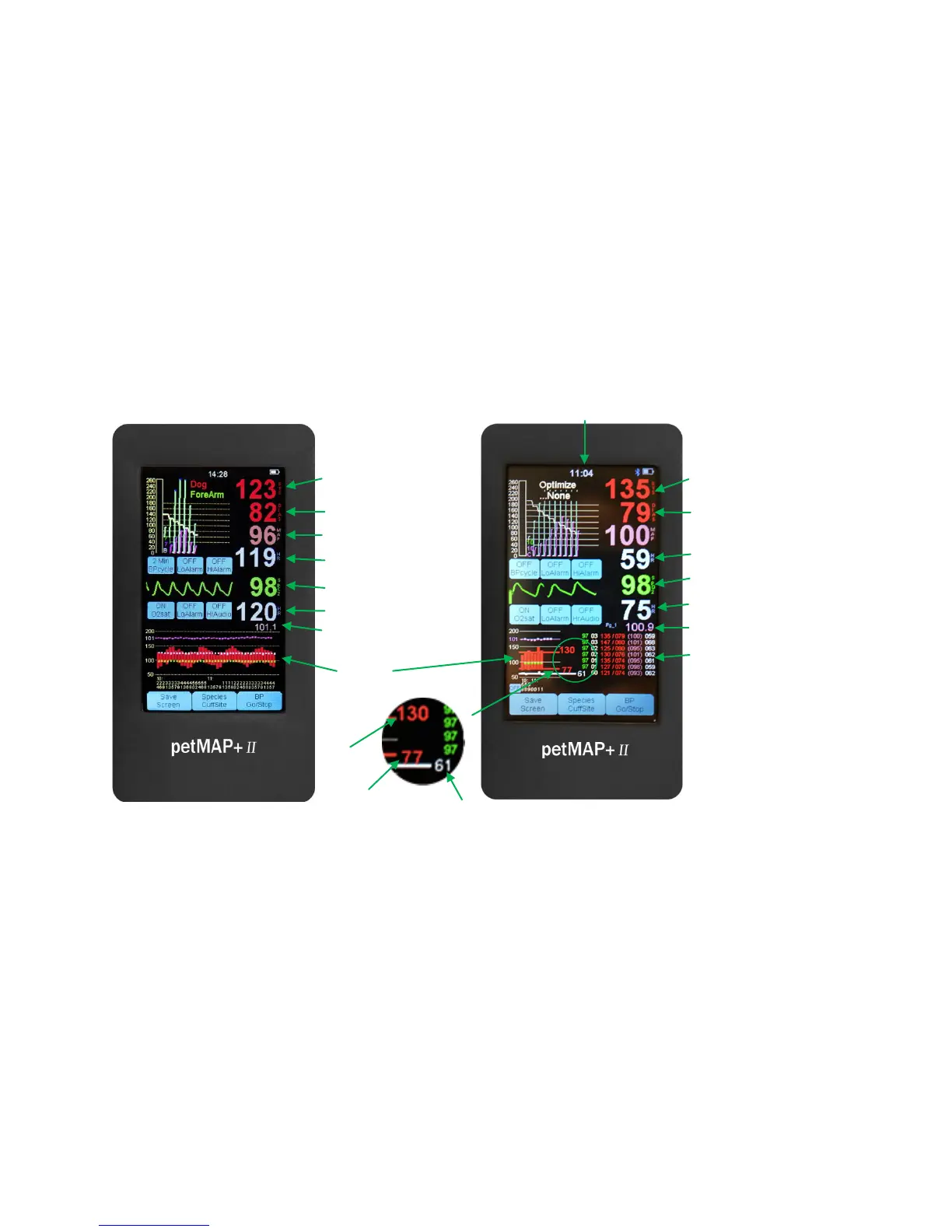
If the MAP value is desired while in Clinic Mode, simply touch the screen area below diastolic BP for it to
be displayed. By default, in Clinic Mode the bottom area of the display contains both a graphical and a
tabular display of measured data. In addition to the measured data in this Clinic Mode data display, the
petMAP+II displays the NSV in the graphical display area. NSV stands for Nominal Session Value, a
unique and proprietary petMAP feature. After the second reading, NSV is automatically calculated after
each subsequent reading in the BP measurement session. NSV is not a straight average of the previous
readings—all of the BP session readings are analyzed to result in a robust statistical measure of the
patient’s nominal BP. Outliers are eliminated and more averaging weight is given to the readings that
are more similar to each other and near the median BP value measured. The OR Mode trend display
(shown below) can be selected at anytime by touching the graphical data display area, and another
touch returns to the Clinic Mode display.
BP cycle set
CLINIC MODE
Systolic BP
Diastolic BP
Mean Arterial Pressure
Heart rate (from BP)
SpO
2
SpO2 Heart rate
BP Trend
Systolic BP
Diastolic BP
Heart rate (from BP)
2
SpO2 Heart rate
Measurement History
Temperature
Time of Day
NSV Systolic
NSV Heart Rate



 To Next Page