4:11
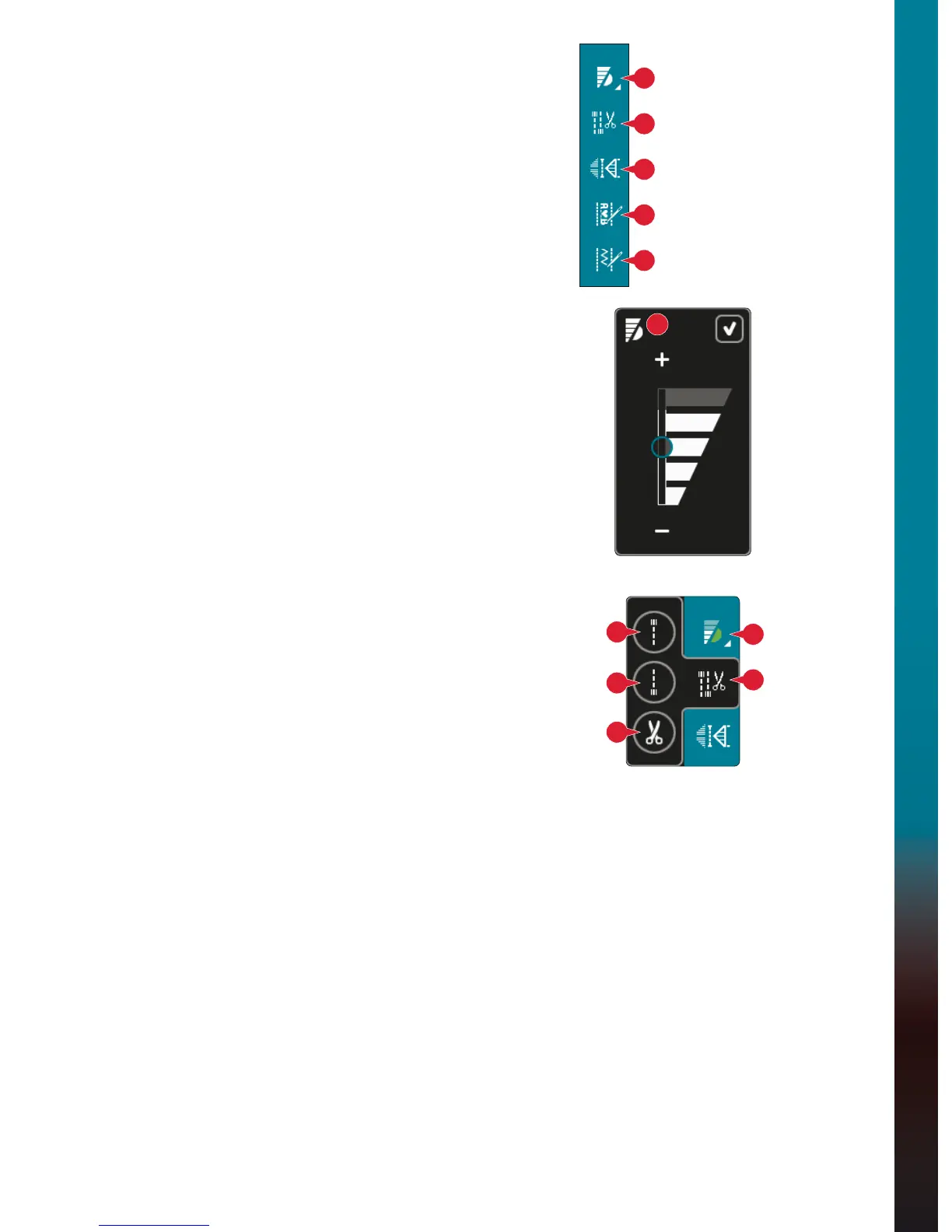
Speed control
Tie-off options
Stitch programs
Sequencing
Stitch Creator
™
feature
19
20
21
22
23
19
19
20
a
c
b
Sewing mode
Option bar
Speed control (19)
7KLVIXQFWLRQHQDEOHV\RXWRHDVLO\UHGXFHWKHPD[LPXP
sewing speed. Just touch the speed control icon to reduce
WKHVSHHG7RUHWXUQWRQRUPDOVSHHGGHVHOHFWWKHLFRQ
<RXFDQFKDQJHWKHVHWVSHHGOLPLW/RQJWRXFKWKHVSHHG
FRQWUROLFRQWRJHWDSRSXS6HWGHVLUHGVSHHGOLPLWXVLQJ
WKHVOLGHUWKHQFORVHWKHSRSXS7KHQH[WWLPH\RXWRXFK
the speed control icon, the speed will be reduced to the
OLPLW\RXKDYHFKRVHQ
<RXFDQVHZZLWKRXWFORVLQJWKHSRSXS
Note: You cannot set maximum speed in the popup. To set
maximum speed, close the popup and deselect the speed control
icon.
Tie-off options (20)
7KHVHRSWLRQVOHW\RXSURJUDPWLHRIIVERWKDWWKH
beginning and the end, and thread snips at the end of the
stitch.
:KHQWRXFKLQJWKHWLHRIILFRQWKUHHRSWLRQVRSHQWROHW
\RXVHOHFWGLIIHUHQWIXQFWLRQVWLHRIIEHJLQQLQJDWLH
RIIHQGEDQGWKUHDGVQLSVF
:KHQ\RXKDYHDFWLYDWHG\RXUVHWWLQJV\RXFDQKLGHWKH
WKUHHLFRQVE\WRXFKLQJWKHWLHRIILFRQRQWKHRSWLRQEDU
DJDLQ7KHWLHRIILFRQZLOOVKRZ\RXUVHWWLQJVE\FKDQJLQJ
WKHFRORURIWKHFKRVHQIXQFWLRQ7KHVHWWLQJVZLOOUHPDLQ
DFWLYHXQWLO\RXVZLWFKWKHPRII
Note: For immediate tie-off, use the tie-off button, found on the
front of the machine.
Sewing with tie-off options selected
7KHWLHRIIEHJLQQLQJDZLOOEHSHUIRUPHGDVVRRQ
as you start to sew.
3UHVVWKHUHYHUVHEXWWRQWRSHUIRUPWLHRIIHQGE
7KHDFWLRQLQGLFDWRUZLOOEHOLW7KHPDFKLQHZLOO
ÀQLVKWKHVWLWFKDQGGRDWLHRII
:KHQDWKUHDGVQLSFLVSURJUDPPHGWKHPDFKLQH
will automatically cut the threads after performing the
WLHRIIHQG7KHQHHGOHDQGSUHVVHUIRRWZLOOUDLVH
Note: Stop sewing and press the reverse button twice to
activate reverse sewing. The reverse indicator will be lit. No
tie-off will be performed.
Press the reverse button when sewing in reverse to activate
tie-off end. Both the reverse indicator and the action
indicator will be lit.
To go back to sewing forward, stop sewing in reverse and
press the reverse button. No indicators will be lit and no
tie-off will be performed.








 To Next Page