ENG
Operating Manual | Roof-mounted Cooling Unit | Multi Controller (MC) – 230 V | 086100023d 52/80
5.2 Multi-Controller (MC) operation
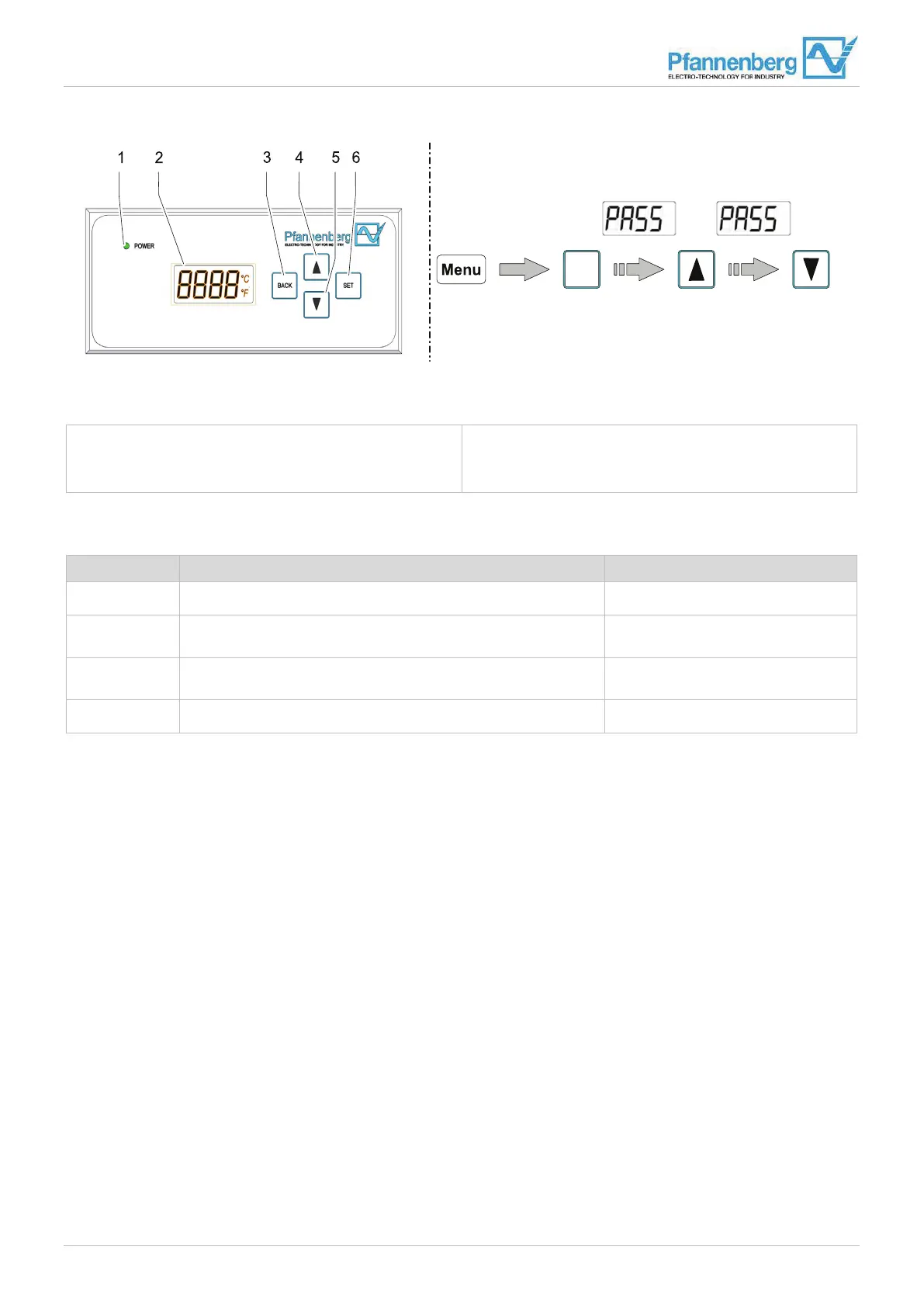
Fig. 27: Multi-Controller (MC) operation
1 LED light
2 Control panel
3 BACK button
4 SCROLL UP button
5 SCROLL DOWN button
6 SET button
The control unit offers four menus which are displayed on the control panel (1).
Control panel System information Value range
SetP: Setpoint of the switch cabinet temperature. 0 … 90 °C
¯
Lit¯: Maximum value (limit value high) of the switch cabinet
temperature
−55 … 95 °C
_
Lit_: Minimum value (limit value low) of the switch cabinet
temperature
−55 … 95 °C
Unit: Unit of the switch cabinet temperature. °C / °F
Tab. 9: Menus on the Multi-Controller
5.2.1 Carrying out menu settings
See also section "Menu overview", Page 53.
Requirements
• The cooling unit has started operation.
• The LED light (6) of the control unit lights green.
Procedure
1. Scroll through the menus (SetP, Lit¯, Lit_, Unit) from the temperature display (1) with the SCROLL UP (3) and SCROLL
DOWN (4) buttons.
2. Select a menu with the SET button (5).
3. Enter the password. After pressing the SET button (5), first press the SCROLL UP button (3) and then the
SCROLL DOWN button (4) within two seconds, see Fig. 27 – Password entry.
4. Set the desired value with the SCROLL UP (3) and SCROLL DOWN (4) buttons.
5. Confirm the value with the SET button (5).
– Back with the BACK button (2); the value will not be saved in this case.
6. Select another menu by scrolling with the SCROLL UP (3) and SCROLL DOWN (4) buttons.
Note – If no entry is made for 30 seconds, a TIMEOUT occurs and the control panel jumps to the temperature display.
Menu is set in the cooling unit.


 To Next Page