- 29 -
6. Humidity span calibration
Operation
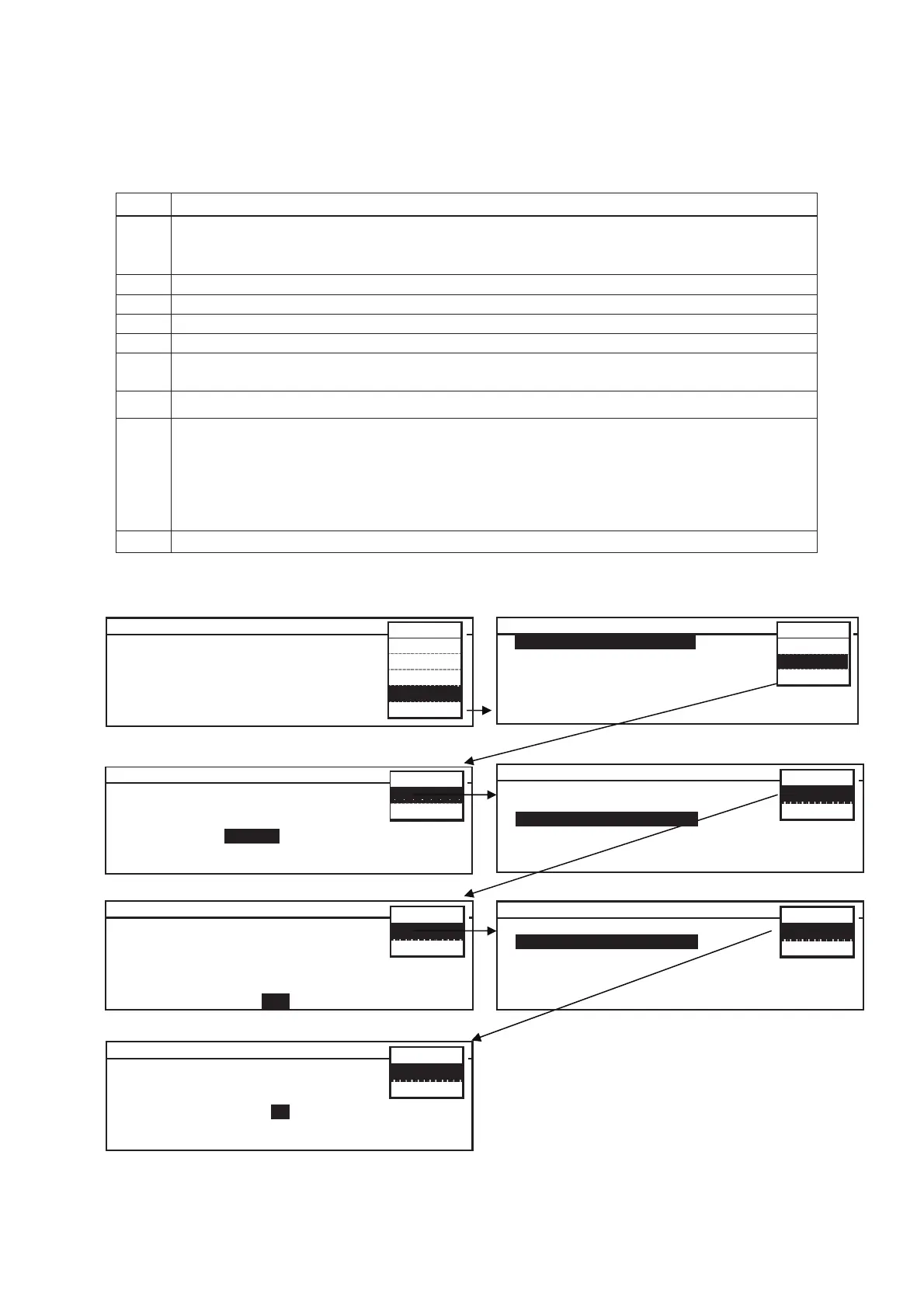
1 Place humidity sensor in the center of the chamber and set light step to “LS0”.
Set chamber temperature to 25.0䉝 and set chamber humidity to 85%RH (80~90%RH,
recommended) and leave the unit until temperature and humidity are stabilized.
2 In Stand-by Top screen, select “Tools” on MENU bar.
3 Select Tools screen will be displayed. Select “Svc” on MENU bar.
4 Password screen will be displayed. Input service code “384” and select “OK” on MENU bar.
5 Select Tools Svc screen will be displayed. Select “Calibration 2” and “OK” on MENU bar.
6 Calibration 2 screen will be displayed. Input “105” to Function column.
Select “OK” on MENU bar.
7 Select Tools screen will be displayed. Select “Calibration 1” and “OK” on MENU bar.
8 Calibration 1 screen will be displayed. Compare displayed value for humidity sensor with a
value besides RH Span column.
(Ex) When displayed humidity in humidity sensor is 90%RH, displayed humidity is 80%RH
and a value besides RH Span column is “560”;
Input “635” (560+75) to RH span column.
*To reduce 10% from present chamber humidity, add “75” to the value in RH Span column.
9 Select Tools Svc screen will be displayed.
Select Tools M L R - 3 5 2 H
L o g
Date Time
Alarm Setting
Key Lock PW Sett i n g
Default Setting
Delete User Data
MENU
OK
S v c
Ca nc e l
C a l i b r a t i o n 2
A n a l o g T e m p 490
A n a l o g L i g h t 490
A n a l o g R H 480
C o m p M o d e 0 ( 0 . A u t o 1 . O N )
E V C o n t r o l 5 0 0 ( 5 0 0 . A u t o 0 - 4 8 0 )
F u n c t i o n 1 0 5 ( 1 0 2 . H S 1 0 3 . T M )
ME N U
O K
Ca n c e l
S t a n d - b y T o p S c r e e n
T e m p 4 5 . 0
o
C L i g h t 0 L S R H 8 5 %
2 0 1 1 / 0 3 / 2 0 1 2 : 0 0 : 0 0
㸲㸳㸬㸮
Υ
㸮
LS
㸶㸳
㸣
ME N U
Run
St d- by
Edit
T o o l s
M. D e f
䝟䝇䝽䞊䝗䛿ඛ㢌䛛䜙䇿㻟㻤㻠䇿䛸ධຊ䛧䛶䛟䛰䛥䛔䚹㻌
1. Top screen 2. Select Tools
P a s s w o r d
F o r S e r v i c e T o o l s
P a s s w o r d
MENU
O K
Ca nc e l
3. Password 4. Select Tools Svc
5. Calibration 2 6. Select Tools Svc
7. Calibration 1
Select Tools Sv c V e r . 1 . 0 0 A
Send All Data t o P C
Calibration 1
C a l i b r a t i o n 2
Test Program
Delete All User d a t a
Hardware Status
ME N U
O K
Ca n c e l
Select Tools Sv c V e r . 1 . 0 0 A
Send All Data t o P C
C a l i b r a t i o n 1
Calibration 2
Test Program
Delete All User d a t a
Hardware Status
ME N U
O K
Ca n c e l
C a l i b r a t i o n 1
T e m p Z e r o 0.0 4 5 . 0 ° C
R H Z e r o 0 5 5 %
T e m p S p a n 0.0
R H S p a n 0
E V o f f s e t 50 ( 1 - 1 0 0 )
M o d e l C o d e 1 ( 0 . 3 5 2 1 . 352H)
ME N U
O K
Ca n c e l


 To Next Page