EN - 33
08/2012Copyright © 2012, Fast ČR, a. s.
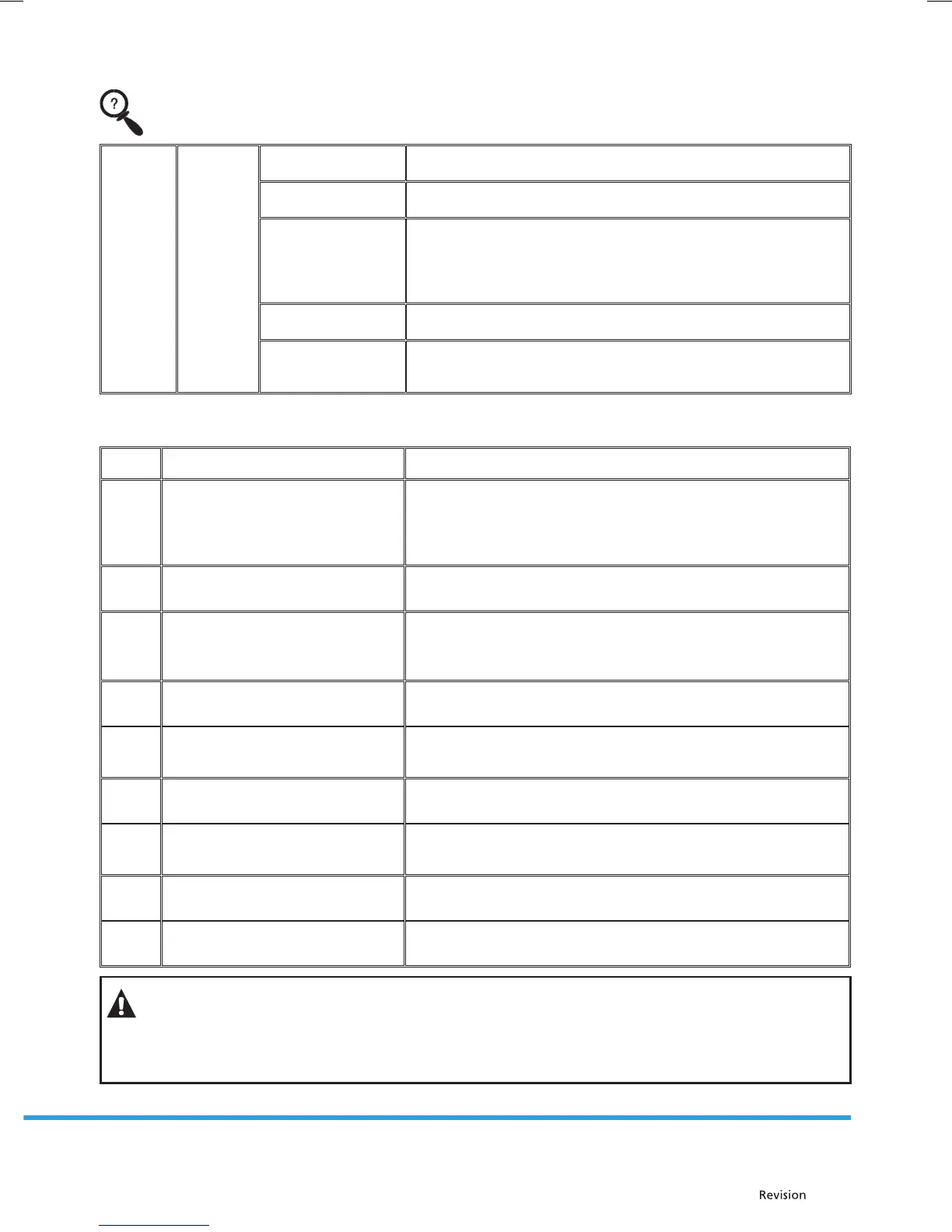
Drying
results
are not
satisfac-
tory.
The dishes
are not
dry.
The dishes were
incorrectly loaded.
Load the dishwasher with dishes according to the instructions.
You did not add
enough rinsing aid.
Increase the amount of rinsing aid / ll up the rinsing
aid compartment.
You took the dishes
out too soon.
Do not take the dishes out of the dishwasher immediately after the
wash. Slightly open the door so that steam is released.
Only take the dishes out when they are warm and you can hold
them in your hand. First unload the lower rack. This will prevent
wetting the dishes with water dripping from the upper rack.
You selected an
incorrect program.
During a short program the water temperature is lower. This also
reduces the washing e ciency. Select a longer program.
Knives do not have
a quality surface
treatment.
Water drainage is a somewhat more di cult from these items.
These types of knives or dishes are not suitable for dishwashers.
Error codes
Codes Meaning Possible causes
F5 Insu cient water supply
Check that the water inlet is fully open and that the water
supply was not interrupted.
Shut o the water inlet. Unscrew the water supply hose and
clean out the lter on the end of the hose.
Restart the dishwasher, contact an authorised service centre.
F3 Water supply failure
Shut o the water inlet.
Contact an authorised service centre.
F2
It is not possible to pump residual
water out of the dishwasher.
The drain hose is clogged.
The lters may be clogged.
Turn o the dishwasher and turn on the cancel wash programs.
If the problem persists contact an authorised service centre.
F8 Heat malfunction Contact an authorised service centre.
F1
The warning indicator light is
activated when the dishwasher
over ows.
Turn o the dishwasher and close the water inlet.
Contact an authorised service centre.
FE Faulty electronic card Contact an authorised service centre.
F7
Overheating malfunction
(the temperature of the dishwasher
is too high)
Contact an authorised service centre.
F9 Malfunction of the divider area Contact an authorised service centre.
F6 Heat sensor error Contact an authorised service centre.
WARNING!
In the event that the dishwasher becomes ooded, close the water supply before calling the
service technician.
If as a result of ooding or a water leak there is water in the bottom container, pour it out
before turning on the dishwasher again.


 To Next Page