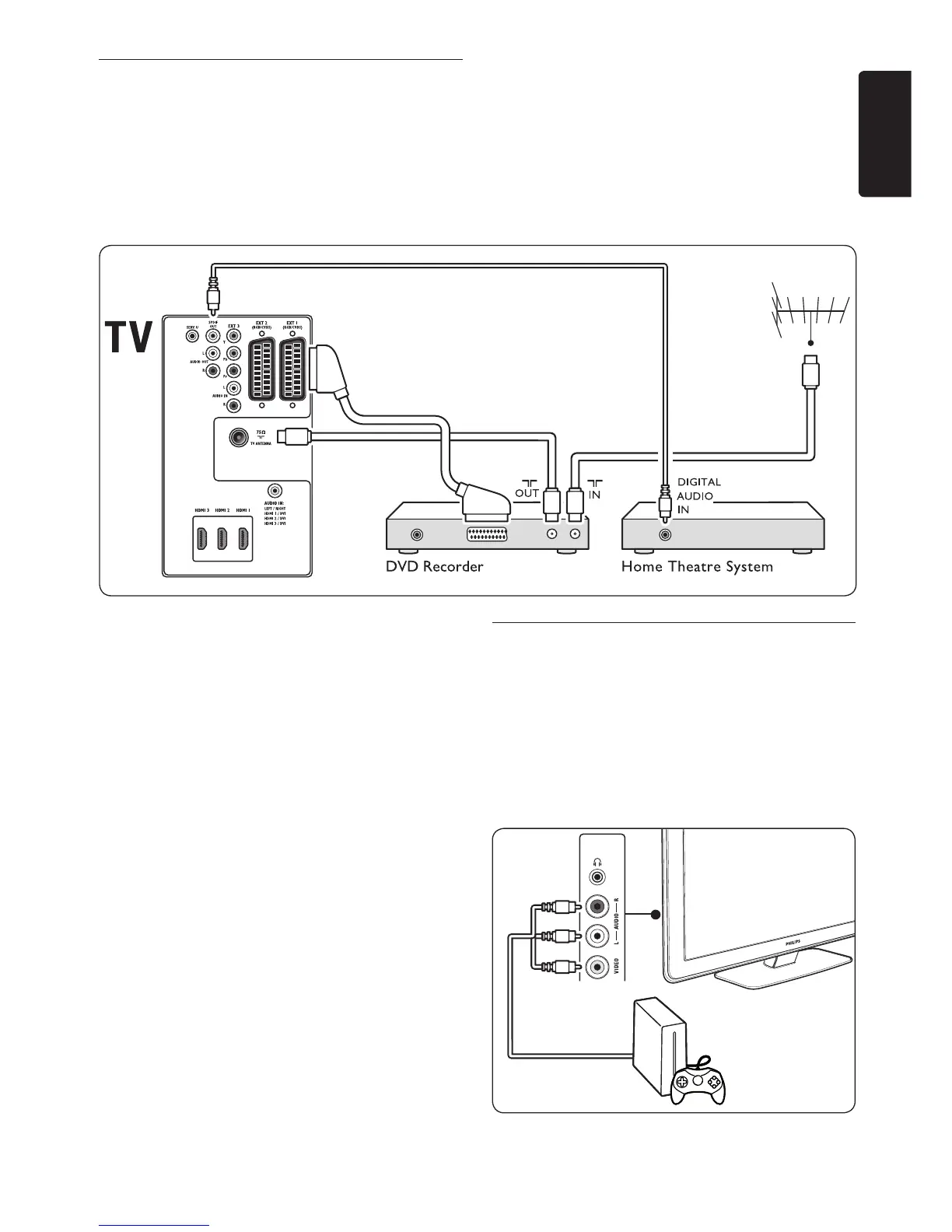
7�3�7 DVD recorder and home theatre
system
To receive analogue channels via antenna,
output sound to a home theatre system and
record programmes on a DVD recorder,
connect two antenna cables, one SCART cable
and two digital audio cables as illustrated:
Note D
If using a home theatre or other audio
system, the best synchronisation between
images and sound is achieved by connecting
the audio signal from your playback device
totheTVrst.Subsequently,channelthe
audio signal to the home theatre system or
audio device via the audio connectors on
the back of the TV.
7�3�8 Game console or camcorder
The most practical connection for a mobile
game console or camcorder may be at the side
of the TV. You can, for example, connect the
game console or camcorder to VIDEO/S-Video
and AUDIO L/R connnectors at the side of
the TV. A HDMI connector is also available for
high-definition devices.












 To Next Page