44 EN
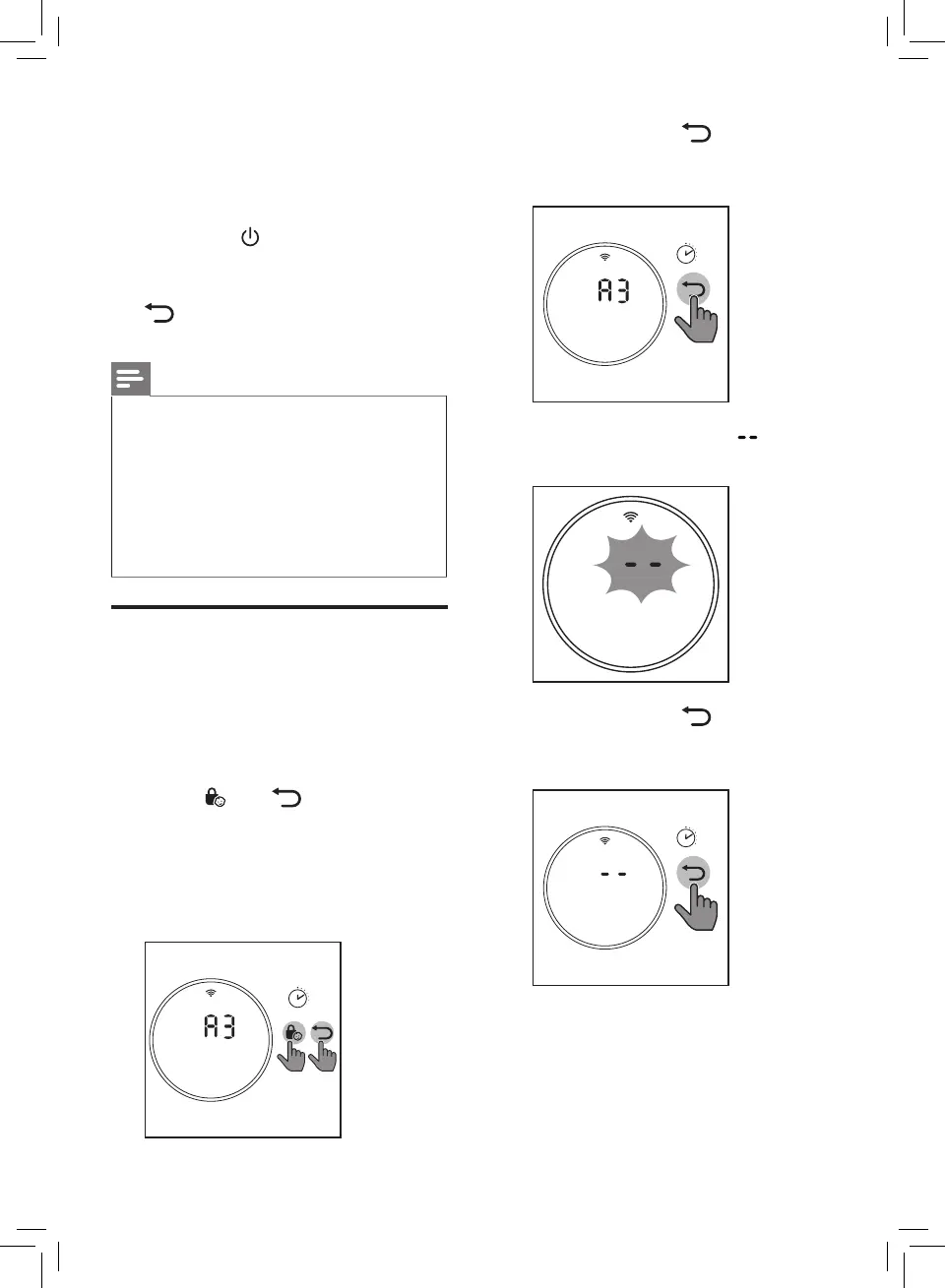
2 Touch and hold for
3 seconds to force reset the lter
lifetime counter.
3’
3 After the lter is reset,
displays on the screen.
4 Touch and hold for
3 seconds to exit the lter reset
mode.
3’
5 Place the new lters into the air
purier.
6 Put the plug of the air purier in
the power socket.
7 Touch the button to switch on
the appliance.
8 Touch and hold the reset button
for 3 seconds to reset the
lter lifetime counter
Note
• Wash your hands after changing
a lter.
• This air purier has no other
user-serviceable parts. For
assistance, contact the
Consumer Care Center in your
country.
Filter force reset
You can replace lters even if
there is no lter replacement code
displayed on the screen. After
replacing a lter, you need to reset
the lter lifetime counter manually.
1 Touch and simultaneously
for 3 seconds to enter the lter
reset mode.
» Code (A3) of the
NanoProtect lter Pro S3
displays on the screen.
3’


 To Next Page