User Manual BDL4771V
RETURN TO THE CONTENTS
3.6. CONNECTING ANOTHER BDL4771V DISPLAY
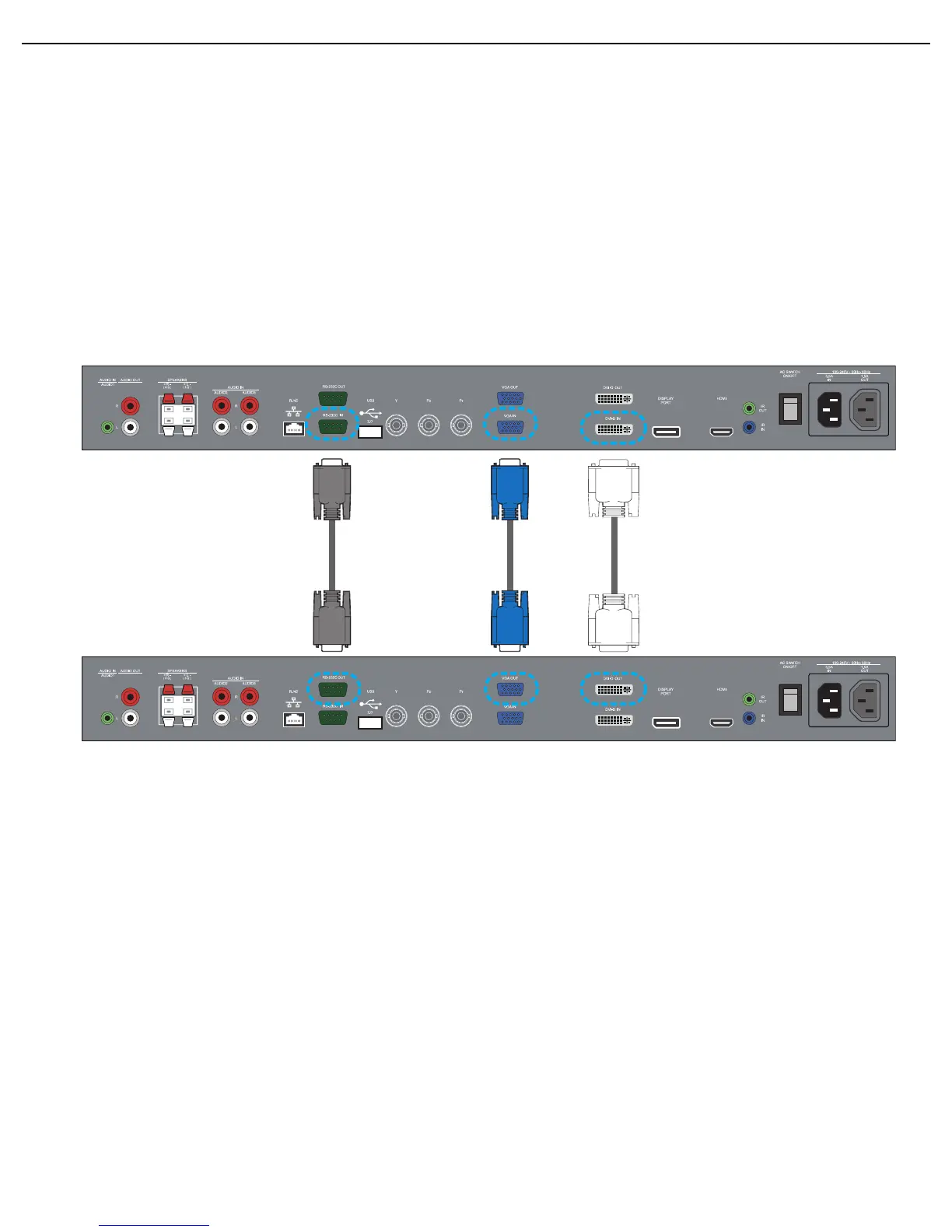
You can interconnect multiple BDL4771V units to create a daisy-chain configuration for applications such as a video wall.
Note: The number of displays that can be used in a daisy-chain configuration will depend on the resolution of the input signal being
used.
• Connect the VGA OUT connector of the display to the VGA IN connector of an additional BDL4771V unit.
Note: You can connect up to 25 displays using the VGA OUT connectors.
• Connect the RS-232C OUT connector of the display to the RS-232C IN connector of an additional BDL4771V unit.
• Connect the DVI-D OUT connector of the display to the DVI-D IN connector of an additional BDL4771V unit.
Note:
• You can connect up to 9 displays by daisy-chaining via DVI-D.
• To ensure optimal image quality, we recommend using a DVI cable of no more than 2 metres in length.
Additional BDL4771V display
The first BDL4771V display












 To Next Page