40
SETUPS
EN
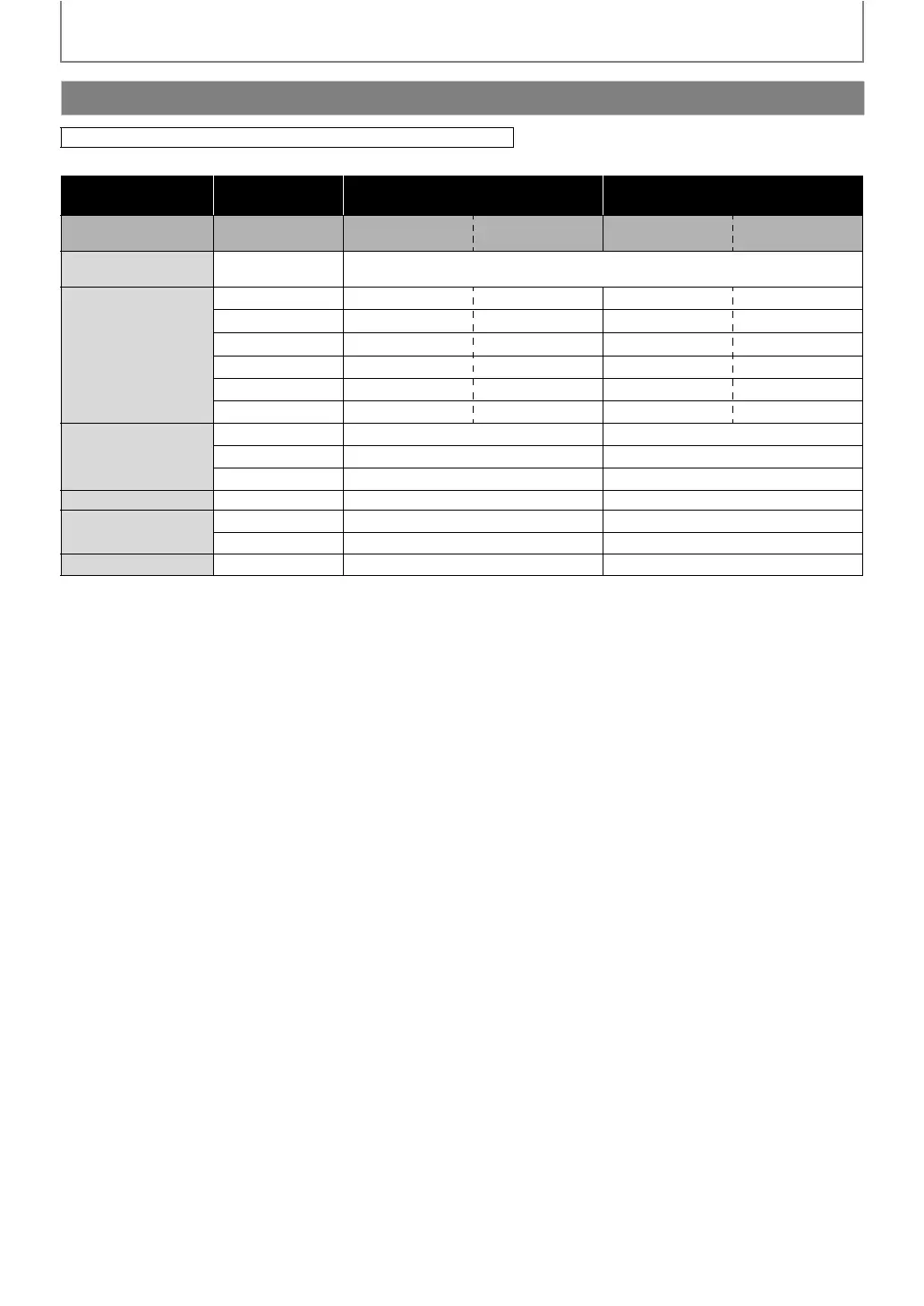
Refer to the table below to see which setting you should choose.
*1
) Only the independent substream is decoded.
*2
) Only the Dolby Digital substream is decoded.
*3
) Only the core substream is decoded.
• When playing back a BD-video which only contains the primary audio, the audio output will be the same case as the
“Primary Audio Only” even if the “Blu-ray Disc Audio” is set to “Mix Audio Output”.
Digital Out
home A “Settings” A “Advanced Setup” A “Audio” A “Digital Out”
“Digital Out”
setting A
“Bitstream” “PCM”
“Blu-ray Disc Audio”
setting A
“Primary Audio
Only”
“Mix Audio Output”
“Primary Audio
Only”
“Mix Audio Output”
Media
ª
Audio Source
ª
BD-video
Dolby Digital
Dolby Digital Dolby Digital DownMix PCM DownMix PCM
Dolby Digital Plus
*1
Dolby Digital Dolby Digital DownMix PCM DownMix PCM
Dolby TrueHD
*2
Dolby Digital Dolby Digital DownMix PCM DownMix PCM
DTS
DTS DTS DownMix PCM DownMix PCM
DTS-HD
*3
DTS DTS DownMix PCM DownMix PCM
LPCM
DownMix PCM DownMix PCM DownMix PCM DownMix PCM
DVD-video
Dolby Digital Dolby Digital
DownMix PCM
DTS DTS
DownMix PCM
LPCM 2ch PCM
2ch PCM
DTS-CD DTS DTS DownMix PCM
DivX®
Dolby Digital Dolby Digital
DownMix 2ch PCM
MP3 / MP2
2ch PCM 2ch PCM
Audio CD / MP3 PCM 2ch PCM
2ch PCM



 To Next Page