EN 10
3.3. Remote Control
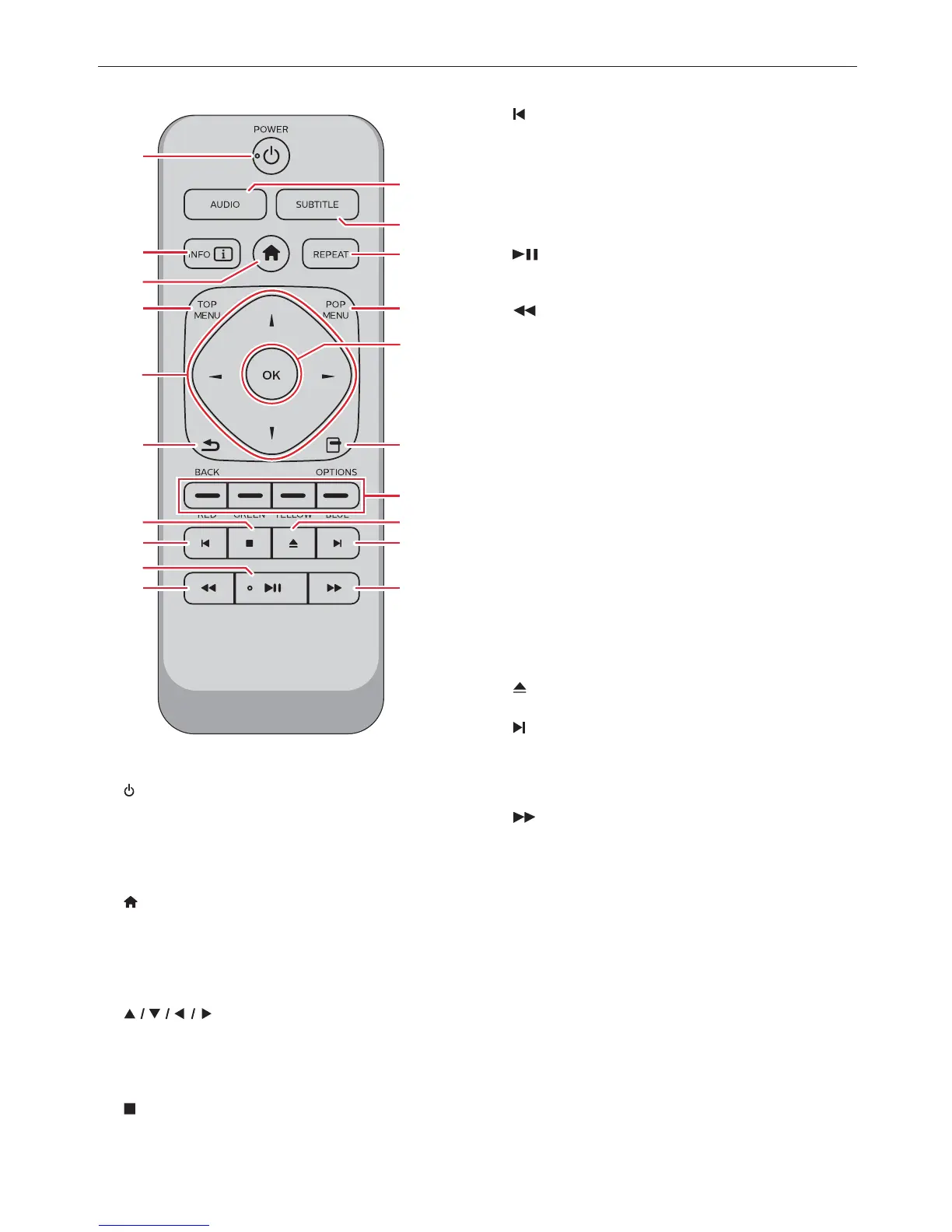
1
16
17
19
18*
20
12
2
3
4
14
13
11
6
7
8
9*
10
5
15
* The unit can also be turned on by pressing these
buttons.
1.
(POWER) button
• Press to Turn On the unit, or to switch the unit into
Standby mode. (To completely Turn Off the unit,
you must unplug the AC power cord.)
2. INFO button
• Press to display the information display.
3.
(HOME) button
• Press to display the Home Menu.
4. TOP MENU
Ultra HD Blu-ray™, Blu-ray Disc™:
Press to display the Top Menu.
DVD: Press to display the Title Menu.
5.
buttons
• Press to select items or settings.
6. BACK button
• Press to Return to the previously displayed menu
or screen function.
7.
(STOP) button
• Press to Stop playback.
8.
(SKIP) button
• During playback, press once to return to the
beginning of the current Title, Chapter, Track or
File.
• During playback, press twice to return to the
previous Title, Chapter, Track or File.
• During Photo playback, press to return to the
previous File.
9.
(PLAY/PAUSE) button*
• Press to start playback or resume playback.
• Press to Pause playback.
10.
(REVERSE) button
• During playback, press to Fast Reverse the
playback.
11. AUDIO button
• Press to select the Audio Channel (such as audio
languages) on a disc.
12. SUBTITLE button
• Press to select Subtitles on a disc.
13. REPEAT button
• Press to select Repeat mode.
14. POP MENU
Blu-ray Disc™: Press to display the Pop Menu.
DVD: Press to display the Disc Menu.
15. OK button
• Press to confirm or select menu items.
16. OPTIONS button
• During playback, press to display the Play Menu.
17. RED / GREEN / YELLOW / BLUE buttons
• Press to activate shortcut keys on some BD-video
functions.
18.
(OPEN/CLOSE) button*
• Press to Open or Close the disc tray.
19.
(SKIP) button
• During playback, press to Skip to the next Chapter,
Track or File.
• When playback is in pause mode, press to
Forward the playback picture by picture.
20.
(FORWARD) button
• During playback, press to Fast Forward the
playback.
• When playback is in pause, press to Slow Forward
the playback.
continued on next page



 To Next Page