EN 16
4.4. Connection to the Network
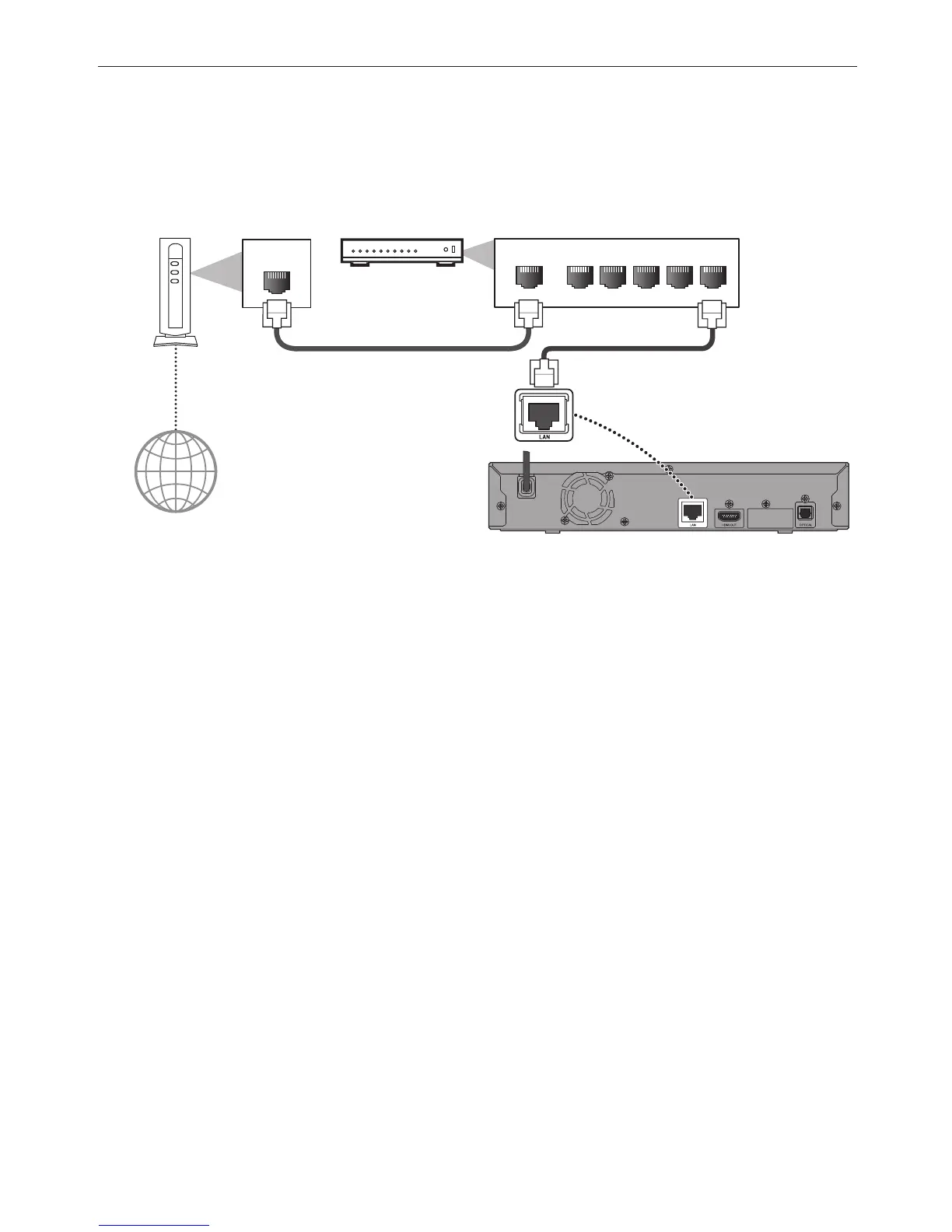
By connecting this unit to the Internet, you can update Software via the Internet and access BD-Live™.
– Software Update: For more information, refer to “Software Update” on page 46.
– BD-Live™: For more information, refer to “Enjoying BD-Live™ Discs Using Internet” on page 31.
C Network Connection
WAN LAN
12345
LAN
Nerwork equipment
(Modem, etc.)
Broadband Router or
Hub
Ethernet cable
(not supplied)
Ethernet cable
(not supplied)
Internet
CautionC
• Do not insert any cable other than an Ethernet cable to the LAN terminal to avoid damaging the unit.
• Do not connect your PC directly to the LAN terminal of this unit.
NoteD
• When you connect an Ethernet cable from a Router with Internet access to this unit, it will automatically
configure Network settings. (You do not need to manually configure Network settings unless particular settings
are required.)
• If your modem does not have Router functions, connect a wired Router.
• If your modem has Router functions but there is no vacant port, add a Switch / Hub.
• Please purchase shielded Ethernet cables at your local store and use them when you connect to Network
equipment.



 To Next Page