EN 9
3. FUNCTIONAL OVERVIEW
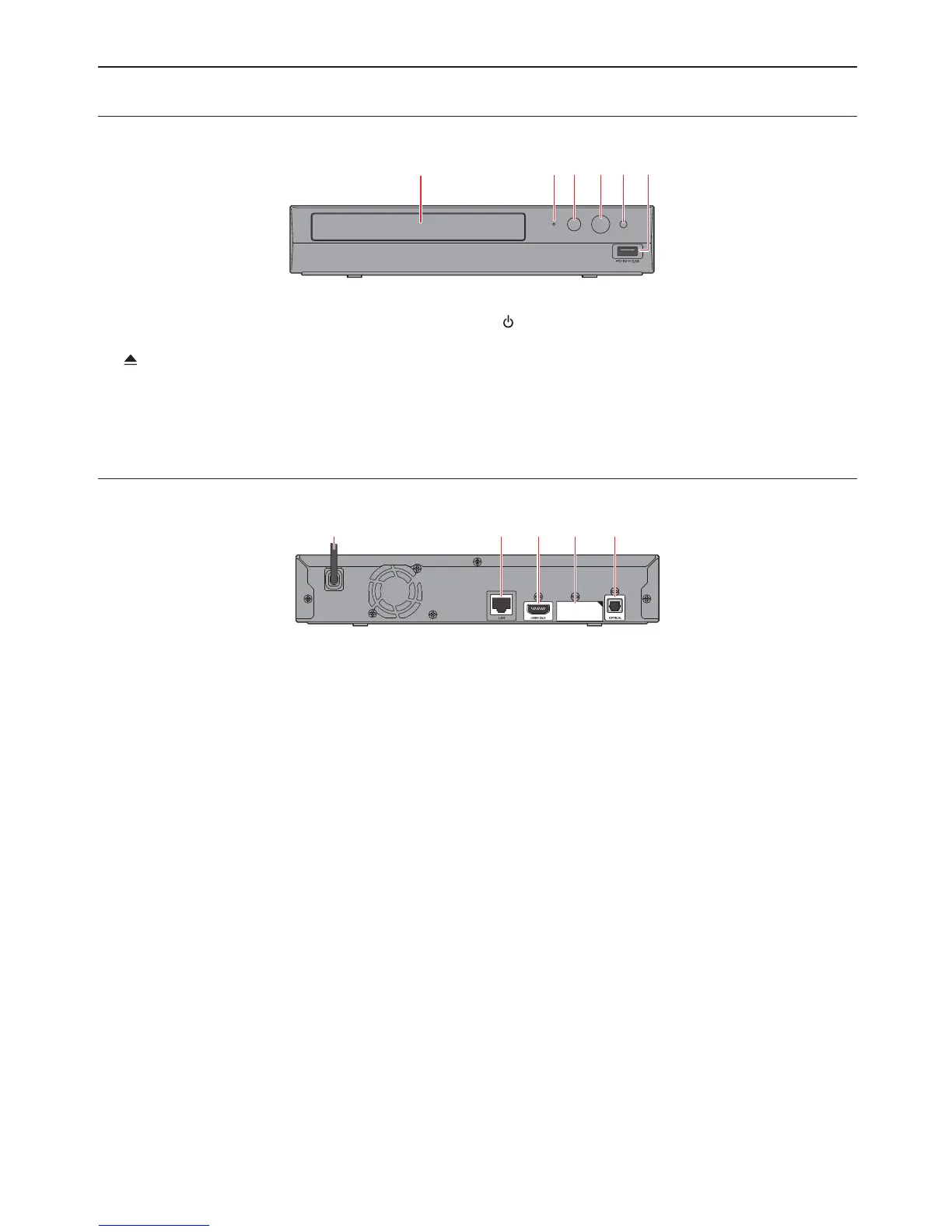
3.1. Front Panel
1 3 4*2 5 6
* The unit can also be turned on by pressing this button.
1. Disc tray
2. Power-On indicator
3.
(OPEN/CLOSE) button*
4.
(POWER) button
5. Infrared sensor window
6. USB Input
CautionC
• Do not connect any device other than USB Memory Stick or USB card reader into the USB Input. (e.g. PC,
external HDD, digital camera, keyboard, mouse, etc.)
• When connecting a USB Memory Stick, connect it directly to the USB Input. Do not use a USB extension cable.
3.2. Rear Panel
123 4* 5
* Do not connect a TV to this HDMI port. This is only used for HDMI-compatible AV reciever / Amplifier. When
conneting an AV device, remove the sticker and connect it to this HDMI port.
1. AC Power cord
2. LAN terminal
3. HDMI OUT jack
4. HDMI OUT (AUDIO) jack
5. OPTICAL jack
CautionC
• Do not touch the inner pins of the jacks on the rear panel. Electrostatic discharge may cause permanent damage
to the unit.
• This unit does not have a TV RF modulator.



 To Next Page