EN 13
4. CONNECTIONS
• When you change the connections, all devices should be turned off.
• When making connections with external devices, please refer to their user manuals for additional setup help.
4.1. HDMI Video /Audio Connection
(Supjacks up to 1080i, 1080p, 1080/24p, 4K resolution.)
No analog audio connection required.
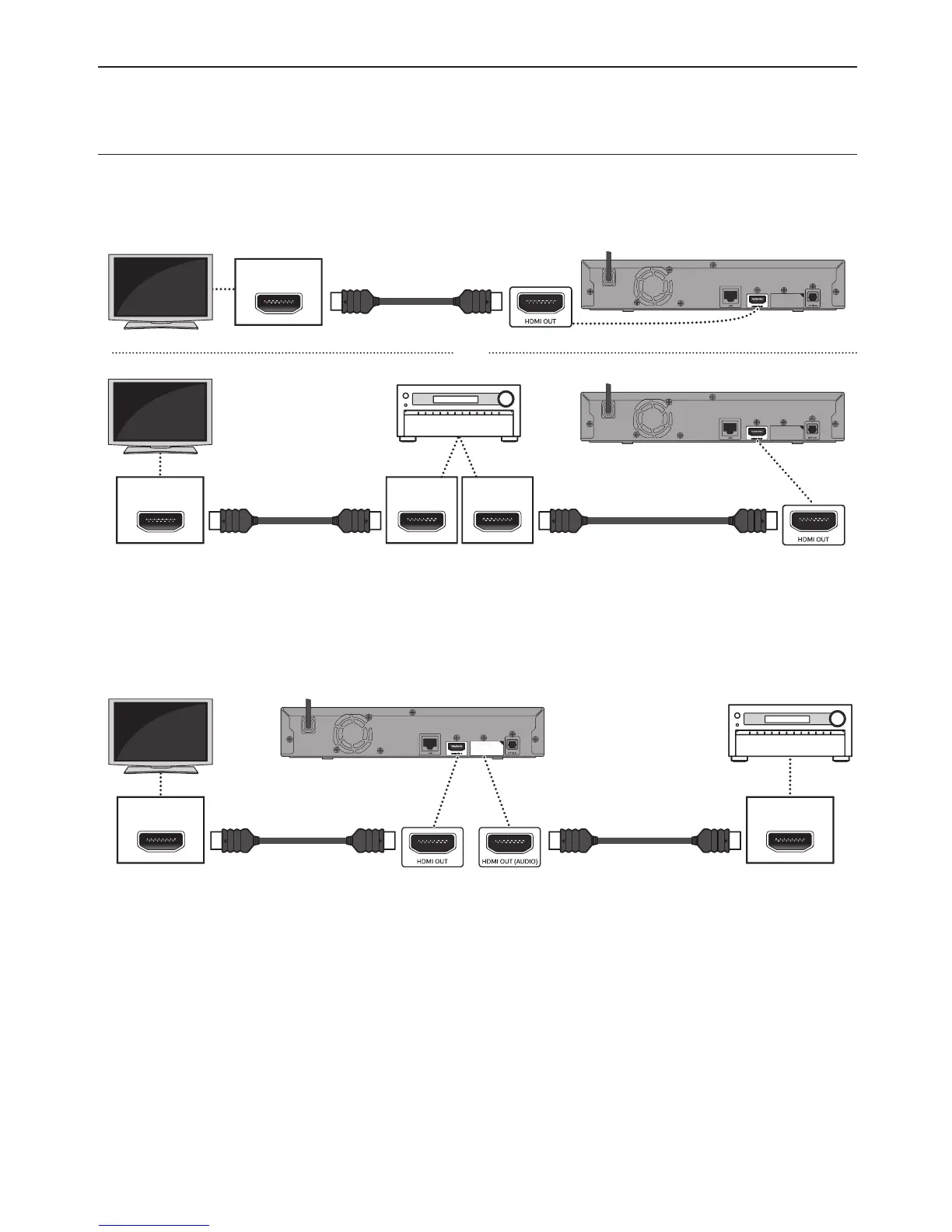
C Connecting with the HDMI OUT Jack Only
HDMI IN
HDMI cable
(supplied)
or
HDMI INHDMI OUT
HDMI IN
HDMI cable
(supplied)
HDMI cable
(not supplied)
• With this connection, the HDMI OUT jack outputs both video and audio.
• In order for Ultra HD Blu-ray™ video playback to work with this connection, a 4K/HDR compatible AV receiver/
amplifier and 18 Gbps high-speed HDMI cables are required.
• In order for Blu-ray 3D™ video playback to work with this connection, a 3D compatible AV receiver/amplifier and
3D compatible HDMI cables are required.
C Connecting with the HDMI OUT and HDMI OUT (AUDIO) Jacks
HDMI INHDMI IN
HDMI cable
(supplied)
HDMI cable
(not supplied)
• With this connection, the HDMI OUT jack only outputs video, and the HDMI OUT (AUDIO) jack only outputs audio.
• The EasyLink function is only available for the HDMI OUT jack.
• In order for Ultra HD Blu-ray™ content playback to work on this unit, a 4K/HDR compatible display device and
AV receiver/amplifier must be connected to this unit. Otherwise, the Audio will not be output.
• In order for 3D content playback to work on this unit, a 3D compatible display device and AV receiver/amplifier
must be connected to this unit. Otherwise, the Audio will not be output.
continued on next page



 To Next Page