EN 14
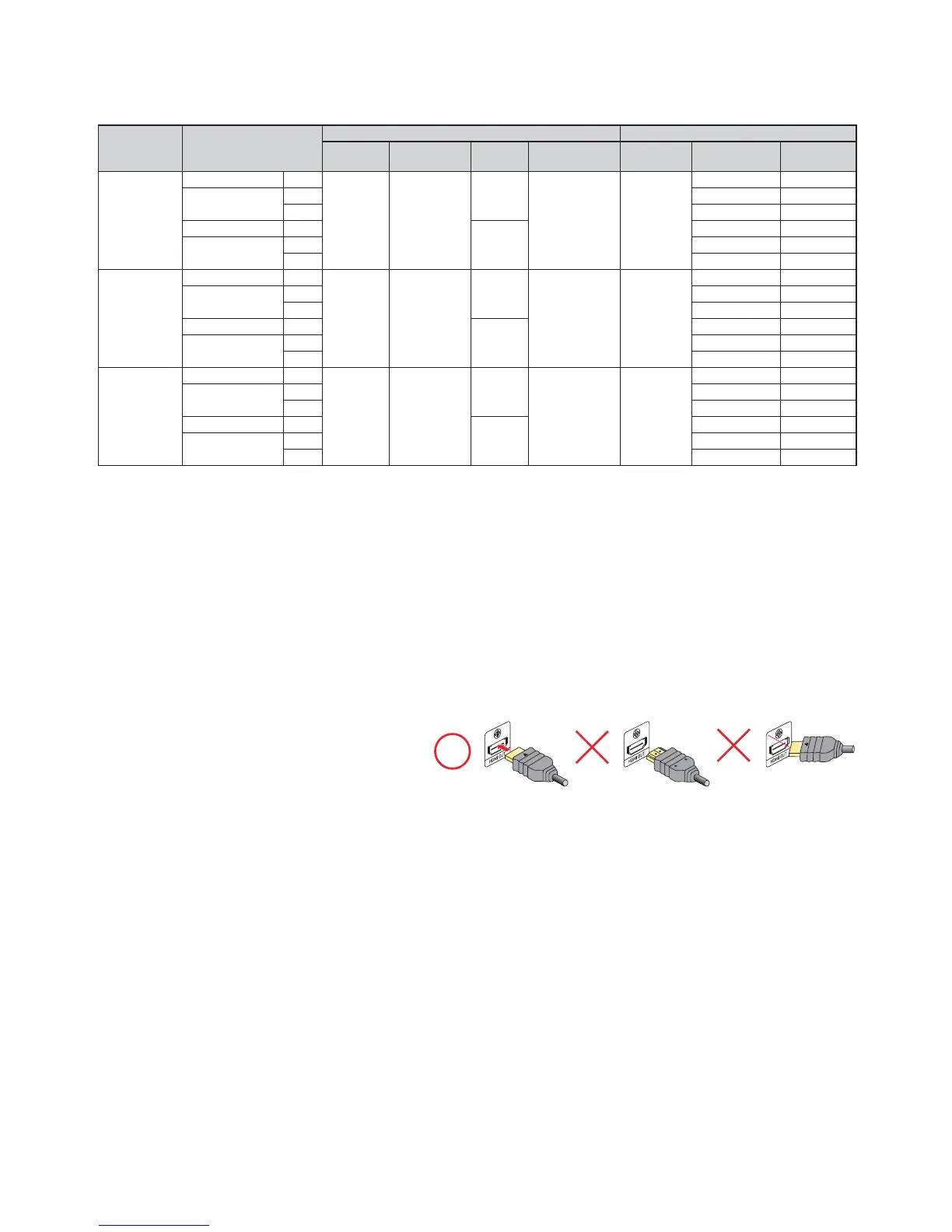
In order to play 4K/HDR content, this unit must be connected to a 4K/60p/4:4:4 and Ultra HD Blu-ray HDR
compliant device.
• For 4K/60p/4:4:4, an 18Gbps high-speed HDMI cable is required.
Required TV
Specifications
Playback Content
Recommended Settings Video Signals from the Unit
HDMI
Resolution
HDMI
Color Format
24p
Output
High Dynamic
Range Output
Output
Resolution
Frame Rate /
Color Space
Color Depth
Up to
4K
60p
4:4:4
BD-Video 24p
Auto
YCbCr
(4:4:4)
Auto
Auto
4K
24p/4:4:4 12 bit
Ultra HD Blu-ray
24p
24p/4:4:4 12 bit
60p 60p/4:2:2 12 bit
BD-Video 24p
Off
60p/4:2:2 12 bit
Ultra HD Blu-ray
24p
60p/4:2:2 12 bit
60p 60p/4:2:2 12 bit
Up to
4K
60p
4:2:0
BD-Video 24p
Auto
YCbCr
(4:4:4)
Auto
Auto 4K
24p/4:4:4 8 bit
Ultra HD Blu-ray
24p
24p/4:2:2 12 bit
60p 60p/4:2:0 8 bit
BD-Video 24p
Off
60p/4:2:0 8 bit
Ultra HD Blu-ray
24p
60p/4:2:0 8 bit
60p 60p/4:2:0 8 bit
Up to
4K
24p/30p
BD-Video 24p
Auto
YCbCr
(4:4:4)
Auto
Auto
4K
24p/4:4:4 8 bit
Ultra HD Blu-ray
24p
24p/4:4:4 8 bit
60p 30p/4:4:4 8 bit
BD-Video 24p
Off
30p/4:4:4 8 bit
Ultra HD Blu-ray
24p
30p/4:4:4 8 bit
60p 30p/4:4:4 8 bit
• Ultra HD Blu-ray content is created in 4K resolution.
• TVs supporting 4K60p are compatible with HDCP 2.2.
• For HDR content with 8-bit color depth, HDR output is not available.
NoteD
• If this unit is connected to an HDCP incompatible display device, video will not be displayed properly.
• Use a certified HDMI cable (an HDMI cable with the HDMI logo) for this connection. High-Speed HDMI cable
(also known as HDMI category 2 cable) is recommended for better compatibility.
• In order for Ultra HD Blu-ray™ video playback, connect this unit to a 4K/HDR compatible display device using an
18 Gbps high-speed HDMI cable.
• In order for Blu-ray 3D™ video playback, connect this unit to a 3D compatible display device using a 3D
compatible HDMI cable.
• Do not tilt the HDMI connector when inserting it into the HDMI port, and make sure the shapes of the HDMI port
and the HDMI cable's connector match.



 To Next Page