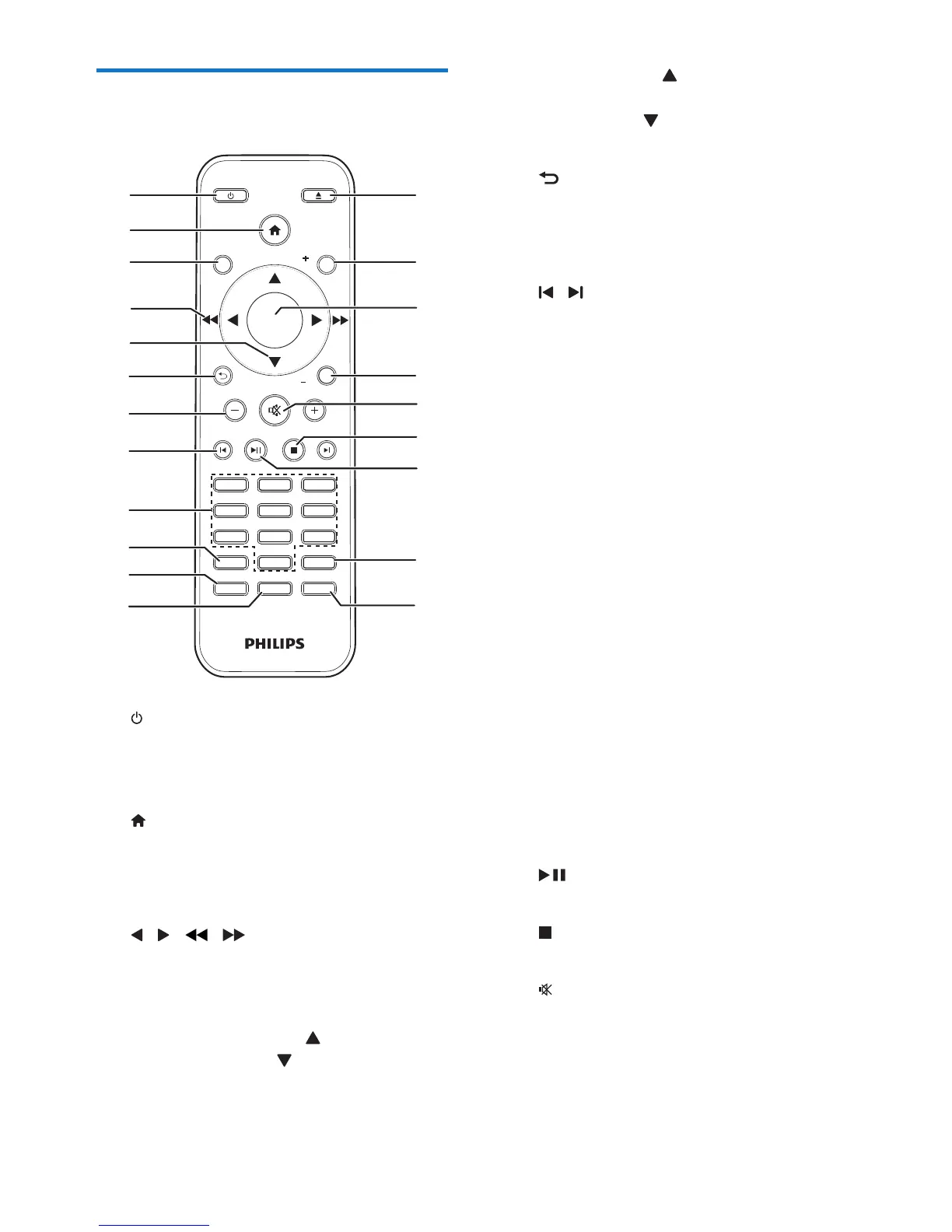
a /STANDBY
• Turn the unit on or off.
• Switch to standby mode or Eco
standby mode.
b
• Access the system menu.
c DISPLAY
• View playback information.
d / ( / )
• Navigate through the menu.
• Search within a track/disc/USB.
• Tune to a radio station.
e SUBTITLE/PRESET + ( ) /
AUDIO/PRESET -( )
• Navigate through the menu.
• Skip to the previous/next album.
SOUND
DISPLAY
STANDBYEJECT
OK
1
4
7
0
2
5
8
3
6
9
TIME
RDS
PROG
CLOCK SETSLEEP
OPTION
MENU
PRESET
AUDIO/
PRESET
SUBTITLE/
SOURCE
a
b
c
d
e
f
h
g
p
o
q
l
m
n
i
k
r
s
t
j
u
• SUBTITLE ( ): Select a preset radio
station.
• AUDIO ( ): Set the subtitle language.
• Set time.
f
• Return to the previous display menu.
g +/-
• Adjust volume.
h /
• Skip to the previous or next title,
chapter,track,orle.
i Numeric buttons
• Select a title/chapter/track to play.
• Select a preset number.
j MENU
• Access DISC/USB menu.
k OPTION
• In DISC/USB play mode, press to
select preferred play options.
l PROG/CLOCK SET
• Program radio stations.
• Set the clock.
• View clock information.
m TIME/SLEEP
• Set the alarm timer.
• Set the sleep timer.
n RDS
• For selected FM radio stations, display
information of Radio Data System
(RDS).
o
• Start, pause, or resume play.
p
• Stop play.
q
• Mute or restore volume.
r SOUND
• Adjust BASS or TREBLE level.
s OK
• Conrmaselection.



 To Next Page