Adjusting the Picture Controls (cont’d) 27
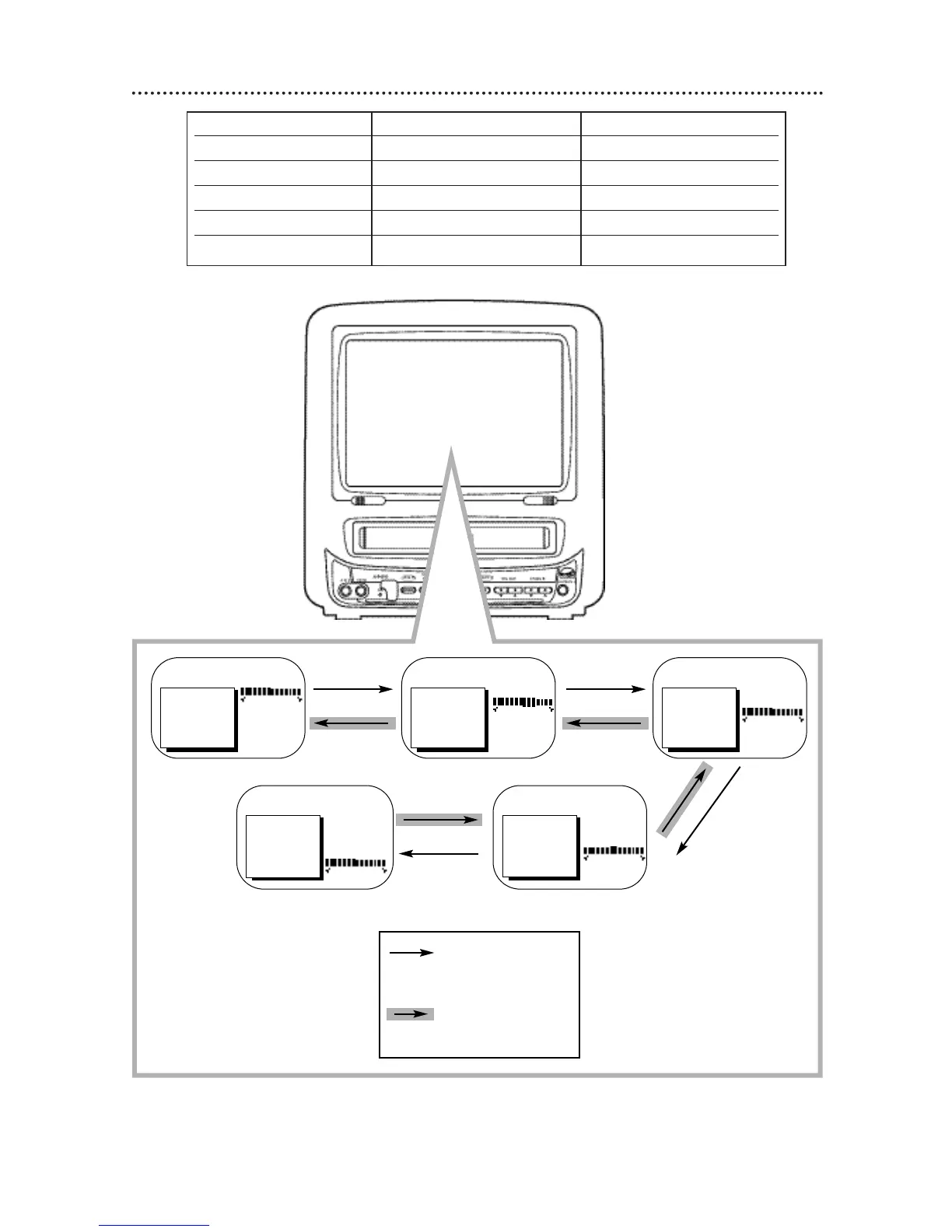
Decrease Increase
BRIGHTNESS decreased brightness increased brightness
PICTURE decreased contrast increased contrast
COLOR paler more brilliant
TINT more purple more green
SHARPNESS softer clearer
Press the REW(ind)/{
button to decrease a
picture control. Press
the F.FWD/B button
to increase a picture
control.
TO ADJUST PRESS { / B TO ADJUST PRESS { / BTO ADJUST PRESS { / B
Press the STOP/▼
button
Press the PLAY/▲
button
> BRIGHTNESS
PICTURE
COLOR
TINT
SHARPNESS
TV RESET
BRIGHTNESS
> PICTURE
COLOR
TINT
SHARPNESS
TV RESET
BRIGHTNESS
PICTURE
> COLOR
TINT
SHARPNESS
TV RESET
TO ADJUST PRESS { / B
BRIGHTNESS
PICTURE
COLOR
> TINT
SHARPNESS
TV RESET
TO ADJUST PRESS{ / B
BRIGHTNESS
PICTURE
COLOR
TINT
> SHARPNESS
TV RESET









 To Next Page