35
English
EN
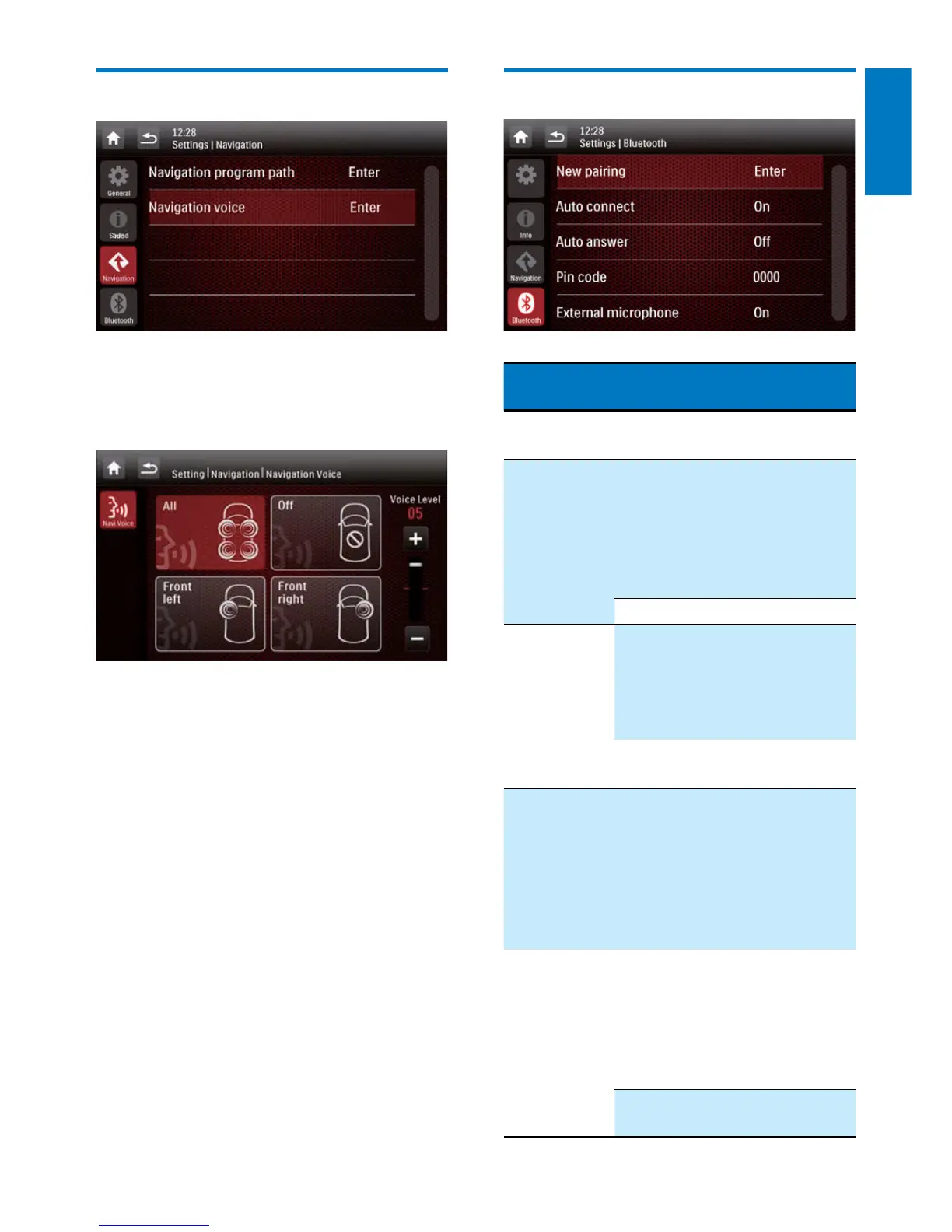
Adjust Navigation settings
• [Navigation Program Path]: Tap [Enter] to
access the Navigation Program Path mode.
• [Navigation Voice]: Tap [Enter] to display
the [Navigation Voice] interface.
• [All]/[Front left]/[Front right]: Select a
zone for navigation voice.
• [Off]: Mute the navigation voice.
• [Voice Level]: Tap +/- to adjust the
volume of navigation voice.
Adjust Bluetooth settings
Bluetooth
settings
Options Description
[New
Pairing]
Search for new
devices.
[Auto
Connect]
[On] When a paired
device is within
effective range, the
system reconnects
with the device
automatically.
[Off] Reconnect manually.
[Auto
Answer]
[On] Answer phone calls
automatically when
the paired mobile
phone receives an
incoming call.
[Off] Answer phone calls
manually.
[Pin Code] Set the password
for pairing the car
entertainment
system with
another Bluetooth
device. The default
password is 0000.
[External
microphone]
[On] If an external
microphone is
connected, turn
on it for better
communication
quality.
[Off] Use the integrated
microphone.



 To Next Page