24 EN
8 Use Bluetooth
devices
With this system, you can listen to audio from a
player and make a call through Bluetooth.
Activate the Bluetooth
function
• On the home menu, tap .
• In any other mode, tap
on top of the
screen.
Pair a device
Note
•
Philips does not guarantee the compatibility with all
Bluetooth devices.
• Before pairing a device with this system, read its user
manual for Bluetooth compatibility.
• Make sure that Bluetooth function is enabled on your
device, and your device is set as visible to all other
Bluetooth devices.
• The operational range between this system and a
Bluetooth device is approximately 8 meters (24 feet).
• Any obstacle between this system and a Bluetooth
device can reduce the operational range.
• Keep away from any other electronic device that may
cause interference.
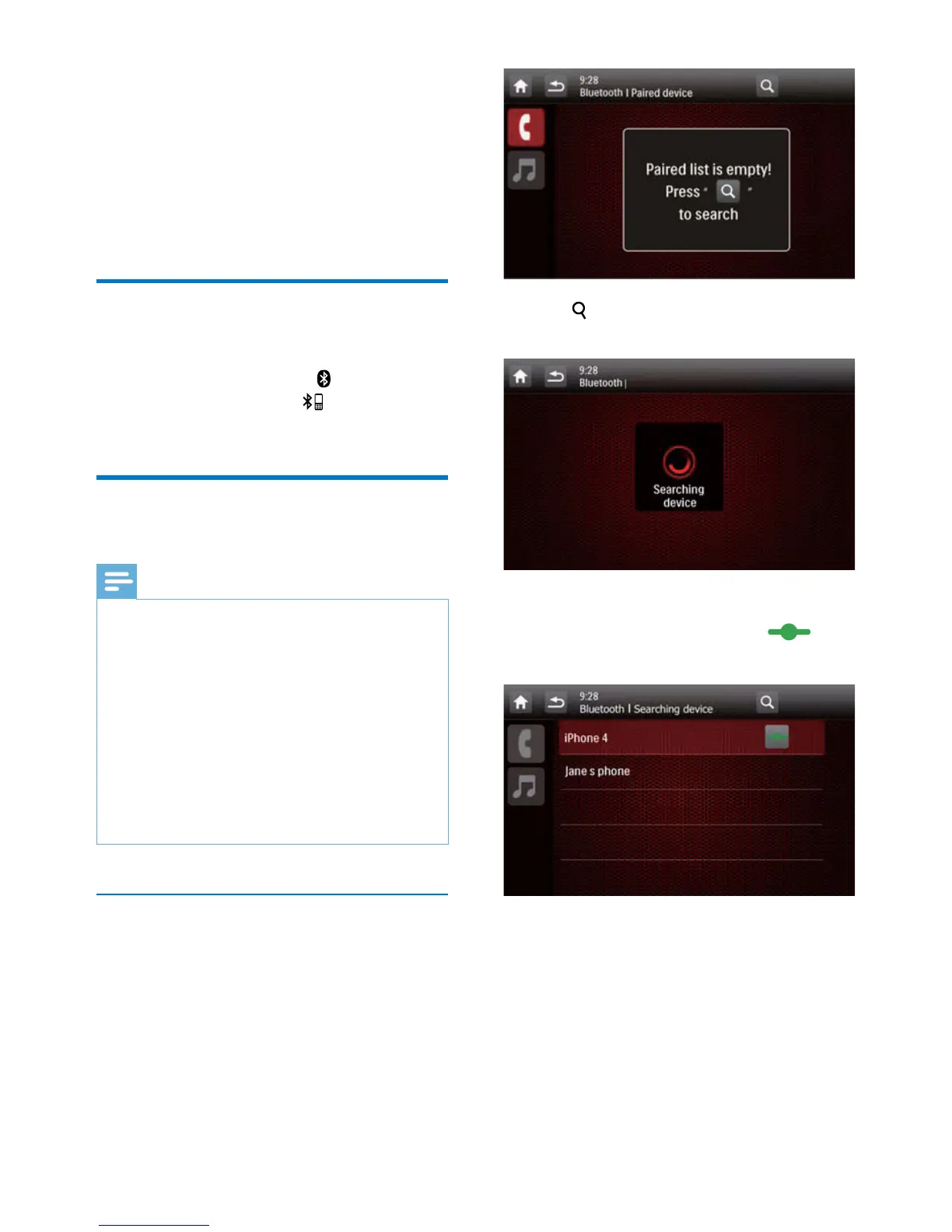
Pair the rst device
1 Activate the Bluetooth function on this
system.
» The following interface is displayed.
2 Tap on this system to search for other
Bluetooth devices.
3 In the device list, tap the name of your
Bluetooth device, and then tap
behind the name.
» The paring starts, and then a pairing
request from CED1900 is displayed on
your device.
4 On your device, accept the pairing request
from CED1900, enter the default password
'0000', and then conrm the password entry.
» [Paired OK!] ashes, and then
[Connecting] is displayed on this
system.



 To Next Page