26 EN
Note
•
You can connect a music player and a mobile phone
simultaneously.
Manage paired devices
1 Activate the Bluetooth function.
2 Tap or .
• To manage paired players, tap
.
• To manage paired mobile phones, tap
.
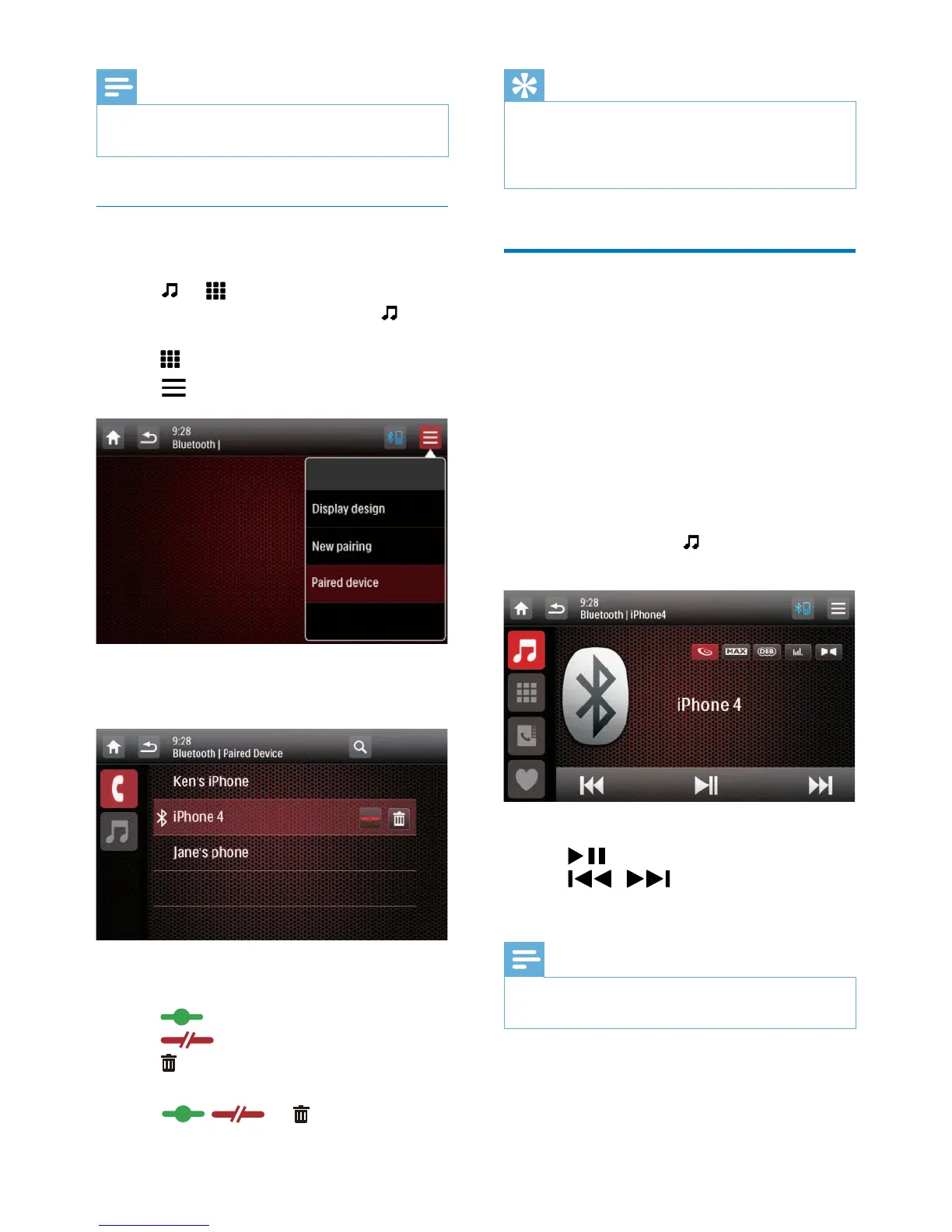
3 Tap on the top right corner.
4 Tap [Paired Device].
» The list of paired devices is displayed.
5 Tap the name of the paired device that you
want to reconnect, disconnect, or delete.
•
: Tap to reconnect the device.
•
: Tap to disconnect the device.
•
: Tap to delete the device from the
list of paired devices.
6 Tap , , or .
Tip
•
If you want to manually reconnect a device after the
connection is interrupted, disable the function of
automatic connection (see 'Adjust Bluetooth settings'
on page 35).
Play audio from a connected
device
If the connected Bluetooth device supports
Advanced Audio Distribution Prole (A2DP),
you can listen to tracks that are stored on the
device through the system. If the device also
supports Audio Video Remote Control Prole
(AVRCP) prole, you can control play on the
system or with its remote control.
1 Play a track on the connected device.
2 On this system, tap to display the music
playback interface.
3 Tap icons on the interface to control play.
•
: Pause or resume play.
•
/ : Select the previous or
next track.
Note
•
If the connected device does not support the AVRCP
prole, control play on the connected device.



 To Next Page