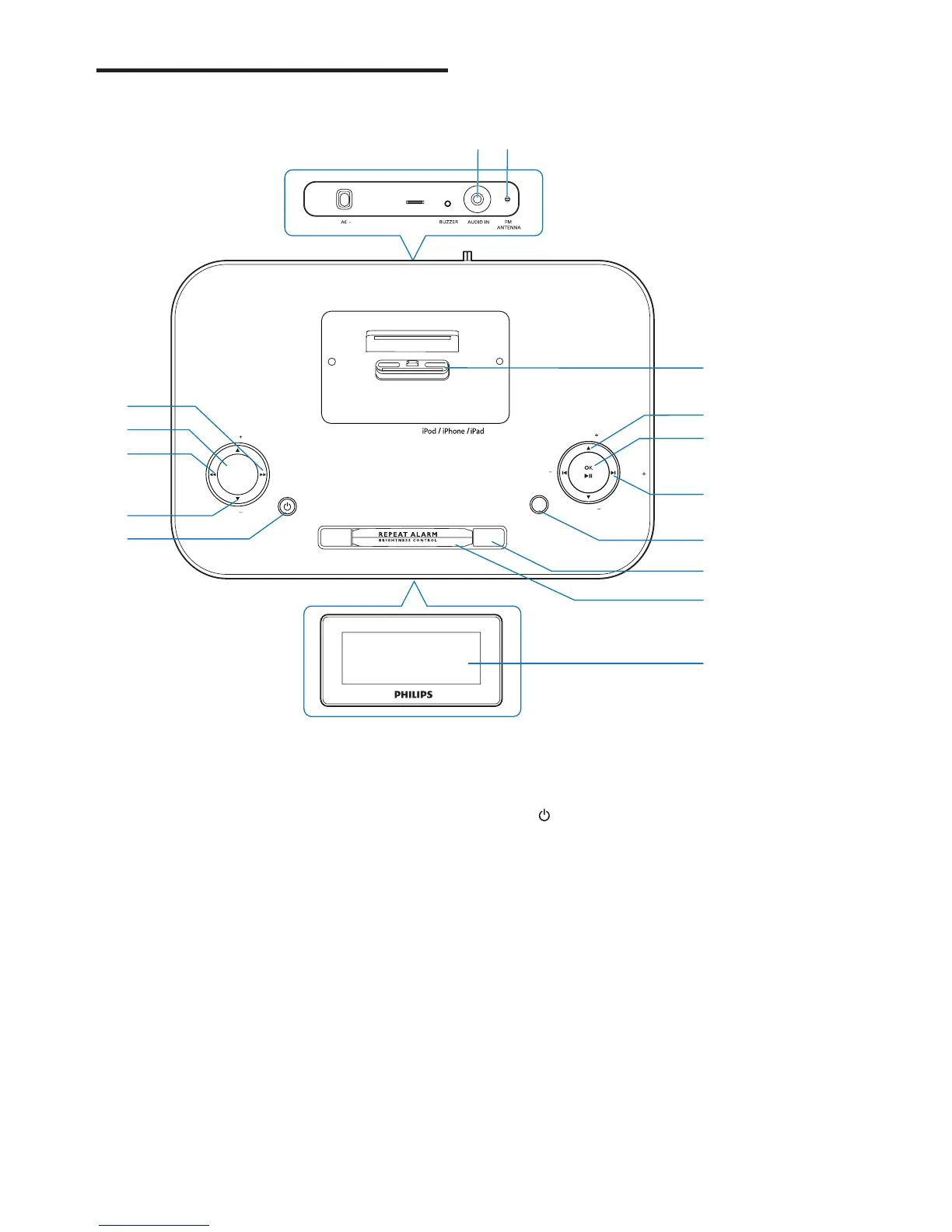
a PROG/SCAN
• Program radio stations.
• Automatically scan for radio stations.
• In dock mode, search within a track.
b SLEEP
• Set the sleep timer.
c DBB/DSC/SET TIME
• In standby mode, set day, month and
year.
• In other modes, enable/disable either
DBB (Dynamic Bass Boost) or DSC
(Digital Sound Control) sound effect
in turn.
• In dock mode, search within a track.
SOURCE
TUNING
TUNING
PRESET
PRESET
SLEEP
VOL
VOL
PROG
/
SCAN
SET TIME
/
DBB/DSC
ALARM 1 ALARM 2
i
g
f
h
k
l
m
n
o
j
DOCKING SYSTEM FOR
c
e
d
a
b
d VOL +/VOL -
• Adjust volume.
e
• Turn on the unit or switch to standby
mode.
• Stop alarm.
f AUDIO IN
• Select external audio device source.
g FM ANTENNA
• Improve FM reception.
h Dock for iPod/iPhone/iPad



 To Next Page