EasyManua.ls Logo

Philips DSR1010 - Remote Control Operation; Menu Language Selection; Channel Selection Methods

Philips DSR1010
Print Icon
To Next Page IconTo Next Page
To Previous Page IconTo Previous Page
Loading...
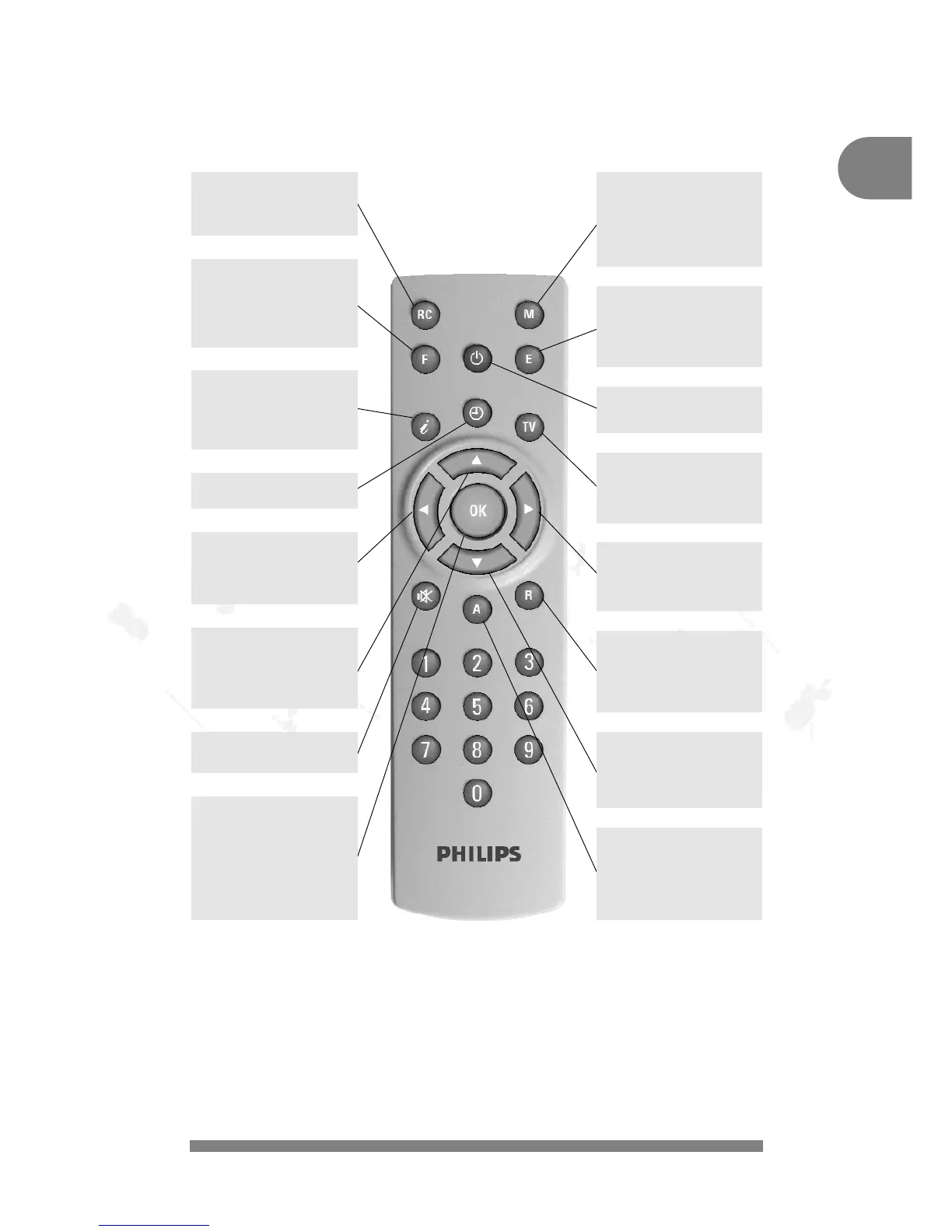
YOUR REMOTE
#
GB
F : Choose favourite chan-
nel list
Menu:
Change transparency
of On-Screen-Display
(OSD).
I : Display Short and
extended information
(if broadcasted) about
current and next pro-
grammes.
8 : Change channels up
by one unit.
Menu:
Choose previous
parameter.
??
: Mute: turn the sound
off/on.
RC : Detailed
Remote Control func-
tions on-screen-
Display (OSD) on/off.
R : Switch receiver from
TV to Radio mode or
switch between Sat-
Receiver-Radio or TV-
set.
OK : Press
OK
once:
choose 1 to 4 previous
received channels.
Press
OK
twice:
choose a channel from
channel list.
Menu: Activate and
de-activate.
M : Activates MAIN-
MENU:
channel Arrangement.
Channel Search.
Satellite Selection.
Installation.
TV : Switch receiver from
Radio to TV mode or
switch between Sat.
Receiver-TV or TV-set.
* : Change volume up.
Menu:
Increase a selected
parameter by one unit.
9 : Change channels
down by one unit.
Menu:
Choose next
parameter.
E : Switch to previous
channel
Menu:
Exit from current
menu.
A : Choose another audio
channel (Language
choice).
Or opens Radio
sub-channels if trans-
mitted.
/ : Activate TIMER MENU
+ : Change volume down.
Menu:
Reduce a selected
parameter by one unit.
: Switch the receiver in
and out of standby
mode.

Table of Contents

Related product manuals