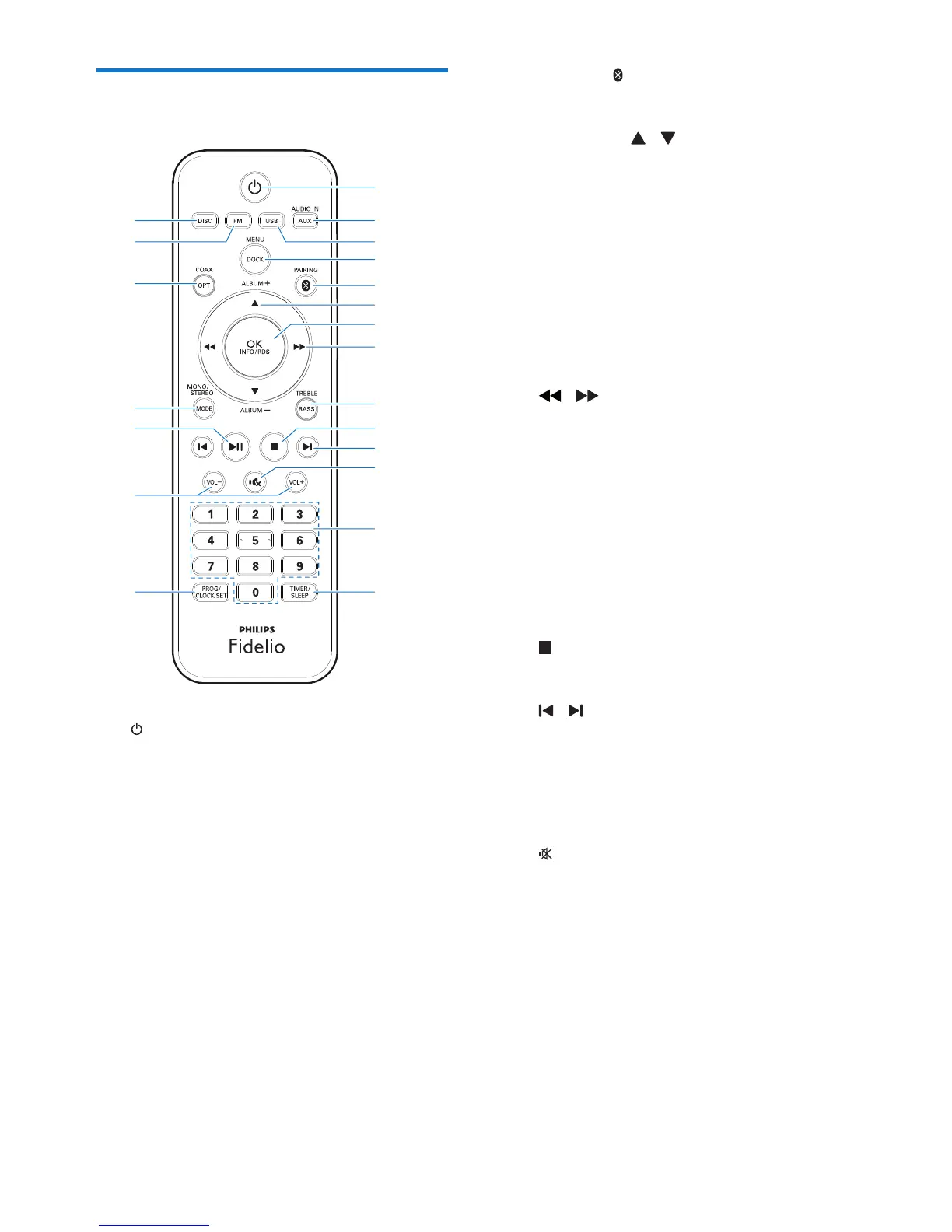
a
• Turn the unit on.
• Switch to standby mode or Eco power
standby mode.
b AUDIO IN/AUX
• Select the 3.5mm or RCA (red/white)
audio input source.
c USB
• Select the USB source.
d DOCK/MENU
• Select the dock (IPOD_IPHONE)
source.
• Access the iPod/iPhone menu.
a
b
c
d
e
f
g
h
i
j
k
l
m
no
p
r
q
s
t
u
e PAIRING
• Select the Bluetooth source.
f ALBUM +/- /
• Skip to previous/next album.
• Navigate through the iPod/iPhone
menu.
g OK/INFO/RDS
• Conrm a selection.
• Select display information during play.
• Display Radio Data System (RDS)
information.
h /
• In Disc/USB/Dock source, press to
search within a track.
• In tuner source, press to tune to a
radio station.
• Navigate through the iPod/iPhone
menu.
i BASS/TREBLE
• Adjust the bass/treble level.
j
• Stop play or erase a program.
k /
• In Disc/USB/Dock source, press to skip
to the previous/next track.
• Set clock and timer.
• Select a preset radio station.
l
• Mute or restore sound.
m Numeric keypad
• Select a track.
• Select a preset radio station.
n TIMER/SLEEP
• Set the sleep timer.
• Set the alarm timer.


 To Next Page