16 EN
7 Play iPod/iPhone
You can enjoy audio from iPod/iPhone through
this unit.
Compatible iPod/iPhone
With the integrated dual docks, the unit
supports the following iPod, and iPhone models:
Made for (lightning connection):
• iPhone 5
• iPod nano (7th generation)
• iPod touch (5th generation)
Also made for (30-pin connection):
• iPhone 4S
• iPhone 4
• iPhone 3GS
• iPhone 3G
• iPhone
• iPod nano (2nd/3rd/4th/5th/6th
generation)
• iPod classic
• iPod touch (1st/2nd/3rd/4th generation)
Load the iPod/iPhone
Note
• You can only use one dock each time.
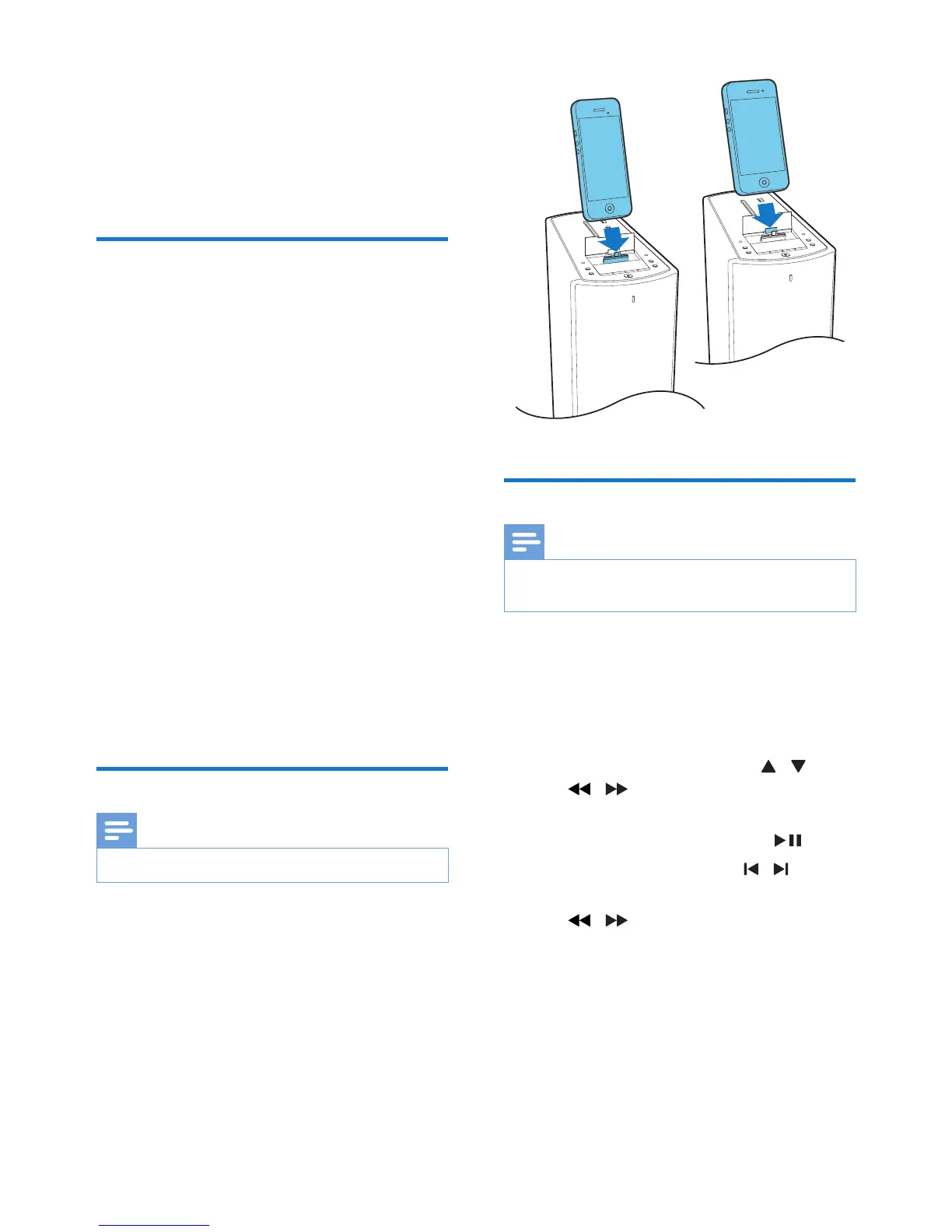
1 Lift up the dock cover.
2 Connect your iPod/iPhone to the lightning
or 30-pin dock connector.
Listen to the iPod/iPhone
Note
• Make sure that your iPod/iPhone has been loaded
securely.
1 Press DOCK/MENU to select the dock
source.
2 Play audio on your iPod/iPhone.
• To navigate in the menu: press
DOCK/MENU, and press / /
/ to select, and then press
OK/INFO/RDS to conrm.
• To pause/resume play, press .
• To skip to a track, press / .
• To search during play, press and hold
/ , then release to resume
normal play.


 To Next Page