English
Rerecording (Tape Duplication) 23
1
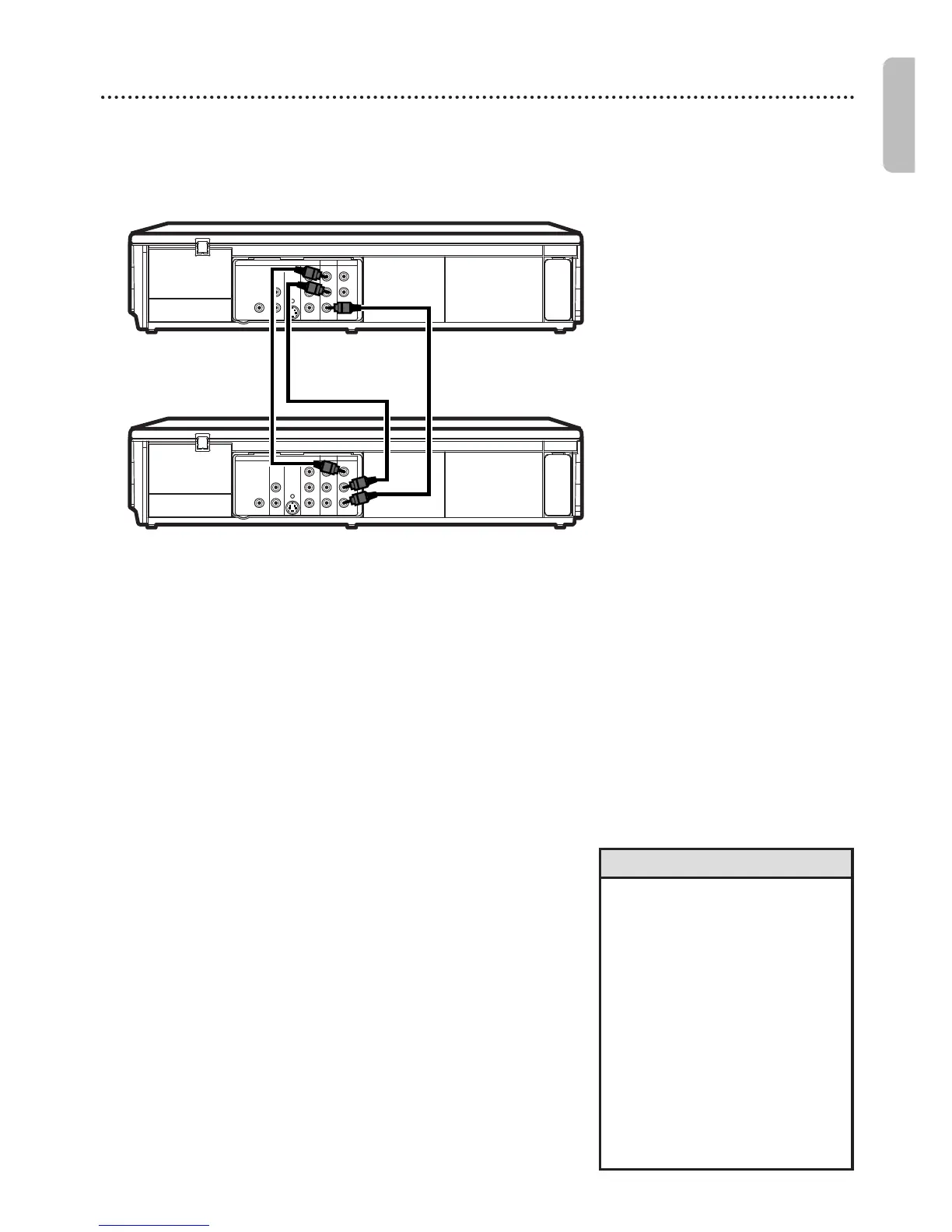
Make the connections shown above.
2
DVD/VCR 1 will play your tape.Put a prerecorded
tape into the cassette compartment of
DVD/VCR 1. Press VCR to put the unit in VCR mode if
necessary.
3
DVD/VCR 2 will record your tape.Insert a blank tape
in the cassette compartment of DVD/VCR 2.
Press VCR to put the unit in VCR mode if necessary.
4
Turn on the TV and set it to the correct Video
In channel. (Check your TV owner’s manual for details.)
5
Point the remote control at DVD/VCR 2. Press
INPUT to select the appropriate external input
channel. (See Helpful Hints to the right.)
6
Press SPEED to select SP or SLP at DVD/VCR 2.
Details about tape speed are on page 57.
7
Press PLAY B (VCR) on the front of DVD/VCR
1 and REC I on the front of DVD/VCR 2 at the
same time.
● To stop recording,press STOP/EJECT C A on DVD/VCR
2,then press STOP/EJECT C A on DVD/VCR 1.
DVD/VCR 1
Playing unit
DVD/VCR 2
Recording unit
1. Audio cable from AUDIO OUT jacks (red and white)
of DVD/VCR 1 to AUDIO IN jacks of DVD/VCR 2
• If you use the AUDIO and
VIDEO IN jacks on the back of
DVD/VCR 2,select L1 at step 5.
• If you use the AUDIO and
VIDEO IN jacks on the front of
DVD/VCR 2,select L2 at step 5.
• Unauthorized recording of
copyrighted television programs,
video tapes or other materials
may infringe on the rights of
copyright owners and violate
copyright laws.
• If a program has copyright
protection,it may not be
recorded clearly.
Helpful Hints
These instructions are made on the premise that the DVD/VCR 1 is already connected to the TV. The
instructions show you how to copy videotapes. The illustration uses two DVD/VCRs.Other VCRs or
Camcorders may operate differently.
2. Video cable from yellow VIDEO
OUT jack of DVD/VCR 1 to
VIDEO IN jack of DVD/VCR 2











 To Next Page