EasyManua.ls Logo

Philips FR 930 - Installation; Digital In;Out

Philips FR 930
11 pages
Print Icon
To Next Page IconTo Next Page
To Previous Page IconTo Previous Page
Loading...
INSTALLATION
-
You
only
have
to
install
your
system
once.
Please
make
the
following
connections
(whenever
applicable).
NOTE:
SWITCH
OFF
THE
RECEIVER
BEFORE
MAKING
ANY
CONNECTIONS.
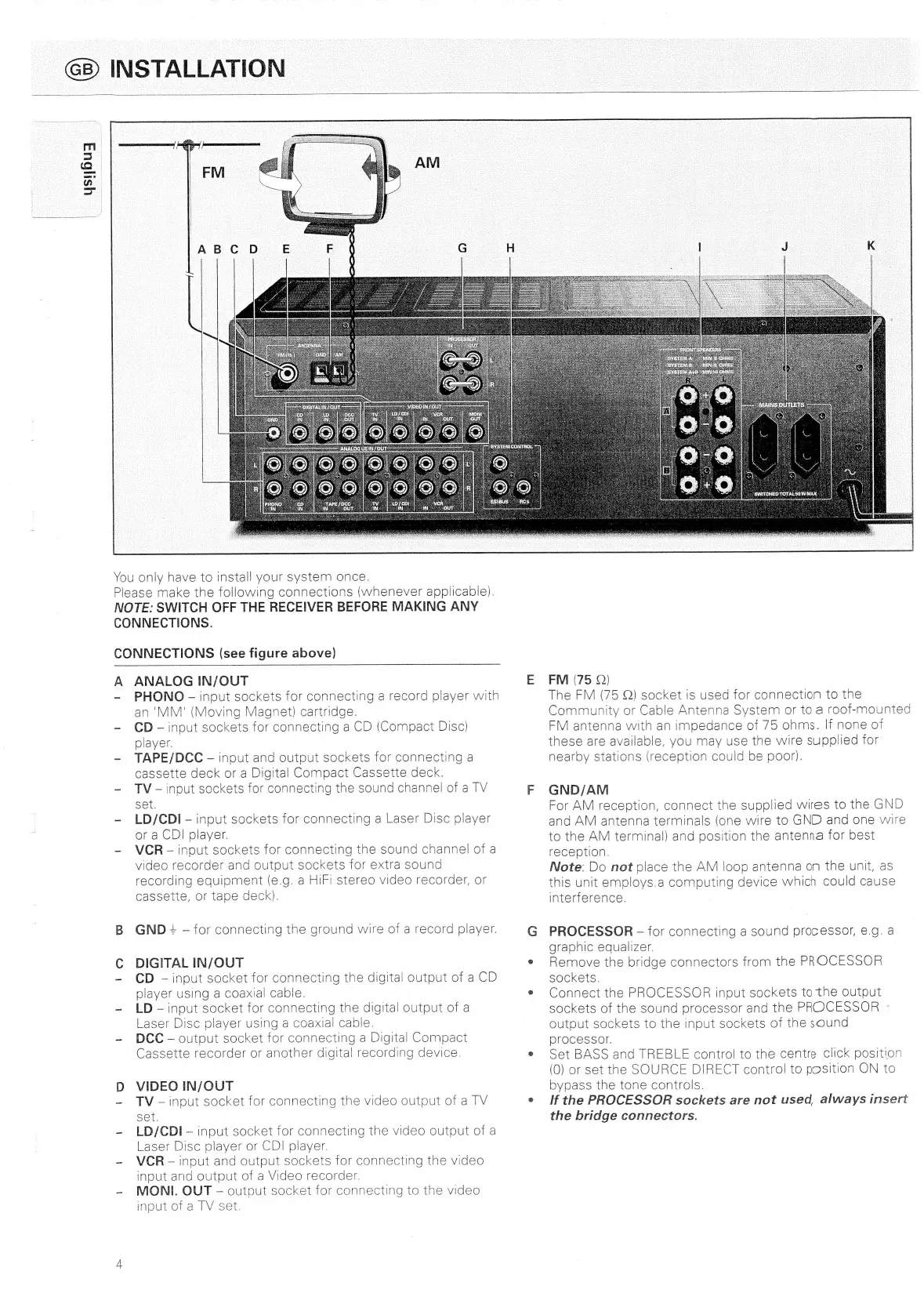
CONNECTIONS
(see
figure
above)
A
ANALOG
IN/OUT
E
-
PHONO
-
input
sockets
for
connecting
a
record
player
with
an
'MM'
(Moving
Magnet)
cartridge.
-
CD
-—
input
sockets
for
connecting
a
CD
(Compact
Disc)
player.
-
TAPE/DCC
input
and
output
sockets
for
connecting
a
cassette
deck
or
a
Digital
Compact
Cassette
deck.
-
TV-—input
sockets
for
connecting
the
sound
channel
of
a
TV
F
Set.
-
LD/CDI-
input
sockets
for
connecting
a
Laser
Disc
player
or
a
CDI
player.
~
VCR
input
sockets
for
connecting
the
sound
channel
of
a
video
recorder
and
output
sockets
for
extra
sound
recording
equipment
(e.g.
a
HIF!
stereo
video
recorder,
or
cassette,
or
tape
deck).
B
GND
=
for
connecting
the
ground
wire
of
a
record
player.
G
C
DIGITAL
IN/OUT
8
-
CD
input
socket
for
connecting
the
digital
output
of
a
CD
player
using
a
coaxial
cable.
®
-
LD
-—
input
socket
for
connecting
the
digital
output
of
a
Laser
Disc
player
using
a
coaxial
cable.
-
DCC
output
socket
for
connecting
a
Digital
Compact
Cassette
recorder
or
another
digital
recording
device.
e
D
VIDEO
IN/OUT
-~
TV
-—
input
socket
for
connecting
the
video
output
of
a
TV
set.
-
LD/CDI-—
input
socket
for
connecting
the
video
output
of
a
Laser
Disc
player
or
CDI
player.
~
VCR
-—
input
and
output
sockets
for
connecting
the
video
input
and
output
of
a
Video
recorder.
-
MONI.
OUT
output
socket
for
connecting
to
the
video
input
of
a
TV
set.
FM
(75
Q)
The
FM
(75
Q)
socket
is
used
for
connection
to
the
Community
or
Cable
Antenna
System
or
to
a
roof-mounted
FM
antenna
with
an
impedance
of
75
ohms.
If
none
of
these
are
available,
you
may
use
the
wire
supplied
for
nearby
stations
(reception
could
be
poor).
GND/AM
For
AM
reception,
connect
the
supplied
wires
to
the
GND
and
AM
antenna
terminals
(one
wire
to
GND
and
one
wire
to
the
AM
terminal)
and
position
the
antenna
for
best
reception.
Note:
Do
not
place
the
AM
loop
antenna
on
the
unit,
as
this
unit
employs.a
computing
device
which
could
cause
interference.
PROCESSOR
-
for
connecting
a
sound
processor,
@.g.
4
graphic
equalizer.
Remove
the
bridge
connectors
from
the
PROCESSOR
sockets.
Connect
the
PROCESSOR
input
sockets
to
the
output
sockets
of
the
sound
processor
and
the
PROCESSOR
°
output
sockets
to
the
input
sockets
of
the
sound
processor.
Set
BASS
and
TREBLE
control
to
the
centre
click
position
(0)
or
set
the
SOURCE
DIRECT
control
to
position
ON
to
bypass
the
tone
controls.
If
the
PROCESSOR
sockets
are
not
used,
always
insert
the
bridge
connectors.

Related product manuals