EasyManua.ls Logo

Philips FR 930 - Cursor Keys; Cursor Mode

Philips FR 930
11 pages
Print Icon
To Next Page IconTo Next Page
To Previous Page IconTo Previous Page
Loading...
10
11
12
13
14
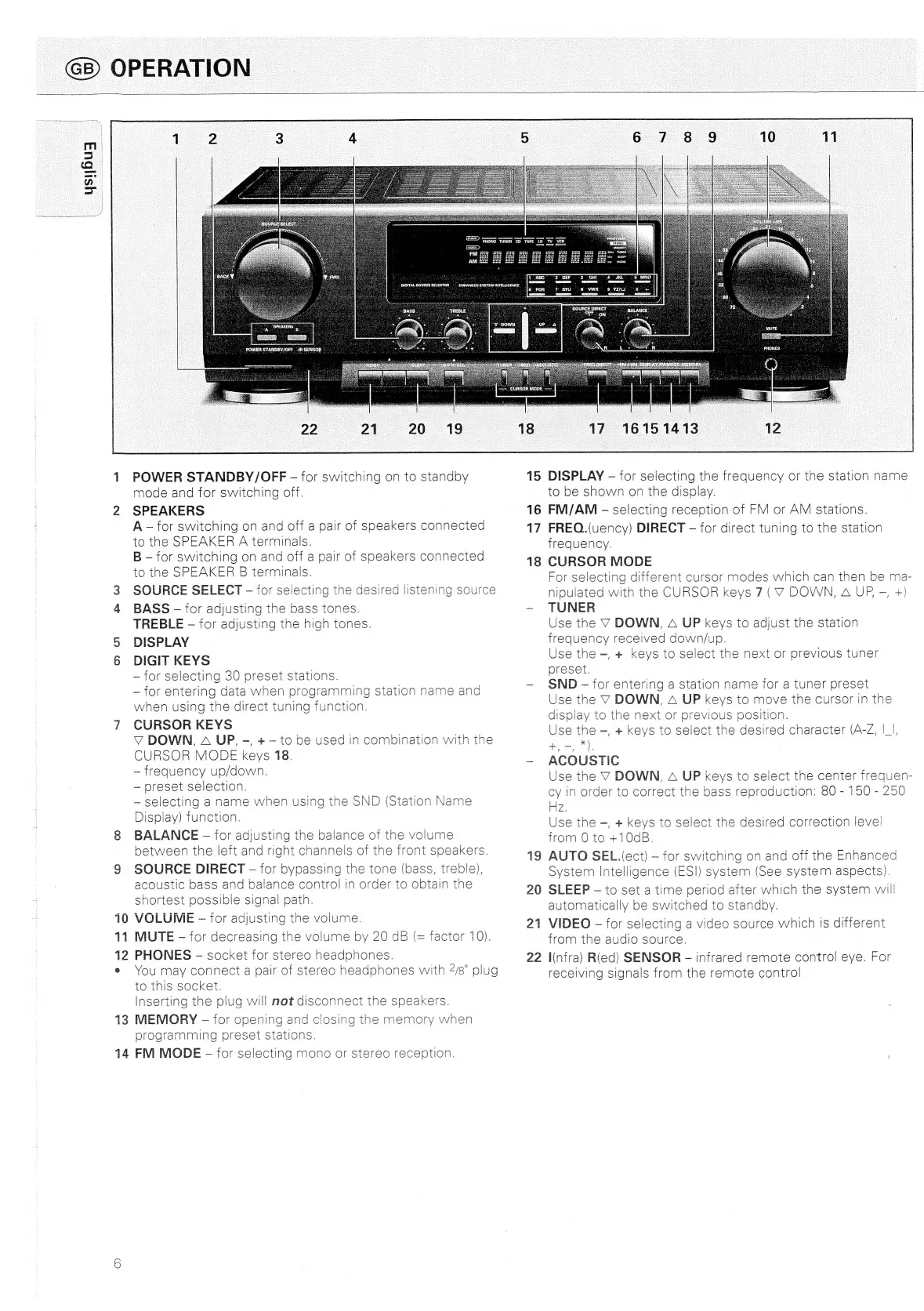
OWEASTANDBY/OFF
POWER
STANDBY/OFF
-
for
switching
on
to
standby
mode
and
for
switching
off.
SPEAKERS
A
-
for
switching
on
and
off
a
pair
of
speakers
connected
to
the
SPEAKER
A
terminals.
B
for
switching
on
and
off
a
pair
of
speakers
connected
to
the
SPEAKER
B
terminals.
SOURCE
SELECT
-
for
selecting
the
desired
listening
source
BASS
-
for
adjusting
the
bass
tones.
TREBLE
for
adjusting
the
high
tones.
DISPLAY
DIGIT
KEYS
for
selecting
30
preset
stations.
for
entering
data
when
programming
station
name
and
when
using
the
direct
tuning
function.
CURSOR
KEYS
VY
DOWN,
A
UP,
-,
+
to
be
used
in
combination
with
the
CURSOR
MODE
keys
18.
frequency
up/down.
preset
selection.
selecting
a
name
when
using
the
SND
(Station
Name
Display)
function.
BALANCE
-
for
adjusting
the
balance
of
the
volume
between
the
left
and
right
channels
of
the
front
speakers.
SOURCE
DIRECT
-
for
bypassing
the
tone
(bass,
treble),
acoustic
bass
and
balance
control
in
order
to
obtain
the
shortest
possible
signal
path.
VOLUME
-—
for
adjusting
the
volume.
MUTE
for
decreasing
the
volume
by
20
dB
(=
factor
10).
PHONES
socket
for
stereo
headphones.
You
may
connect
a
pair
of
stereo
headphones
with
4/8"
plug
to
this
socket.
Inserting
the
plug
will
not
disconnect
the
speakers.
MEMORY
-—
for
opening
and
closing
the
memory
when
programming
preset
stations.
FM
MODE
-
for
selecting
mono
or
stereo
reception.
17
16151413
15
DISPLAY
-—
for
selecting
the
frequency
or
the
station
name
16
17
18
19
20
to
be
shown
on
the
display.
FM/AM
selecting
reception
of
FM
or
AM
stations.
FREQ.(uency)
DIRECT
-—
for
direct
tuning
to
the
station
trequency.
CURSOR
MODE
For
selecting
different
cursor
modes
which
can
then
be
ma-
nipulated
with
the
CURSOR
keys
7
(V
DOWN,
A
UP,
-,
+)
TUNER
Use
the
V
DOWN,
A
UP
keys
to
adjust
the
station
frequency
received
down/up.
Use
the
=,
+
keys
to
select
the
next
or
previous
tuner
preset.
SND
for
entering
a
station
name
for
a
tuner
preset
Use
the
V
DOWN,
A
UP
keys
to
move
the
cursor
in
the
dispiay
to
the
next
or
previous
position.
Use
the
~,
+
keys
to
select
the
desired
character
(A-Z,
|_|,
+,-,™),
ACOUSTIC
Use
the
V
DOWN,
A
UP
keys
to
select
the
center
frequen-
cy
in
order
to
correct
the
bass
reproduction:
80
-
150
-
250
Hz.
Use
the
—,
+
keys
to
select
the
desired
correction
level
from
0
to
+10dB.
AUTO
SEL.(ect)
for
switching
on
and
off
the
Enhanced
System
Intelligence
(ESI)
system
(See
system
aspects).
SLEEP
to
set
a
time
period
after
which
the
system
will
automatically
be
switched
to
standby.
21
VIDEO
-
for
selecting
a
video
source
which
Is
different
22
from
the
audio
source.
infra)
R(ed)
SENSOR
infrared
remote
control
eye.
For
receiving
signals
from
the
remote
control

Related product manuals