EasyManua.ls Logo

Philips FR 930 - Page 6

Philips FR 930
11 pages
Print Icon
To Next Page IconTo Next Page
To Previous Page IconTo Previous Page
Loading...
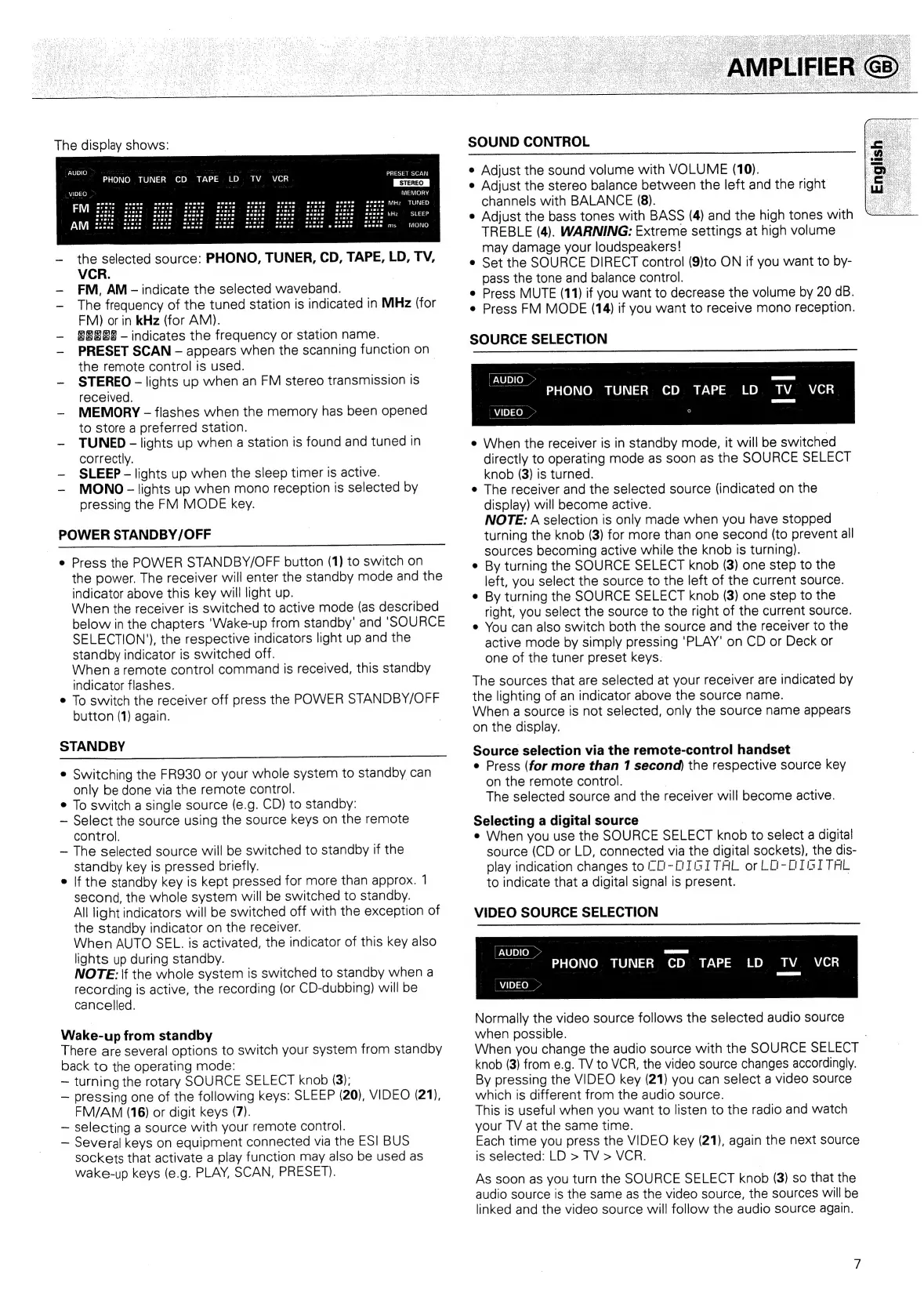
The
display
shows:
FAUDIO
[OES
SRR
era
ne
OPIS
RE
Co
LER
BO
RTE
SA
SOY
Betaae
onc
cere
e
|
See
Ee
ee
Mea
tne
"
PHONO
TUNER
CD
TAPE
LD
TV
VCR
ae
MEMORY
the
selected
source:
PHONO,
TUNER,
CD,
TAPE,
LD,
TV,
VCR.
FM,
AM-
The
frequency
of
the
tuned
station
is
indicated
in
MHz
(for
FM)
or
in
kHz
(for
AMV).
indicate
the
selected
waveband.
8888
-
indicates
the
frequency
or
station
name.
PRESET
SCAN
-
appears
when
the
scanning
function
on
the
remote
control
is
used.
|
~
STEREO
-
lights
up
when
an
FM
stereo
transmission
Is
received.
—~
MEMORY
-
flashes
when
the
memory
has
been
opened
to
store
a
preferred
station.
TUNED
-
lights
up
when
a
station
is
found
and
tuned
in
correctly.
SLEEP
-
lights
up
when
the
sleep
timer
is
active.
MONO-
lights
up
when
mono
reception
is
selected
by
pressing
the
FM
MODE
key.
POWER
STANDBY/OFF
Press
the
POWER
STANDBY/OFF
button
(1)
to
switch
on
the
power.
The
receiver
will
enter
the
standby
mode
and
the
indicator
above
this
key
will
light
up.
When
the
receiver
is
switched
to
active
mode
(as
described
below
in
the
chapters
‘Wake-up
from
standby’
and
‘SOURCE
SELECTION’),
the
respective
indicators
light
up
and
the
standby
indicator
is
switched
off.
When
a
remote
contro!
command
is
received,
this
standby
indicator
flashes.
To
switch
the
receiver
off
press
the
POWER
STANDBY/OFF
button
(1)
again.
STANDBY
e
Switching
the
FR930
or
your
whole
system
to
standby
can
only
be
done
via
the
remote
control.
To
switch
a
single
source
(e.g.
CD)
to
standby:
~—
Select
the
source
using
the
source
keys
on
the
remote
control.
The
selected
source
will
be
switched
to
standby
if
the
standby
key
is
pressed
briefly.
If
the
standby
key
is
kept
pressed
for
more
than
approx.
1
second,
the
whole
system
will
be
switched
to
standby.
All
light
indicators
will
be
switched
off
with
the
exception
of
the
standby
indicator
on
the
receiver.
When
AUTO
SEL.
is
activated,
the
indicator
of
this
key
also
lights
up
during
standby.
NOTE:
\f
the
whole
system
is
switched
to
standby
when
a
recording
is
active,
the
recording
(or
CD-dubbing)
will
be
cancelled.
Wake-
-up
from
standby
There
are
several
options
to
switch
your
system
from
standby
back
to
the
operating
mode:
turning
the
rotary
SOURCE
SELECT
knob
(3);
pressing
one
of
the
following
keys:
SLEEP
(20),
VIDEO
(21),
FM/AM
(16)
or
digit
keys
(7).
selecting
a
source
with
your
remote
control.
Several
keys
on
equipment
connected
via
the
ES]
BUS
sockets
that
activate
a
play
function
may
also
be
used
as
wake-up
keys
(e.g.
PLAY,
SCAN,
PRESET).
SOUND
CONTROL
e
Adjust
the
sound
volume
with
VOLUME
(10).
e
Adjust
the
stereo
balance
between
the
left
and
the
right
channels
with
BALANCE
(8).
e
Adjust
the
bass
tones
with
BASS
(4)
and
the
high
tones
with
TREBLE
(4).
WARNING:
Extreme
settings
at
high
volume
may
damage
your
loudspeakers!
e
Set
the
SOURCE
DIRECT
control
(9)to
ON
if
you
want
to
by-
pass
the
tone
and
balance
control.
e
Press
MUTE
(11)
if
you
want
to
decrease
the
volume
by
20
aB.
e
Press
FM
MODE
(14)
if
you
want
to
receive
mono
reception.
SOURCE
SELECTION
-
PHONO
TUNER
CD
TAPE
LD
TV
VCR
VIDEO
>
9
e
When
the
receiver
is
in
standby
mode,
it
will
be
switched
directly
to
operating
mode
as
soon
as
the
SOURCE
SELECT
knob
(3)
is
turned.
e
The
receiver
and
the
selected
source
(indicated
on
the
display)
will
become
active.
NOTE:
A
selection
is
only
made
when
you
have
stopped
turning
the
knob
(3)
for
more
than
one
second
(to
prevent
all
sources
becoming
active
while
the
knob
is
turning).
By
turning
the
SOURCE
SELECT
knob
(3)
one
step
to
the
left,
you
select
the
source
to
the
left
of
the
current
source.
By
turning
the
SOURCE
SELECT
knob
(3)
one
step
to
the
right,
you
select
the
source
to
the
right
of
the
current
source.
You
can
also
switch
both
the
source
and
the
receiver
to
the
active
mode
by
simply
pressing
'PLAY'
on
CD
or
Deck
or
one
of
the
tuner
preset
keys.
The
sources
that
are
selected
at
your
receiver
are
indicated
by
the
lighting
of
an
indicator
above
the
source
name.
When
a
source
is
not
selected,
only
the
source
name
appears
on
the
display.
Source
selection
via
the
remote-control
handset
e
Press
(for
more
than
1
second)
the
respective
source
key
on
the
remote
control.
The
selected
source
and
the
receiver
will
become
active.
Selecting
a
digital
source
e
When
you
use
the
SOURCE
SELECT
knob
to
select
a
digital
source
(CD
or
LD,
connected
vig
digital
sockets),
the
dis-
play
indication
changes
to
TO-OTGITAL
or
LO-OTGITAL
to
indicate
that
a
digital
signal
S
ee
VIDEO
SOURCE
SELECTION
PHONO
TUNER
CD
TAPE
LD
TV
VCR
Normally
the
video
source
follows
the
selected
audio
source
when
possible.
When
you
change
the
audio
source
with
the
SOURCE
SELECT
knob
(3)
from
e.g.
TV
to
VCR,
the
video
source
changes
accordingly.
By
pressing
the
VIDEO
key
(21)
you
can
select
a
video
source
which
is
different
from
the
audio
source.
This
is
useful
when
you
want
to
listen
to
the
radio
and
watch
your
TV
at
the
same
time.
Each
time
you
press
the
VIDEO
key
(21),
again
the
next
source
is
selected:
LD
>
TV
>
VCR.
As
soon
as
you
turn
the
SOURCE
SELECT
knob
(3)
so
that
the
audio
source
is
the
same
as
the
video
source,
the
sources
will
be
linked
and
the
video
source
will
follow
the
audio
source
again.

Related product manuals