EN 11
3139 785 31871
4.
Dismantling Instructions & Service Positions
4.2
Dismantling of the Front Board, PSU Module
& DVD Loader.
1) Release 4 snap hooks to remove the Front Board.
- 1 snap hook each on the left & right side
- 2 snap hooks on the bottom side
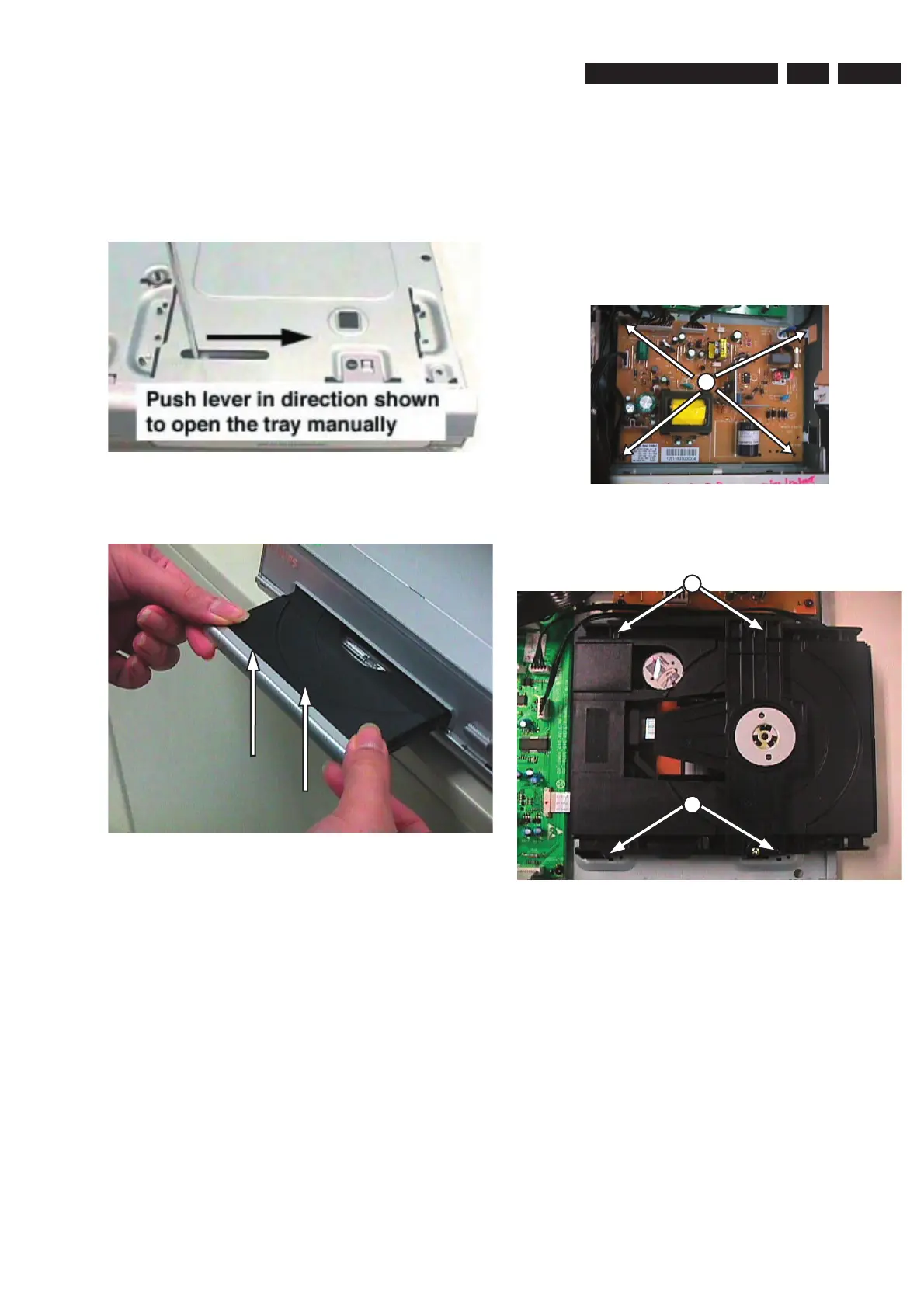
2) Loosen 4 screws A (See Figure 4-3) to remove the PSU
Module.
Figure 4 3
3) Loosen 4 screws B (See Figure 4-4) to remove the DVD
Loader.
Figure 4-4
4. Dismantling Instructions
4.1 Dismantling of the DVD Loader Tray Cover
1) Insert a minus screwdriver and push the lever in the
direction as shown in Figure 4-1 to unlock the tray before
sliding it out.
Figure 4-1
2) Remove the Tray Cover as shown in Figure 4-2
Figure 4-2
A
B
B


 To Next Page
 Loading...