15
English
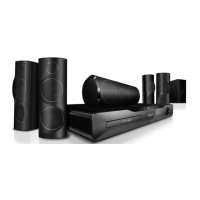
Rear right
a AUDIO IN-AUX 1
Connect to an analog audio output on the
TV or an analog device.
b SD CARD (Not available in China)
Slot for SD card. The SD card is used to
rent online videos and access BD-Live.
c VIDEO OUT-VIDEO
Connect to the composite video input on
the TV.
d HDMI OUT (ARC)
Connect to the HDMI input on the TV.
e LAN
Connect to the LAN input on a broadband
modem or router.
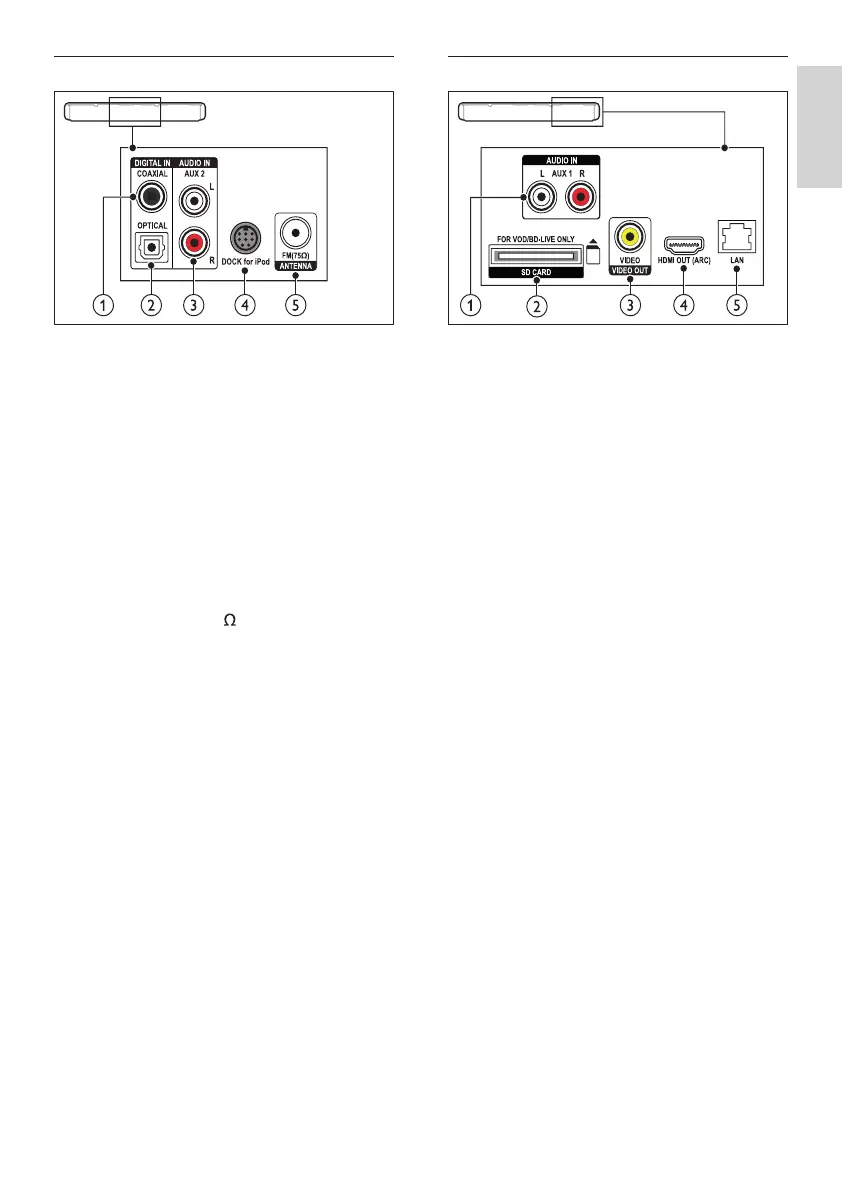
Rear center
a DIGITAL IN-OPTICAL
Connect to an optical audio output on the
TV or a digital device.
b DIGITAL IN-COAXIAL
Connect to a coaxial audio output on the
TV or a digital device.
c AUDIO IN-AUX 2
Connect to an analog audio output on the
TV or an analog device.
d DOCK for iPod
Connect to a Philips dock for iPod or
iPhone.(Model: Philips DCK3060/DCK3061)
e ANTENNA FM 75
Signal input from an antenna, cable or satellite.
EN



 To Next Page