16
Option 2: Connect to TV through HDMI
Best quality video
If your TV is not HDMI ARC compliant, connect
your home theater to the TV through a standard
HDMI connection.
With a standard HDMI connection, you need an
additional audio cable to play the audio from the
TVthroughyourhometheater(see‘Connect
audiofromTVandotherdevices’onpage17).
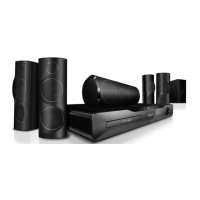
1 Using a High Speed HDMI cable, connect
the HDMI OUT (ARC) connector on your
home theater to the HDMI connector on
the TV.
The HDMI connector on the TV might be
labeled HDMI IN.
2 On your TV, turn on HDMI-CEC. For
details, see the TV user manual.
» When you play a disc on your home
theater, the video is automatically
displayed on TV and the audio is
automatically played on the home theater.
3 To play audio from TV programs through
your home theater, connect an additional
audiocable(see‘ConnectaudiofromTV
andotherdevices’onpage17).
4 If audio from the TV does not play
automatically on your home theater, set up
theaudiomanually(see‘Setupaudiofor
connecteddevices’onpage18).
Note
• If your TV has a DVI connector, you can use an
HDMI/DVI adapter to connect to TV.
Connect to TV
Connect your home theater to a TV to watch
videos. You can listen to audio from TV
programs through your home theater speakers.
Usethebestqualityconnectionavailableonyour
home theater and TV.
Option 1: Connect to TV through HDMI
(ARC)
Best quality video
Your home theater supports HDMI version
1.4 - Audio Return Channel (ARC). If your TV
is HDMI ARC compliant, connect your home
theater to the TV through the HDMI ARC
connectionforeasyandquicksetup.
With HDMI ARC, you do not need an additional
audio cable to play audio from TV through your
home theater.
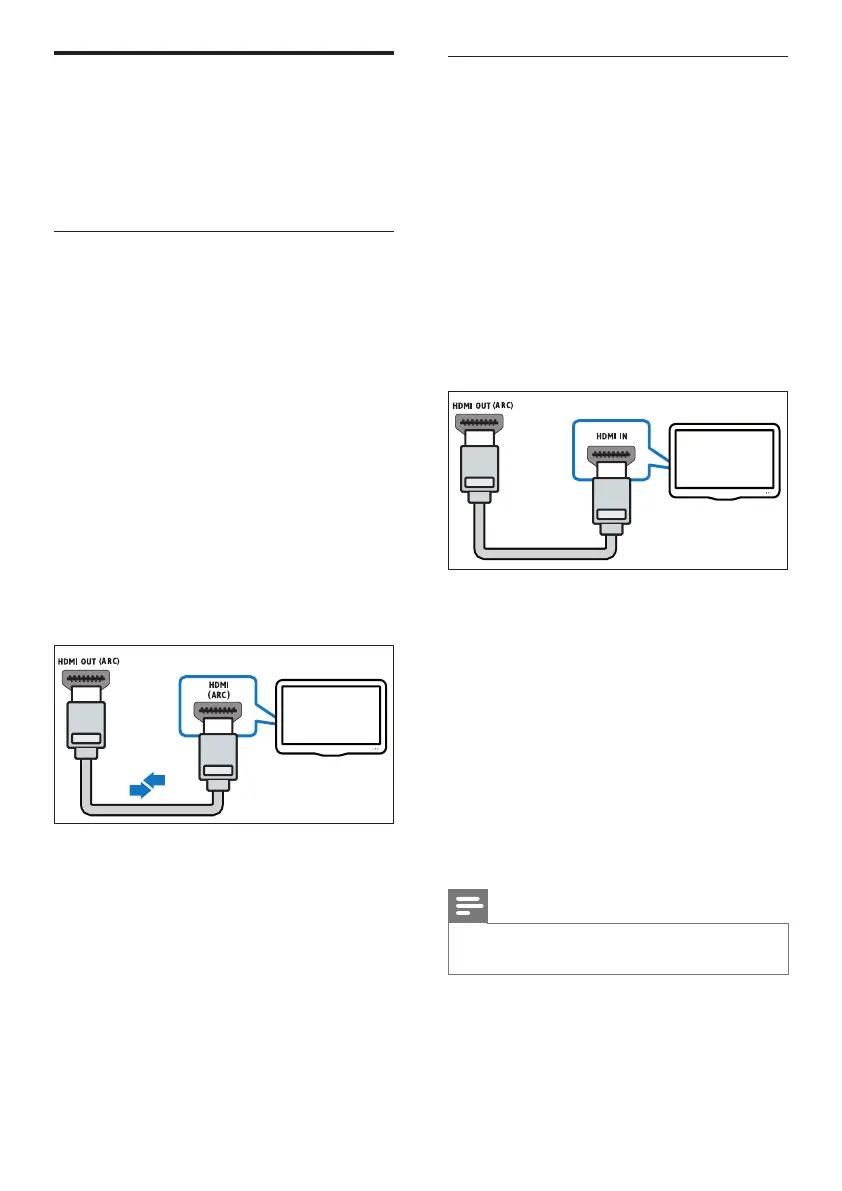
1 Using a High Speed HDMI cable, connect
the HDMI OUT (ARC) connector on your
home theater to the HDMI ARC connector
on the TV.
The HDMI ARC connector on the TV
might be labeled HDMI IN or HDMI. For
details on TV connectors, see the TV user
manual.
2 On your TV, turn on HDMI-CEC. For
details, see the TV user manual.
» When you play a disc on your home
theater, the video is automatically
displayed on TV and the audio is
automatically played on the home
theater.
3 If audio from the TV does not play
automatically on your home theater, set up
theaudiomanually(see‘Setupaudiofor
connecteddevices’onpage18).
EN



 To Next Page