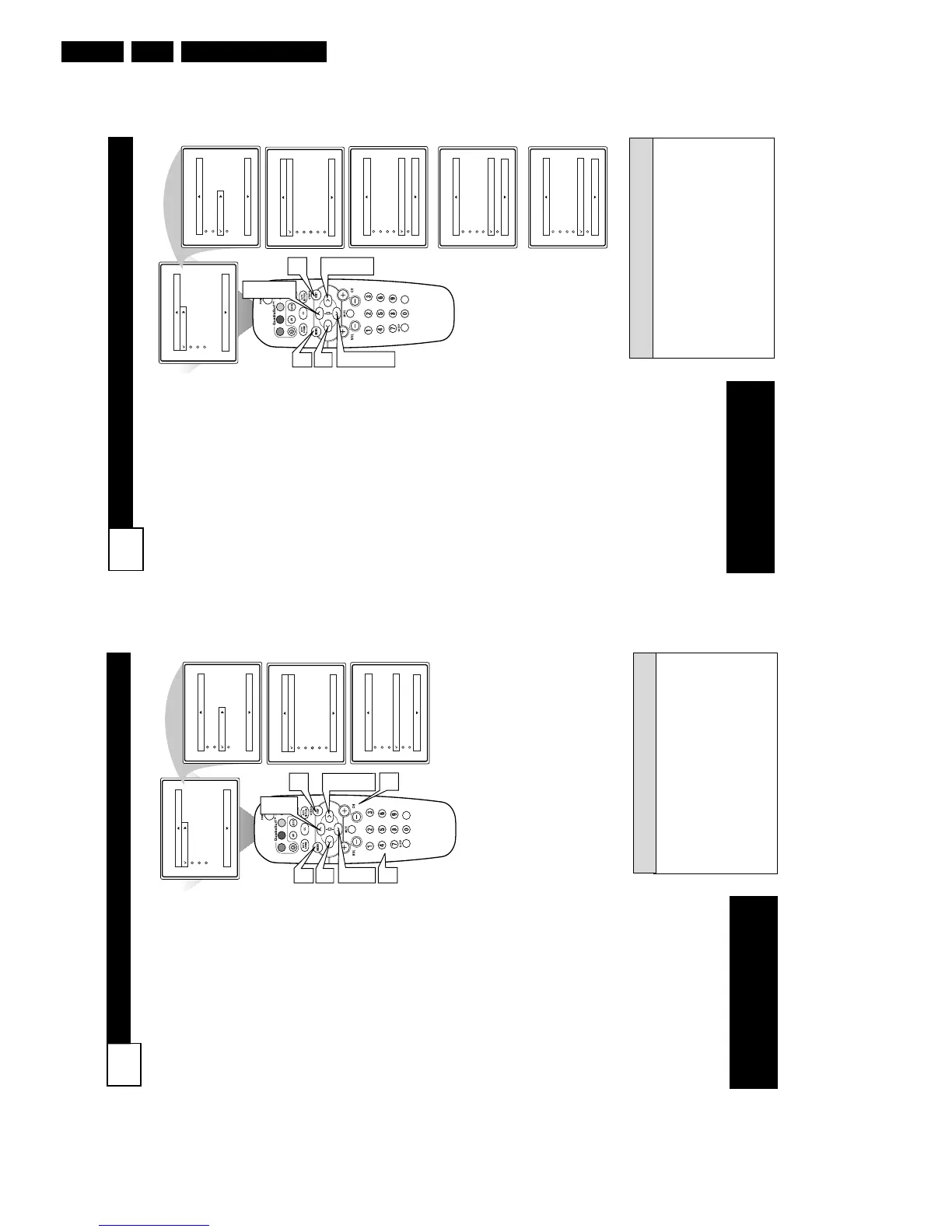
ACTIVATE CONTROL
21
A
fter you have set the Time, Start
Time, Stop Time, and Start
Channel, the timer must be set to
come on Once or Daily, or turned Off
through the Activate control.
1
Press the MENU button on the
remote to show the on-screen
menu.
2
Press the CURSOR UP 3 or
DOWN 4 buttons to scroll
through the on-screen menu
until the word Features is high-
lighted.
3
Press the CURSOR RIGHT 2
button to display the Features
menu.
4
Press the CURSOR UP 3 or
DOWN 4 buttons to scroll
through the on-screen menu
until the word Timer is high-
lighted.
5
Press the CURSOR RIGHT 2
button to display the Timer
menu.
6
Press the CURSOR UP 3 or
CURSOR DOWN 4 buttons
to highlight the Activate
Control.
7
Press the CURSOR RIGHT 2
or CURSOR LEFT 1 buttons
repeatedly to select Once, Daily,
or Off.
8
When finished, press the STA-
TUS /EXIT button to remove
the on-screen menu from the
TV’s screen.
VOL
Main
Picture
Sound
Features
Install
Brightness
Color
Picture
Sharpness
Tint
More...
Main
Picture
Sound
Features
Install
Timer
AutoLock
Active Control
Digi. Pic. Demo
Timer
Time
Start Time
Stop Time
Channel
Activate Off
Display
8
3
5
7
1
Timer
Time
Start Time
Stop Time
Channel
Activate
Display
10:-- AM
7
2
4
6
OR
Timer
Time
Start Time
Stop Time
Channel
Activate Daily
Display
OR
Timer
Time
Start Time
Stop Time
Channel
Activate Once
Display
2
4
6
Remember, before setting the Timer con-
trols, the TV’s clock must be set to the
correct time, see panel 18 for details.
The TV’s clock settings may be lost when
the TV is unplugged or when AC power
to the set is interrupted.
You can get to the Clock setting by press-
ing the Clock button on the remote con-
trol.
H
ELPFUL HINTS
NOTE: Active Control will only
appear in the menu of models
27PT6441/37 and 27PT6442/37.
SETTING TV TO STARTUP ON A SPECIFIC CHANNEL
20
Y
ou can select a specific channel
that the television will tune to
when the timer turns the set On.
Follow these steps to select the
channel.
1
Press the MENU button on
the remote to show the on-
screen menu.
2
Press the CURSOR UP 3 or
DOWN 4 buttons to scroll
through the on-screen menu
until the word Features is
highlighted.
3
Press the CURSOR RIGHT
2 button to display the
Features menu.
4
With Timer selected, press the
CURSOR RIGHT 2 button
to display the Timer menu.
5
Press the CURSOR UP 3 or
DOWN 4 buttons to scroll
through the Timer menu until
Channel is highlighted.
6
Press the Numbered buttons
to enter the desired start-up
channel. Or, press the CUR-
SOR RIGHT 2 or CURSOR
LEFT 1 or the CH+ or CH-
buttons repeatedly to enter the
start-up channel you want.
NOTE: The Activate Control must
be set to Once or Daily for this
Channel control to take effect.
7
When finished, press the
STATUS /EXIT button to
remove the on-screen menu
from the TV’s screen.
Remember, be sure to press “0” and
then the hour number for single digit
entries.
You can get to the Clock setting by
pressing the Clock button on the
remote control.
The TV’s clock settings may be lost
when the TV is unplugged or when
AC power to the set is interrupted.
HELPFUL HINTS
NOTE: Active Control will only
appear in the menu of models
27PT6441/37 and 27PT6442/37.



 To Next Page