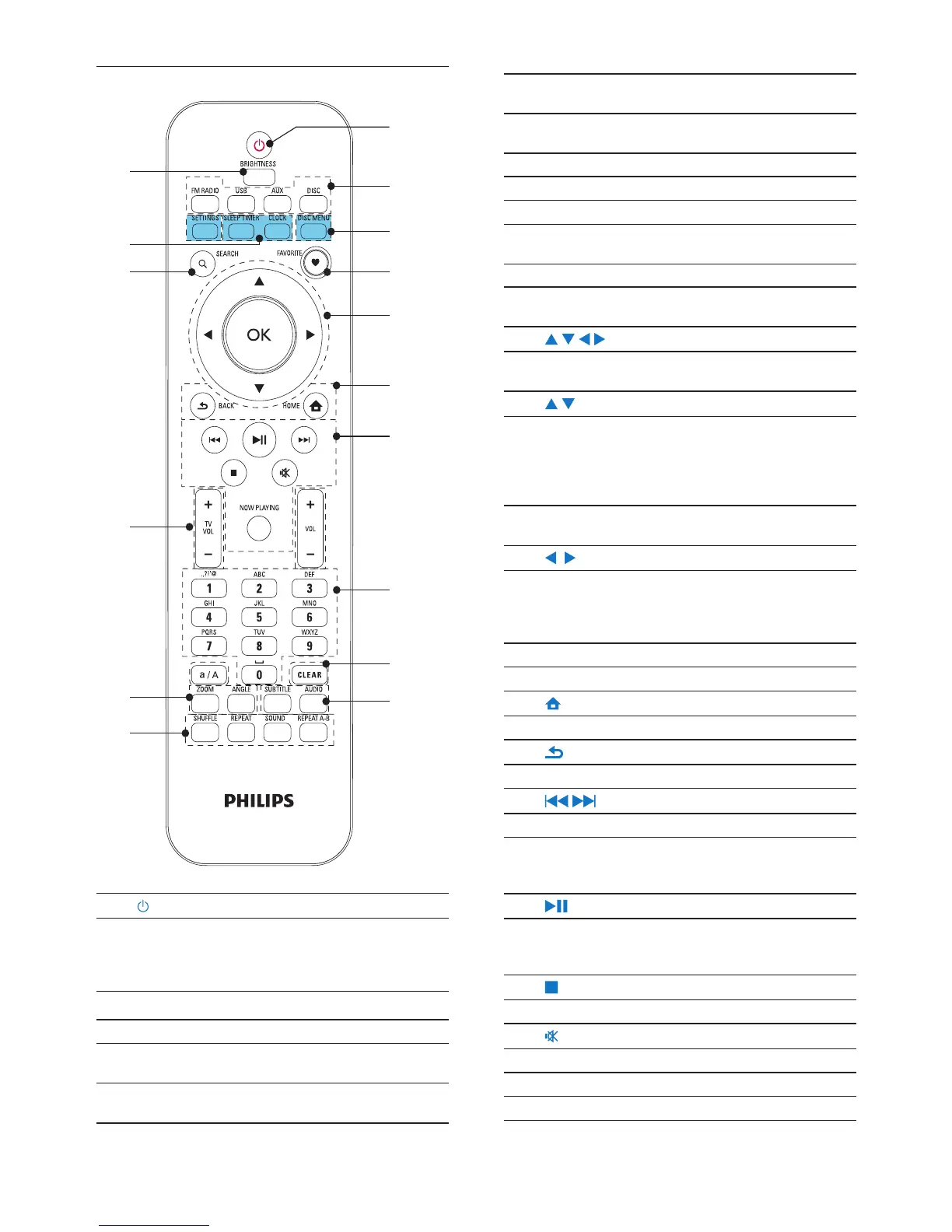
8
AUX: Connected external audio device (e.g. an
MP3 player or other portable music players);
DISC: DVDs, DivX/MP3/WMA les on discs,
and audio CDs.
3. SETTINGS
Enter the settings menus.
DISC MENU
In DISC mode:
Enter or exit the disc menu.
4. FAVORITE
In DISC mode:
Program favorite chapters/tracks
5.
/ / / /OK
Navigation buttons
Press to navigate through menus.
/
In USB mode:
Superscroll: In a long list of options, press and
hold to start Superscroll. Release to jump to
the rst item starting with current alphabet/
number.
In DISC mode:
Select an album (for MP3/WMA CDs).
/
In FM RADIO mode:
Press and hold to start the auto tuning to the
next available station;
Press repeatedly for ne tuning.
OK
Conrm selection.
6.
HOME: Return to Home screen (main menu).
BACK: Go back to previous screen.
7.
/
Search buttons on the play screen
In USB/DISC mode:
Press to skip to the previous/ next chapter/
track;
Start/pause/resume play;
In USB mode: Start to play the entire le
folder(SuperPlay™).
Stop play.
Mute/ unmute sound.
NOW PLAYING
Return to play screen.
EN
Remote control
1.
Press to turn on the unit;
To turn off, press to switch to active standby; or,
press and hold to switch to Eco standby.
Exit Demo mode.
2. Source selector
Select a media source:
FM RADIO: FM radio stations, with RDS (Radio
Data System) supported;
USB: Songs/photos on the USB mass storage
device connected to the unit;


 To Next Page