1
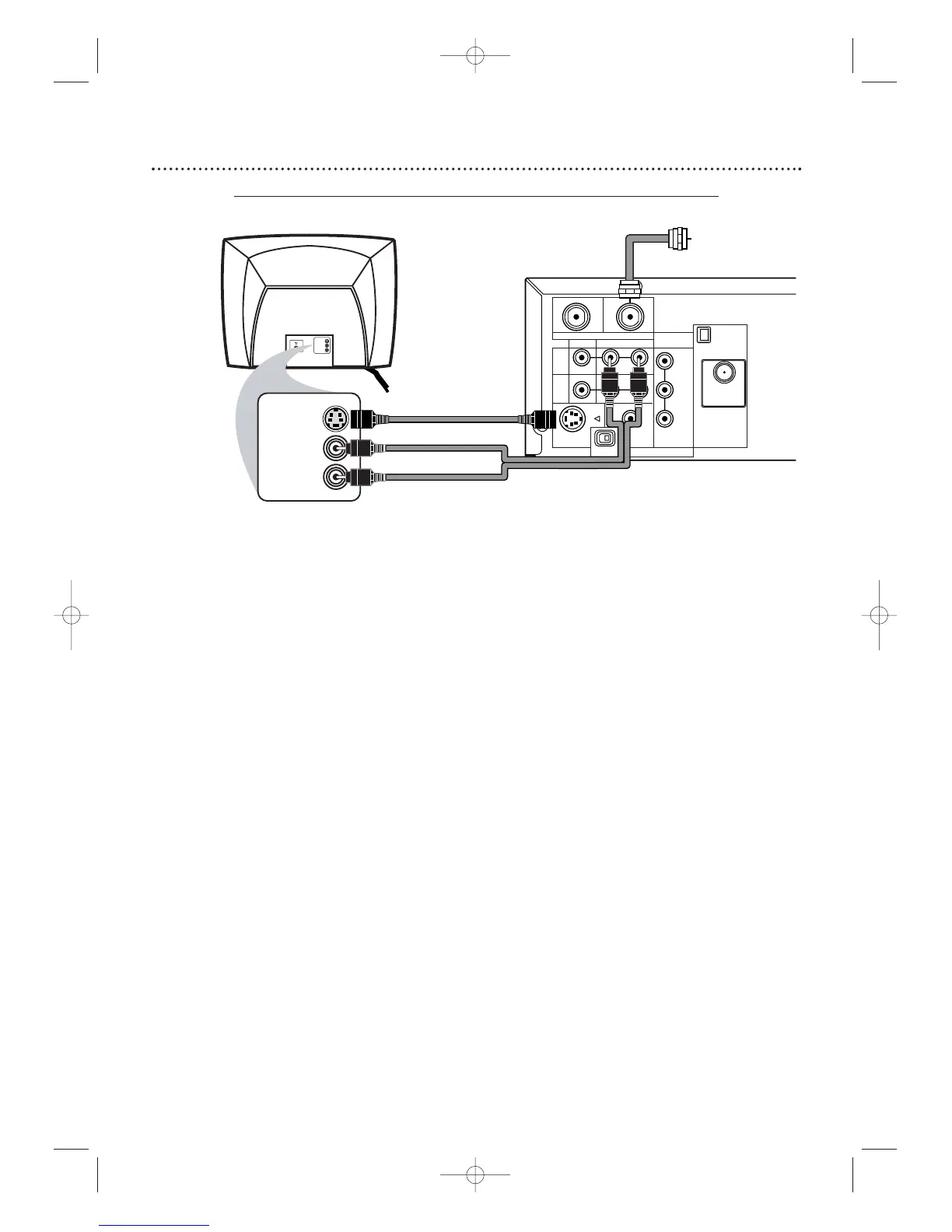
Connect the antenna or Cable TV signal to the System’s TV ANTENNA IN jack.
2
Connect the supplied red/white audio cables to the System’s red/white AUDIO
(DVD/VCR OUT) jacks and to the TV’s AUDIO IN jacks. Match cable colors to jack colors.
3
Connect an S-Video cable to the System’s S-VIDEO OUT jack and to the S-VIDEO IN
jack on the TV. S-Video only supplies a DVD picture.To use the VCR or view TV channels,connect the RF
coaxial cable or the yellow video cable. To use the RF coaxial cable,see step 2 on page eight.To use the
yellow video cable, see step 3 on page 11.If you are using the RF coaxial cable for VCR playback, choose
channel 3 or 4 at the TV. If you are using the yellow video cable,choose the Video In channel at your TV.
4
Set the P/I PROGRESSIVE switch on the rear of the System to I (Interlace).
5
You are ready to connect the AM and FM antennas and the Speakers.Go to pages 16-17
to connect these items.
6
When all connections are complete, connect the power cords of the System and TV to
a power outlet.Turn on the TV and set it to the S-Video In channel for DVD Player
features. To help you find the right S-Video In channel,turn on the System. Press DVD to put the
System in DVD mode.With no Disc in the Player, a large DVD logo will appear on the TV screen
when you get the TV on the S-Video In channel. Go to your lowest TV channel (01 or 02) and
change channels down until you see the DVD logo on the TV screen.
7
If you have not turned on the System already, go to page 19 to complete the VCR’s
First-Time Setup. This process sets up the TV channels and the language for the VCR menu.
8
Set DOLBY DIGITAL to OFF in the DVD Player’s Setup menu. Details are on page 72.
Playing a DVD when the settings are wrong could distort the sound or damage the speakers.








 To Next Page